One place for AI to talk to your business
A Slite alternative
your team will actually use
Slite asks your team to adopt a new wiki and move their knowledge into it. Context Link takes the opposite approach. Connect the sources you already keep current (Notion, Google Docs, email, Basecamp, Monday.com, websites, uploaded files) and Context Link keeps them in sync as one connected knowledge base. Ask source-backed questions from inside ChatGPT, Claude, Gemini, or any MCP-aware agent, get citations on every answer, and save settled decisions as Memories. No new app. No migration. No wiki to maintain.
7-day free trial · start for free · cancel any time
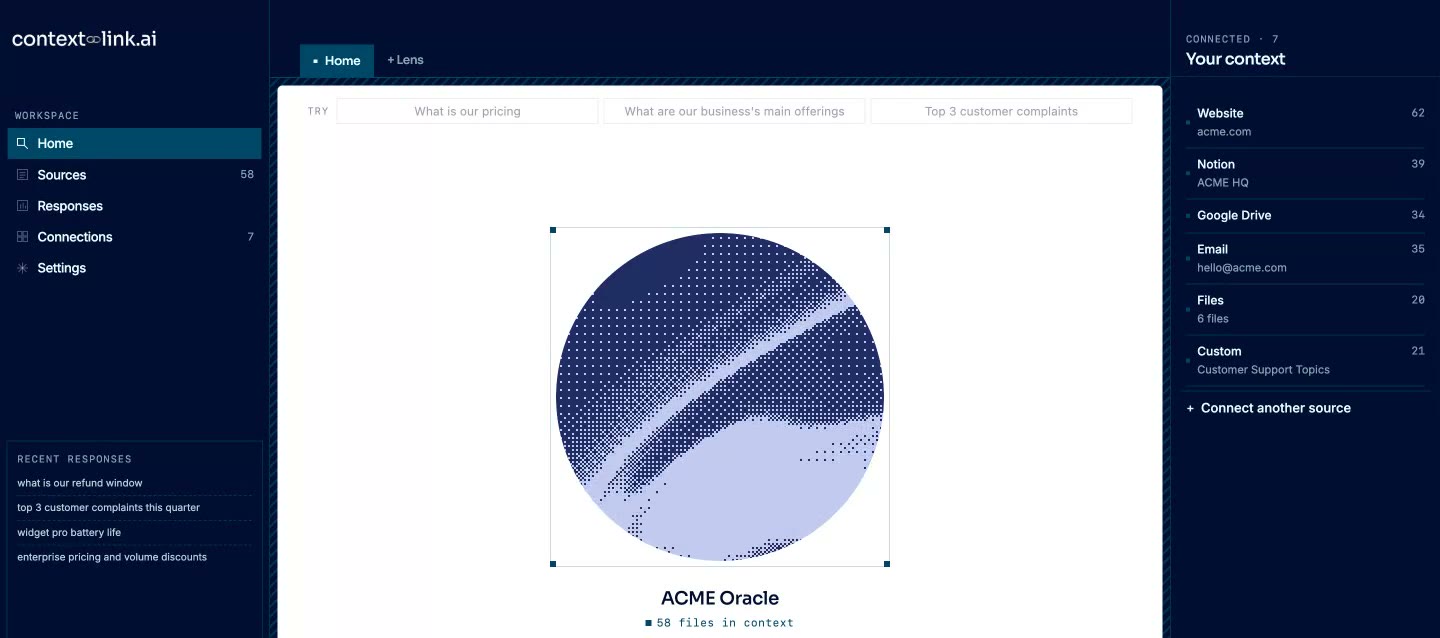
Comparing
 vs
vs

01 / At a glance
Key differences
Slite is a standalone wiki app your team has to learn, populate, and maintain. Context Link connects to the tools you already keep current.
Context Link gives AI one place to talk to your business: Connect, Ask, Remember. Slite stops at write and search inside one wiki.
Every answer is source-backed with citations, retrieved by meaning across all your sources at once
Sources sync every 24 hours, so AI reads what your business says today. Slite only knows what your team writes into it
Save settled decisions as Memories, and every connected AI reads the latest version. Slite has no equivalent
Reach Context Link from inside ChatGPT, Claude, Gemini, and any MCP-aware agent. Slite locks AI into its own interface
Connect Notion, Google Docs, Google Drive, email (Gmail, Outlook, Zoho, Fastmail, IMAP), Basecamp, Monday.com, websites, and uploaded files in minutes, no content migration
Slite caps AI questions at 30-100/month per user. Context Link has no artificial limits on retrieval
02 / No new tools
Use your existing AI
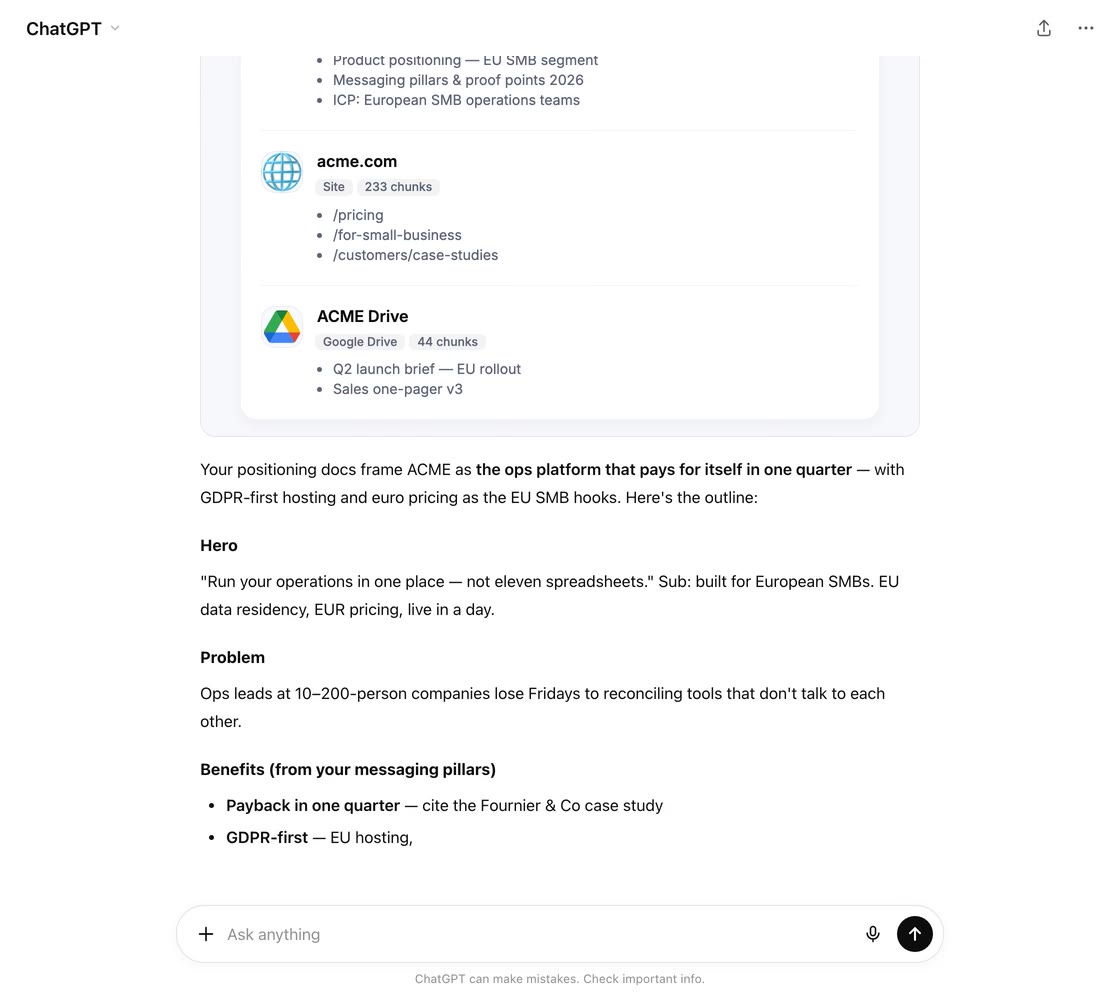
 · ChatGPT
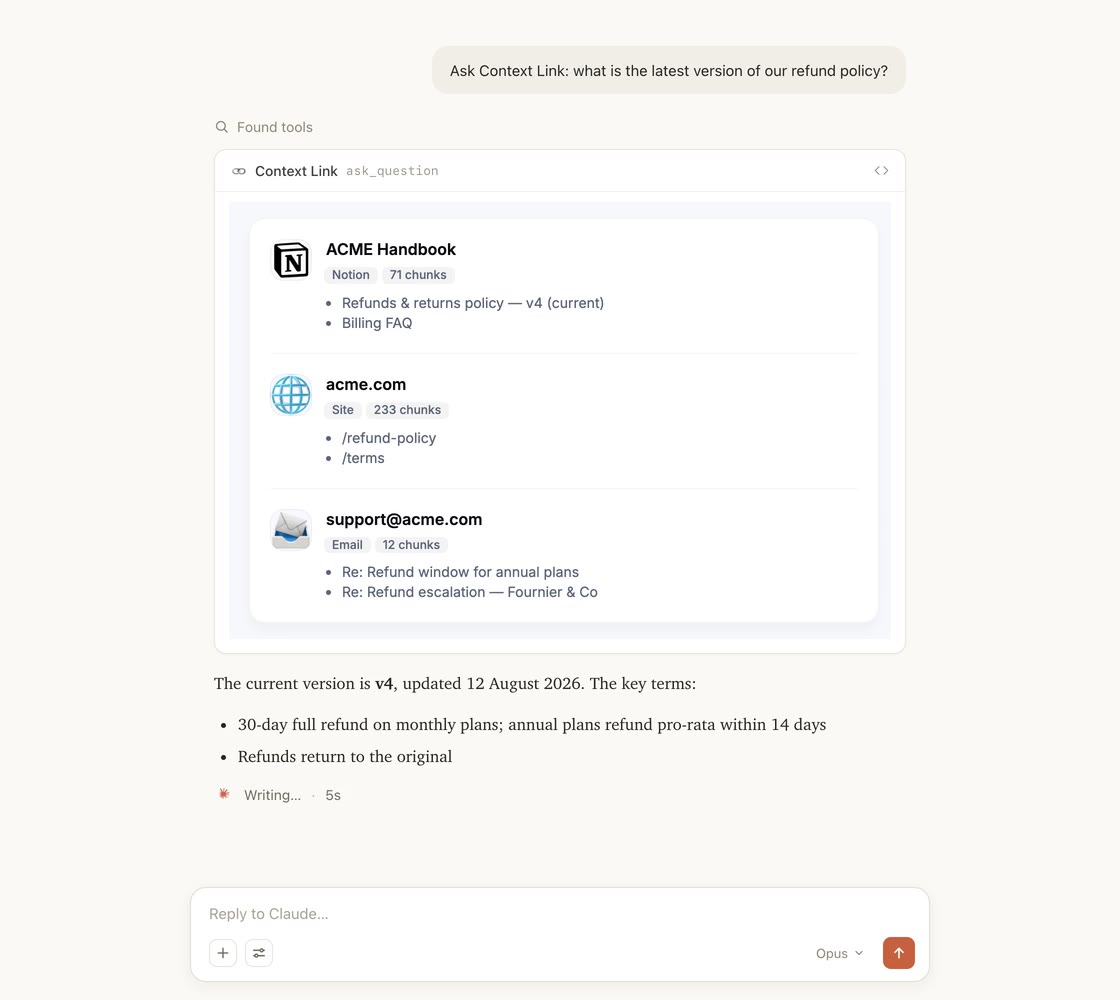
 · Claude
Your sources
With your existing knowledge sources



 Basecamp




03 / Decision time
Which Should You Choose?
Both tools help teams find knowledge faster, but they work in fundamentally different ways.

Choose Slite If...
- You want a dedicated wiki app where your team writes and organizes docs from scratch
- You need doc verification workflows with validity periods and scheduled reviews
- Your team is 10+ people and you're happy to pay $8-25/user/month for everyone
- You want analytics on doc usage what's read, what's searched, what's stale
- You're committed to migrating content into a centralized knowledge base and keeping it current

Choose Context Link If...
- You're a founder or owner-operator of a small business of 3-200 that uses AI daily and wants it grounded in your actual business content
- You want source-backed answers with citations, from across Notion, Docs, email, and your website at once
- You want to save settled decisions as Memories that every connected AI reads the latest version of
- Your knowledge already lives in Notion, Google Docs, email, Basecamp, Monday.com, websites, or uploaded files, and you don't want to migrate it
- You need to connect sources Slite can't reach: email inboxes, Basecamp, Monday.com, websites, or uploaded PDFs
- You want your team to keep using their preferred AI tool, not learn a new interface
04 / Side by side
Feature comparison
| Capability |
Slite
|
Context Link
|
|---|---|---|
| Where you work | Slite's own web app and editor | From inside ChatGPT, Claude, Gemini, and any MCP-aware agent, plus a dashboard for humans connecting sources, reviewing responses, and managing Memories |
| Core promise | A wiki where your team writes docs, with AI search layered on top | One place for AI to talk to your whole business: connect sources, ask source-backed questions, save Memories |
| AI model | Slite's built-in AI (OpenAI/Anthropic under the hood, locked to Slite's interface) | Model-agnostic on the asking side. Retrieval and answer composition are bundled into the service |
| Connectors | Import from Google Docs, Notion, Confluence. External search (Super) adds Slack, Drive, GitHub, Linear, Intercom (requires $20/user tier) | Notion, Google Docs, Google Drive, email (Gmail, Outlook, Zoho, Fastmail, IMAP), Basecamp, Monday.com, any website, uploaded files (PDFs, Word, Markdown), plus custom connections (your AI pushes data from any service it can reach) |
| Setup time | Fast install, but real value requires migrating or writing docs into Slite | Minutes. Connect your existing sources and start retrieving context the same day |
| AI usage limits | 30 AI questions/month (Standard), 100/month (Knowledge Suite) | No per-question caps on retrieval |
| Pricing | $8/user/month (Standard), $20/user/month (Knowledge Suite, min 10 users) | SMB-friendly per-seat pricing, no high minimums, no per-question limits |
| Team size | Best for 10-500 employees; Knowledge Suite requires 10-seat minimum | Built for founders and small businesses of 3-200 |
| Memories (save the latest truth) | No equivalent. Slite docs are human-written only | AI and humans save settled decisions as Memories: named, canonical docs with version history, so every connected AI reads the latest version |
| Kept in sync | Slite searches what your team has written into the wiki | Sources sync every 24 hours across Notion, Docs, email, websites, and files, so AI reads what your business says today |
| Direct question answering (Q&A) | Slite 'Ask' inside the Slite app (capped at 30-100 AI questions/month per user) | Ask Question skill invoked from inside ChatGPT or Claude: `/ask-question [question]` or "ask Context Link what …". Returns one grounded paragraph with numbered citations. Secondary to the primary `get context on [topic]` workflow |
| Best for | Teams that want a structured wiki with AI search layered on top | Founders and small businesses that want AI grounded in the sources they already keep current |
05 / Two approaches
The Real Differentiation
Slite
Slite is a well-designed wiki app. Your team writes docs inside Slite's editor, organizes them into collections, and searches them with AI. It works well when teams commit to it. But that's the catch: it's another app to adopt, another interface to learn, and another wiki to keep current. If your team already keeps their knowledge in Notion, Google Docs, email, and Basecamp, Slite asks you to duplicate that work or migrate it. And once you're in, the product is still scoped to writing and searching inside its own interface.
Context Link
Context Link gives AI one place to talk to your whole business. Connect the places work happens (Notion, Google Docs, Google Drive, email (Gmail, Outlook, Zoho, Fastmail, IMAP), Basecamp, Monday.com, websites, uploaded files) and Context Link keeps them in sync as one connected knowledge base. Ask source-backed questions from inside ChatGPT, Claude, Gemini, or any MCP-aware agent, and every answer comes back with citations. Save settled decisions as Memories, and every connected AI reads the latest version. Under the hood it works like an AI knowledge base and managed RAG workspace, with sources synced every 24 hours.
Slite is another wiki to maintain. Context Link is one place for AI to talk to your business.
06 / No new tools
Meet your team where they already work
Your team stays on the best AI tools for them — ChatGPT, Claude, Gemini, Copilot. Context Link upgrades every conversation with your company's actual knowledge. Easy adoption, zero workflow disruption.
Your team's AIs
ChatGPT
Claude

agent 004
session
One connected knowledge base




 +
+
+
+
+
+
07 / Their strengths
What Slite Does Well
Slite is a well-built product that solves real knowledge management problems. If your team wants a dedicated wiki, these strengths matter.
Clean, intuitive editor
Slite's interface is consistently praised for being easy to pick up. Non-technical teammates can create and organize docs without a learning curve.
Doc verification system
Docs can be marked as 'verified' with expiry dates, so your team knows what's current and what needs review. This is a genuinely useful feature for teams that struggle with stale documentation.
AI-powered search with citations
Slite's 'Ask' feature gives synthesized answers with source citations, not just a list of matching docs. It works well within Slite's own content.
Knowledge management dashboard
Slite proactively surfaces outdated pages, duplicate content, and search gaps. It tells you where your knowledge base is thin before your team notices.
Affordable entry price
At $8/user/month for the Standard plan, Slite is competitively priced for teams that want a standalone wiki. The free tier (50 docs) lets small teams try it without commitment.
08 / Our strengths
What Context Link Does Differently
One connected knowledge base, not a wiki to maintain
Slite is a place to write and search docs. Context Link connects the sources your team already keeps current and turns them into one knowledge base every AI tool can read, with citations on every answer.
Memories, save the latest truth
AI and humans can save settled decisions as Memories: named, canonical documents like a positioning statement or a pricing rationale. Update a Memory and every connected AI reads the latest version, with history kept. Slite docs are human-written only; Memories let AI write knowledge back.
Always in sync
Sources sync every 24 hours, so AI reads what your business says today, not a snapshot from the month you set it up. No manual refresh, no stale context.
Returned with citations
Every answer cites the exact sources it came from, past lookups are reviewable in the responses log, and anything you don't want indexed can be excluded with a click. Slite stops at search inside the wiki.
Reach Context Link from inside the AI you already use
Ask from inside ChatGPT, Claude, Gemini, or any MCP-aware agent. Slite's AI is locked to its own interface. Context Link plugs into the tools your team is already in.
Connect the tools you already have
Notion, Google Docs, Google Drive, email (Gmail, Outlook, Zoho, Fastmail, IMAP), Basecamp, Monday.com, any website, uploaded files (PDFs, Word docs, Markdown). And if a tool isn't in the catalogue, the custom-connections skill lets your AI build the connection itself. If Claude can read it, you can push it to Context Link. Your knowledge stays where your team already keeps it current. No migration, no duplication.
No AI usage caps
Slite limits AI questions to 30-100 per user per month depending on your plan. Context Link doesn't ration retrieval. Your team can pull context as often as they need it.
Minutes to value
Connect your sources and start retrieving context the same day. No wiki to populate, no content to write from scratch, no months of doc migration.
SMB-friendly pricing
Built for founders and small businesses of 3-200. No 10-seat minimums, no per-question caps, no enterprise quotes.
09 / FAQ
Frequently asked questions
Is Context Link a direct replacement for Slite?
What if my team already uses Slite?
What are Memories?
How do I know where an answer came from?
How does Context Link handle permissions and security?
Can I use Context Link with ChatGPT AND Claude?
What about Slite's doc verification feature?
Does Slite's AI have usage limits?
What about AI hallucinations?
Does Context Link have an 'Ask' feature like Slite?
10 / Summary
The bottom line
Slite
Slite is a solid wiki app for teams that want a dedicated place to write and organize documentation with AI search on top. If you have the team buy-in to migrate content into Slite and keep it current, its doc verification, analytics, and clean editor make it a good choice, especially for teams of 10-500.
Context Link
Context Link is one place for AI to talk to your business, fully managed and built for founders and small businesses of 3-200. Connect your sources once, ask source-backed questions from inside ChatGPT, Claude, or any MCP-aware agent, and save settled decisions as Memories. Sources sync every 24 hours and every answer comes back with citations. No new app, no wiki to maintain.
Quick decision guide
Your pain
I want a structured wiki where my team writes and organizes documentation
Solution
Slite is the right choice
Your pain
I want AI grounded in my whole business, with citations on every answer
Solution
Context Link is the right choice
Your pain
I want a knowledge base that stays in sync and lets AI save knowledge back, not just AI search inside a wiki
Solution
Context Link is the right choice
Your pain
My knowledge already lives in Notion, Google Docs, email, and Basecamp, I don't want to move it
Solution
Context Link is the right choice
Your pain
I need AI that works from inside ChatGPT, Claude, or any MCP-aware agent, not locked to one tool's interface
Solution
Context Link is the right choice
Get started
Give AI a Way to Talk to Your Business
No credit card required. No IT department needed.
7-day free trial · start for free · cancel any time
11 / Pricing
Pricing
7-day free trial · start for free · cancel any time
Context for business
7-day free trial
includes
start for free · cancel any time
Developer API
7-day free trial
includes
start for free · cancel any time

Supported by real humans
12 / More comparisons