RAG White-Label · for AI-powered products
Give Your AI Features Customer Context With RAG

Point us at a customer's website, YouTube, Notion and more. We keep a private index of it all in sync. Behind it: a maintained vector database, tuned scoring and weighted modes. Pull context and ask questions to inform customer AI calls and UI.
 Context Link response
scope: tf-cust-8841
Context Link response
scope: tf-cust-8841
Demo account
Try the demo
Linked to Stripe's marketing and docs websites.
 docs.stripe.com
stripe.com
5,387 pages · 45,547 passages
docs.stripe.com
stripe.com
5,387 pages · 45,547 passages
Request
curl "https://www.context-link.ai/api/v1/context?query=How+do+I+authorize+a+payment+now+and+capture+it+later%3F&response_format=structured" -H "Authorization: $CONTEXT_LINK_API_KEY"
The demo account searches stripe.com and docs.stripe.com. Your API key searches your connected sources.
Query: How do I authorize a payment now and capture it later?
10 passages from 2 sources: docs.stripe.com 8, stripe.com 2
- stripe.com Payment capture strategies businesses need to know
- docs.stripe.com Capture more than the authorized amount on a payment
- docs.stripe.com Collect card payments while offline
- docs.stripe.com Migrate to the latest flexible payment scenarios
- docs.stripe.com Capture a payment multiple times · Terminal
- docs.stripe.com Place a hold on a payment method
- docs.stripe.com Flexible payment scenarios
- docs.stripe.com Capture a payment multiple times · Payments
{
"format": "structured",
"query": "How do I authorize a payment now and capture it later?",
"markdown": "<!-- cl:chunk start section_number=\"1\" cited_post_title=\"Payment capture strategies businesses need to know | Stripe\" cited_post_link=\"https://stripe.com/resources/more/payment-capture-strategies-timing-risks-and-what-businesses-need-to-know\" cited_post_chunk_number=\"4\" -->\n\n##Payment capture strategies businesses need to know | Stripe\n\n### Customer experience\n\nIn some industries, customers expect to be charged only when the product ships or the service is fulfilled. If you capture payment too early, that can raise questions such as the following:\n\n- “Why did I get charged for something that hasn’t shipped yet?”\n\n- “Are they holding my money indefinitely?”\n\n- “Is this business legitimate?”\n\nCapturing only when the transaction is complete – whether that’s at checkout at a hotel, on delivery of a custom item, or on shipment of a back-ordered product – can make customers feel more comfortable. In other cases, such as digital goods and [subscriptions](https://stripe.com/en-fi/resources/more/subscription-billing-101), immediate capture makes sense. What matters is that you match your capture timing to when value is delivered.\n\n## How does payment capture differ from authorisation?\n\nAuthorisation and capture are two steps in the same payment flow, but they serve different purposes. Understanding the difference matters when you’re managing risk, cash flow, and the customer experience.\n\n### Authorisation\n\nWhen a customer makes a purchase, the payment system asks their bank whether the charge can go through. If the bank approves, that’s authorisation. No money has moved yet, but it’s been set aside and the customer can’t spend it elsewhere.\n\nWith most [card networks](https://stripe.com/en-fi/resources/more/how-do-credit-card-networks-work) and issuers, an authorisation stays valid for about seven days. If you don’t capture the funds before it expires, the authorisation is released and the payment disappears.\n\nA status like “payment authorised but not yet captured” means you have approval to complete the charge, but the funds are still pending. You haven’t been paid yet.\n\n### Capture\n\nCapturing the payment is the step that begins the process of transferring the money from the customer’s account to yours. It’s the point at which the sale becomes real.\n\nAfter you capture payment:\n\n- The bank sends you the funds\n\n- The customer’s card is officially charged\n\n- The transaction shows up as complete in your system and on the customer’s statement\n\n## What industries benefit the most from delayed vs immediate capture?\n\nThe right capture timing depends on how your business delivers value. If the product or service is delivered instantly, immediate capture makes sense. But if there’s a delay between the purchase and fulfilment or if the final amount isn’t known up front, delayed capture gives you more control.\n\n<!-- cl:chunk end section_number=1 -->\n\n<!-- cl:chunk start section_number=\"2\" cited_post_title=\"Capture more than the authorized amount on a payment | Stripe Documentation\" cited_post_link=\"https://docs.stripe.com/payments/overcapture\" cited_post_chunk_number=\"1\" -->\n\n\n\n[Skip to content](docs.stripe.com#main-content)\n\nCapture more than the authorized amount on a payment\n\n[Create account](https://dashboard.stripe.com/register) or [Sign in](https://dashboard.stripe.com/login?redirect=https%3A%2F%2Fdocs.stripe.com%2Fpayments%2Fovercapture)\n\n[\n\n](/)\n\nSearch/Ask AI\n\n[Create account](https://dashboard.stripe.com/register)[Sign in](https://dashboard.stripe.com/login?redirect=https%3A%2F%2Fdocs.stripe.com%2Fpayments%2Fovercapture)\n\nAPIs & SDKsHelp\n\n[Overview](/payments)[Accept a payment](/payments/accept-a-payment)\nOnline payments\n[Overview](/payments/online-payments)[Find your use case](/payments/use-cases/get-started)\nUse Payment Links\n\nBuild a payments page\n\nBuild a custom integration with Elements\n\nBuild an in-app integration\n\nUse Managed Payments\n\n[Recurring payments](/recurring-payments)[Migrate legacy integrations](/payments/migrations)\nIn-person payments\n[Overview](/terminal)[How Terminal works](/terminal/overview)[Availability](/terminal/payments/collect-card-payment/supported-card-brands)\nReaders\n\nReady-made apps\n\nCustom integration\n\nPayment methods\n\nAdd payment methods\n\nManage payment methods\n\nFaster checkout with Link\n\nPayment operations\n\nAnalytics\n\n[Balances and settlement time](/payments/balances)\nCompliance and security\n\nCurrencies\n\nDeclines\n\nDisputes\n\nPayouts\n\n[Receipts](/receipts)[Refunds and cancellations](/refunds)\nAdvanced integrations\n\nCustom payment flows\n\nFlexible acquiring\n\n[Overview](/payments/flexible-payments)\n\n[Capture a payment multiple times](/payments/multicapture)\n\nCapture more than the authorized amount on a payment\n\n[Place an extended hold on an online card payment](/payments/extended-authorization)\n\n[Increment an authorization](/payments/incremental-authorization)\n\n[Partially authorize a payment](/payments/partial-authorization)\n\n[Migrate from beta](/payments/flexible-features-migration)\n\nOff-Session Payments\n\nMultiprocessor orchestration\n\nBeyond payments\n\nIncorporate your company\n\nAgentic commerce\n\nFinancial Connections\n\nClimate\n\n Finland\n\n English (United States)\n\n<!-- cl:chunk end section_number=2 -->\n\n<!-- cl:chunk start section_number=\"3\" cited_post_title=\"Collect card payments while offline | Stripe Documentation\" cited_post_link=\"https://docs.stripe.com/terminal/features/operate-offline/collect-card-payments\" cited_post_chunk_number=\"14\" -->\n\n\n\n Capture payment\n\n](docs.stripe.com#capture-payment)\n\nWhile offline, you can create PaymentIntents with `captureMethod` set to `automatic`.\n\nAfter you confirm these PaymentIntents, they have a `Succeeded` status instead of `RequiresCapture`. Stripe automatically captures the payments after you forward them.\n\nIf you opt for manual capture, payments that are successfully forwarded and authorized require capture from your backend or application.\n\n- To capture payments from your backend, use [webhooks](/webhooks) to listen for PaymentIntents with a `requires_capture` status.\n- To capture payments from your application, wait for your application to receive calls to `OfflineDelegate.didForwardPayment` for each PaymentIntent as the SDK forwards it. A PaymentIntent is ready to capture if its status is `RequiresCapture` and the `offlineDetails` is null or has a `requiresUpload` value of `NO` .\n\nPaymentViewController.swift\n\nSelect a language\n\nSwift\n\nObjective-C\n\n No results\n\n```\n`Terminal.shared.confirmPaymentIntent(paymentIntent) { confirmResult, confirmError in\n if let error = confirmError {\n // Handle offline-specific errors in your application (for example,\n // unsupported payment method).\n print(\"confirmPaymentIntent failed: \\(error)\")\n } else if let confirmedPaymentIntent = confirmResult {\n if intent.status == .requiresCapture {\n if let offlineDetails = confirmedPaymentIntent.offlineDetails(),\n offlineDetails.requiresUpload {\n // Offline payment, wait for `didForwardPaymentIntent` (see snippet below)\n } else {\n // Online payment, can be captured now\n }\n }\n // else, handle other intent.status results here\n }\n}`\n```\n\nCapture an offline payment after the SDK forwards it in your OfflineDelegate’s `didForwardPaymentIntent`:\n\nCustomOfflineDelegate.swift\n\nSelect a language\n\nSwift\n\nObjective-C\n\n No results\n\n```\n`import StripeTerminal\n\nclass CustomOfflineDelegate: OfflineDelegate {\n // ...\n func terminal(_ terminal: Terminal, didForwardPaymentIntent intent: PaymentIntent, error: Error?) {\n if let error = error {\n // Handle the error appropriate for your application\n return\n }\n\n if intent.status == .requiresCapture {\n // The intent is ready to be captured.\n } else {\n // Handle the intent.status as appropriate.\n }\n }\n // ...\n}`\n```\n\n[\n\n<!-- cl:chunk end section_number=3 -->\n\n<!-- cl:chunk start section_number=\"4\" cited_post_title=\"Migrate to the latest flexible payment scenarios | Stripe Documentation\" cited_post_link=\"https://docs.stripe.com/payments/flexible-features-migration\" cited_post_chunk_number=\"6\" -->\n\n\n\n Choose how to capture more than initially authorized amount\n\nTwo of the flexible payment features allow you to capture an amount larger than initially authorized:\n\n- Over capture up to a certain limit ([Capture more than the authorized amount on a payment](/payments/overcapture))\n- Increment the existing authorization and then capture the newly authorized amount ([Increment an authorization](/payments/incremental-authorization))\n\nThe example below showcases how these features can complement each other in the generally available version.\n\nCommand Line\n\nSelect a language\n\ncURL\n\nStripe CLI\n\nRuby\n\nPython\n\nPHP\n\nJava\n\nNode.js\n\nGo\n\n.NET\n\n No results\n\n```\n`curl https://api.stripe.com/v1/payment_intents \\\n -u \"sk_test_...:\" \\\n -d amount=1000 \\\n -d currency=usd \\\n -d \"allowed_payment_method_types[]=card\" \\\n -d payment_method=pm_card_visa \\\n -d confirm=true \\\n -d capture_method=manual \\\n -d \"expand[]=latest_charge\" \\\n -d \"payment_method_options[card][request_incremental_authorization]=if_available\" \\\n -d \"payment_method_options[card][request_overcapture]=if_available\"`\n```\n\n```\n`// PaymentIntent Response\n{\n \"object\": \"payment_intent\",\n \"amount\": 1000,\n ...\n // if latest_charge is expanded\n {\n \"latest_charge\": {\n \"payment_method_details\": {\n \"card\": {\n \"incremental_authorization\": {\n \"status\": \"available\" // or \"unavailable\"\n },\n \"overcapture\": {\n \"status\": \"available\", // or \"unavailable\"\n \"maximum_amount_capturable\": 1200\n }\n }\n }\n ...\n }\n }\n}`\n```\n\nUpon [confirmation](/api/payment_intents/confirm) of the PaymentIntent, if both features are available, you have options on the next steps to capture a larger amount than initially authorized:\n\n1. Overcapture if the desired amount is equal or below the `maximum_amount_capturable`.\n2. Perform an incremental authorization to the desired amount, then capture.\n\n<!-- cl:chunk end section_number=4 -->\n\n<!-- cl:chunk start section_number=\"5\" cited_post_title=\"Capture a payment multiple times | Stripe Documentation\" cited_post_link=\"https://docs.stripe.com/terminal/features/multicapture\" cited_post_chunk_number=\"1\" -->\n\n\n\n[Skip to content](docs.stripe.com#main-content) Capture a payment multiple times [Create accou"
"5\" cited_post_title=\"Capture a payment multiple times | Stripe Documentation\" cited_post_link=\"https://docs.stripe.com/terminal/features/multicapture\" cited_post_chunk_number=\"1\" -->\n\n\n\n[Skip to content](docs.stripe.com#main-content) Capture a payment multiple times [Create account](https://dashboard.stripe.com/register/terminal) or [Sign in](https://dashboard.stripe.com/login?redirect=https%3A%2F%2Fdocs.stripe.com%2Fterminal%2Ffeatures%2Fmulticapture) [ ](/) Search/Ask AI [Create account](https://dashboard.stripe.com/register/terminal)[Sign in](https://dashboard.stripe.com/login?redirect=https%3A%2F%2Fdocs.stripe.com%2Fterminal%2Ffeatures%2Fmulticapture) APIs & SDKsHelp [Overview](/payments)[Accept a payment](/payments/accept-a-payment) Online payments [Overview](/payments/online-payments)[Find your use case](/payments/use-cases/get-started) Use Payment Links Build a payments page Build a custom integration with Elements Build an in-app integration Use Managed Payments [Recurring payments](/recurring-payments)[Migrate legacy integrations](/payments/migrations) In-person payments [Overview](/terminal)[How Terminal works](/terminal/overview)[Availability](/terminal/payments/collect-card-payment/supported-card-brands) Readers Ready-made apps Custom integration [Design an integration](/terminal/designing-integration) [Quickstart](/terminal/quickstart) [Example applications](/terminal/example-applications) [Testing](/terminal/references/testing) Terminal setup [Set up your integration](/terminal/payments/setup-integration) [Multiparty payments with Connect](/terminal/features/connect) [Connect to a reader](/terminal/payments/connect-reader) Accepting a payment [Collect card payments](/terminal/payments/collect-card-payment) [Additional payment methods](/terminal/payments/additional-payment-methods) [Support unattended payments](/terminal/unattended-readers) [Accept offline payments](/terminal/features/operate-offline/overview) [Mail order and telephone order payments](/terminal/features/mail-telephone-orders/overview) [Accept gift cards](/terminal/features/gift-cards) [Regional considerations](/terminal/payments/regional) [Localize API error messages](/terminal/features/locale-config) During checkout [Collect tips](/terminal/features/collecting-tips/overview) [Collect and save payment details for future use](/terminal/features/saving-payment-details/overview) Flexible authorizations [Incremental authorizations](/terminal/features/incremental-authorizations) [Extended authorizations](/terminal/features/extended-authorizations) Capture a payment multiple times After checkout [Refund transactions](/terminal/features/refunds) [Provide receipts](/terminal/features/receipts) [Print content on a reader](/terminal/features/print-content) Customize checkout [Cart display](/terminal/features/display) [Collect on-screen inputs](/terminal/features/collect-inputs) [Collect swiped data](/terminal/features/collect-data) [Collect tapped data for NFC instruments](/terminal/features/collect-nfc-data) [Apps on devices](/terminal/features/apps-on-devices/overview) References [JavaScript API reference](/terminal/references/api/js-sdk) [SDK versioning and support](/terminal/references/sdk-versioning) [SDK migration guide](/terminal/references/sdk-migration-guide) [Deployment\n\n<!-- cl:chunk end section_number=5 -->\n\n<!-- cl:chunk start section_number=\"6\" cited_post_title=\"Place a hold on a payment method | Stripe Documentation\" cited_post_link=\"https://docs.stripe.com/payments/place-a-hold-on-a-payment-method\" cited_post_chunk_number=\"8\" -->\n\n\n\n Capture the funds\n\n Checkout Sessions has a PaymentIntent ID\n\nIf you’re using the Checkout Sessions API, make sure you use the [PaymentIntent ID](/api/checkout/sessions/object#checkout_session_object-payment_intent) that is returned in the Checkout Session object.\n\nAfter the payment method is authorized, the PaymentIntent [status](/api/payment_intents/object#payment_intent_object-status) transitions to `requires_capture`. To capture the authorized funds, make a PaymentIntent [capture](/api/payment_intents/capture) request. This captures the total authorized amount by default. To capture less or (for certain online card payments) more than the initial amount, pass the [amount\\_to\\_capture](/api/payment_intents/capture#capture_payment_intent-amount_to_capture) option. A partial capture automatically releases the remaining amount. If attempting to capture more than the initial amount for an online card payment, refer to the [overcapture documentation](/payments/overcapture).\n\nThe following example demonstrates how to capture 7.50 USD of the authorized 10.99 USD payment:\n\nCommand Line\n\nSelect a language\n\ncURL\n\nStripe CLI\n\nRuby\n\nPython\n\nPHP\n\nJava\n\nNode.js\n\nGo\n\n.NET\n\n No results\n\n```\n`curl https://api.stripe.com/v1/payment_intents/pi_123/capture \\\n -u \"sk_test_...:\" \\\n -d amount_to_capture=750`\n```\n\nAlthough some card payments are eligible for [multicapture](/payments/multicapture), you can only perform one capture on an authorized payment for most payments. If you partially capture a payment, you can’t perform another capture for the difference. (Instead, consider [saving the customer’s payment method details for later](/payments/save-during-payment?payment-ui=elements#save-payment-details-for-future-use) and creating future payments as needed.)\n\nCard statements from some issuers and interfaces from payment methods don’t always distinguish between authorizations and captured (settled) payments, which can sometimes confuse customers.\n\nAdditionally, when a customer completes the payment process on a PaymentIntent with manual capture, it triggers the `payment_intent.amount_capturable_updated` event. You can inspect the PaymentIntent’s [amount\\_capturable](/api/payment_intents/object#payment_intent_object-amount_capturable) property to see the total amount that you can capture from the PaymentIntent.\n\n<!-- cl:chunk end section_number=6 -->\n\n<!-- cl:chunk start section_number=\"7\" cited_post_title=\"Place a hold on a payment method | Stripe Documentation\" cited_post_link=\"https://docs.stripe.com/payments/place-a-hold-on-a-payment-method\" cited_post_chunk_number=\"6\" -->\n\n\n\n# Card-present transactions (in-person payments)\n\n| Card brand | Authorization validity window |\n| --- | --- |\n| **Visa** | 5 days\\* |\n| **Mastercard** | 2 days |\n| **American Express** | 2 days |\n| **Discover** | 2 days |\n\n\\* The exact authorization window is 4 days and 18 hours, to allow time for clearing processes.\n\n# 30-day authorization windows in Japan\n\nIf your account is based in Japan, you can hold JPY-denominated transactions from Visa, Mastercard, JCB, Diners Club, and Discover for up to 30 days. Non-JPY and American Express transactions expire according to the [standard authorization windows](docs.stripe.com#authorization-validity-windows).\n\n Payment method limitations\n\nBefore implementing, understand the following limitations for authorizing and capturing separately.\n\n- Only some payment methods support separate authorization and capture. Some payment methods that support this include cards, Affirm, Afterpay, Cash App Pay, Klarna, and PayPal. Some payment methods that don’t support this include [ACH](/payments/ach-direct-debit) and [iDEAL](/payments/ideal). Read more about [payment method feature support](/payments/payment-methods/payment-method-support).\n\n- Beyond what’s outlined in the tables above, other payment methods have different rules and authorization windows:\n\n Use the Dashboard to authorize and capture\n\nYou can authorize a payment and capture funds separately without writing code.\n\n1. In the Dashboard, [create a new payment](https://dashboard.stripe.com/test/payments/new). Select **One-time**.\n2. When you enter or select the payment method, select **More options** then **Capture funds later**.\n\nThe payment appears in your [payments page](https://dashboard.stripe.com/test/payments) as **Uncaptured**.\n\nTo capture the funds, go to the payment details page and click **Capture**.\n\n<!-- cl:chunk end section_number=7 -->\n\n<!-- cl:chunk start section_number=\"8\" cited_post_title=\"Flexible payment scenarios | Stripe Documentation\" cited_post_link=\"https://docs.stripe.com/payments/flexible-payments\" cited_post_chunk_number=\"2\" -->\n\n\n\n# Flexible payment scenarios\n\n Support complex payment flows through flexible and customizable acquiring features.\n\nAsk about this page\nCopy for LLM\n\nView as Markdown\nInstall tools\n\nStripe’s payment acquiring features provide the flexibility needed to manage complex payment scenarios, such as capturing funds as you fulfill shipments or incrementing an authorization amount when order details change.\n\nThe functionality highlighted below is available to all users on [IC+ pricing](https://support.stripe.com/questions/understanding-blended-interchange-pricing).\n\n[\n\nMulticapture\n\n \n\nPartially capture a PaymentIntent multiple times, for example when processing orders with multiple shipments.\n\n](/payments/multicapture \"Multicapture\")\n\n[\n\nOvercapture\n\n \n\nCapture more than the authorized amount of a PaymentIntent, for example when collecting a tip.\n\n](/payments/overcapture \"Overcapture\")\n\n[\n\nIncremental authorization\n\n \n\nIncrease the authorized amount of a PaymentIntent before capturing it, for example when adding a good or service to an existing order.\n\n](/payments/incremental-authorization \"Incremental authorization\")\n\n[\n\nExtended authorization\n\n \n\nExtend the time period to capture an authorized PaymentIntent from 7 to up to 30 days, for example when processing a hotel reservation.\n\n](/payments/extended-authorization \"Extended authorization\")\n\n[\n\nPartial authorization\n\n \n\nAuthorize a partial amount of the originally requested amount for a card transaction when the available balance is insufficient to cover the full amount.\n\n](/payments/partial-authorization \"Partial authorization\")\n\n<!-- cl:chunk end section_number=8 -->\n\n<!-- cl:chunk start section_number=\"9\" cited_post_title=\"Payment capture strategies businesses need to know | Stripe\" cited_post_link=\"https://stripe.com/resources/more/payment-capture-strategies-timing-risks-and-what-businesses-need-to-know\" cited_post_chunk_number=\"2\" -->\n\n\n\n What is payment capture?\n\nPayment capture is the moment when the acquirer starts the process of moving money from your customer’s account to yours. It happens after [authorisation,](https://stripe.com/en-fi/resources/more/credit-card-payment-authorization-and-transaction-settlement-process) which is when the customer’s bank approves the charge, and before settlement, which is when the funds arrive in your business bank account.\n\nIf you see a payment marked as “authorised but not yet captured”, that means the money is reserved but hasn’t been collected yet. Once captured, the funds are on their way to your account.\n\nYou usually capture the exact amount authorised, but in some cases (e.g. when the final amount changes due to tips or adjustments) the amount captured can change slightly. In many systems, capture happens automatically after authorisation, but businesses can choose to separate the two steps and hold off on capture until later.\n\n<!-- cl:chunk end section_number=9 -->\n\n<!-- cl:chunk start section_number=\"10\" cited_post_title=\"Capture a payment multiple times | Stripe Documentation\" cited_post_link=\"https://docs.stripe.com/payments/multicapture\" cited_post_chunk_number=\"1\" -->\n\n\n\n[Skip to content](docs.stripe.com#main-content)\n\nCapture a payment multiple times\n\n[Create account](https://dashboard.stripe.com/register) or [Sign in](https://dashboard.stripe.com/login?redirect=https%3A%2F%2Fdocs.stripe.com%2Fpayments%2Fmulticapture)\n\n[\n\n](/)\n\nSearch/Ask AI\n\n[Create account](https://dashboard.stripe.com/register)[Sign in](https://dashboard.stripe.com/login?redirect=https%3A%2F%2Fdocs.stripe.com%2Fpayments%2Fmulticapture)\n\nAPIs & SDKsHelp\n\n[Overview](/payments)[Accept a payment](/payments/accept-a-payment)\nOnline payments\n[Overview](/payments/online-payments)[Find your use case](/payments/use-cases/get-started)\nUse Payment Links\n\nBuild a payments page\n\nBuild a custom integration with Elements\n\nBuild an in-app integration\n\nUse Managed Payments\n\n[Recurring payments](/recurring-payments)[Migrate legacy integrations](/payments/migrations)\nIn-person payments\n[Overview](/terminal)[How Terminal works](/terminal/overview)[Availability](/terminal/payments/collect-card-payment/supported-card-brands)\nReaders\n\nReady-made apps\n\nCustom integration\n\nPayment methods\n\nAdd payment methods\n\nManage payment methods\n\nFaster checkout with Link\n\nPayment operations\n\nAnalytics\n\n[Balances and settlement time](/payments/balances)\nCompliance and security\n\nCurrencies\n\nDeclines\n\nDisputes\n\nPayouts\n\n[Receipts](/receipts)[Refunds and cancellations](/refunds)\nAdvanced integrations\n\nCustom payment flows\n\nFlexible acquiring\n\n[Overview](/payments/flexible-payments)\n\nCapture a payment multiple times\n\n[Capture more than the authorized amount on a payment](/payments/overcapture)\n\n[Place an extended hold on an online card payment](/payments/extended-authorization)\n\n[Increment an authorization](/payments/incremental-authorization)\n\n[Partially authorize a payment](/payments/partial-authorization)\n\n[Migrate from beta](/payments/flexible-features-migration)\n\nOff-Session Payments\n\nMultiprocessor orchestration\n\nBeyond payments\n\nIncorporate your company\n\nAgentic commerce\n\nFinancial Connections\n\nClimate\n\n Finland\n\n English (United States)\n\n<!-- cl:chunk end section_number=10 -->",
"results": [
{
"content": "##Payment capture strategies businesses need to know | Stripe\n\n### Customer experience\n\nIn some industries, customers expect to be charged only when the product ships or the service is fulfilled. If you capture payment too early, that can raise questions such as the following:\n\n-"
"##Payment capture strategies businesses need to know | Stripe\n\n### Customer experience\n\nIn some industries, customers expect to be charged only when the product ships or the service is fulfilled. If you capture payment too early, that can raise questions such as the following:\n\n- “Why did I get charged for something that hasn’t shipped yet?”\n\n- “Are they holding my money indefinitely?”\n\n- “Is this business legitimate?”\n\nCapturing only when the transaction is complete – whether that’s at checkout at a hotel, on delivery of a custom item, or on shipment of a back-ordered product – can make customers feel more comfortable. In other cases, such as digital goods and [subscriptions](https://stripe.com/en-fi/resources/more/subscription-billing-101), immediate capture makes sense. What matters is that you match your capture timing to when value is delivered.\n\n## How does payment capture differ from authorisation?\n\nAuthorisation and capture are two steps in the same payment flow, but they serve different purposes. Understanding the difference matters when you’re managing risk, cash flow, and the customer experience.\n\n### Authorisation\n\nWhen a customer makes a purchase, the payment system asks their bank whether the charge can go through. If the bank approves, that’s authorisation. No money has moved yet, but it’s been set aside and the customer can’t spend it elsewhere.\n\nWith most [card networks](https://stripe.com/en-fi/resources/more/how-do-credit-card-networks-work) and issuers, an authorisation stays valid for about seven days. If you don’t capture the funds before it expires, the authorisation is released and the payment disappears.\n\nA status like “payment authorised but not yet captured” means you have approval to complete the charge, but the funds are still pending. You haven’t been paid yet.\n\n### Capture\n\nCapturing the payment is the step that begins the process of transferring the money from the customer’s account to yours. It’s the point at which the sale becomes real.\n\nAfter you capture payment:\n\n- The bank sends you the funds\n\n- The customer’s card is officially charged\n\n- The transaction shows up as complete in your system and on the customer’s statement\n\n## What industries benefit the most from delayed vs immediate capture?\n\nThe right capture timing depends on how your business delivers value. If the product or service is delivered instantly, immediate capture makes sense. But if there’s a delay between the purchase and fulfilment or if the final amount isn’t known up front, delayed capture gives you more control.",
"position": 4,
"rank": 1,
"score": 0.566875577623767,
"content_sha": "bb4131cfbf725ac3b5b7b18aaa0246aeb5d0be4f2a7c08a4eb42b430699f1a1a",
"sources": [
{
"citation": null,
"uid": null,
"title": "Payment capture strategies businesses need to know | Stripe",
"url": "https://stripe.com/resources/more/payment-capture-strategies-timing-risks-and-what-businesses-need-to-know",
"source_updated_at": null,
"connection": {
"uid": null,
"type": "Site",
"name": "stripe.com",
"logo_url": "https://www.google.com/s2/favicons?sz=256&domain=stripe.com"
}
}
]
},
{
"content": "##Capture more than the authorized amount on a payment | Stripe Documentation\n\n[Skip to content](docs.stripe.com#main-content)\n\nCapture more than the authorized amount on a payment\n\n[Create account](https://dashboard.stripe.com/register) or [Sign in](https://dashboard.stripe.com/"
"##Capture more than the authorized amount on a payment | Stripe Documentation\n\n[Skip to content](docs.stripe.com#main-content)\n\nCapture more than the authorized amount on a payment\n\n[Create account](https://dashboard.stripe.com/register) or [Sign in](https://dashboard.stripe.com/login?redirect=https%3A%2F%2Fdocs.stripe.com%2Fpayments%2Fovercapture)\n\n[\n\n](/)\n\nSearch/Ask AI\n\n[Create account](https://dashboard.stripe.com/register)[Sign in](https://dashboard.stripe.com/login?redirect=https%3A%2F%2Fdocs.stripe.com%2Fpayments%2Fovercapture)\n\nAPIs & SDKsHelp\n\n[Overview](/payments)[Accept a payment](/payments/accept-a-payment)\nOnline payments\n[Overview](/payments/online-payments)[Find your use case](/payments/use-cases/get-started)\nUse Payment Links\n\nBuild a payments page\n\nBuild a custom integration with Elements\n\nBuild an in-app integration\n\nUse Managed Payments\n\n[Recurring payments](/recurring-payments)[Migrate legacy integrations](/payments/migrations)\nIn-person payments\n[Overview](/terminal)[How Terminal works](/terminal/overview)[Availability](/terminal/payments/collect-card-payment/supported-card-brands)\nReaders\n\nReady-made apps\n\nCustom integration\n\nPayment methods\n\nAdd payment methods\n\nManage payment methods\n\nFaster checkout with Link\n\nPayment operations\n\nAnalytics\n\n[Balances and settlement time](/payments/balances)\nCompliance and security\n\nCurrencies\n\nDeclines\n\nDisputes\n\nPayouts\n\n[Receipts](/receipts)[Refunds and cancellations](/refunds)\nAdvanced integrations\n\nCustom payment flows\n\nFlexible acquiring\n\n[Overview](/payments/flexible-payments)\n\n[Capture a payment multiple times](/payments/multicapture)\n\nCapture more than the authorized amount on a payment\n\n[Place an extended hold on an online card payment](/payments/extended-authorization)\n\n[Increment an authorization](/payments/incremental-authorization)\n\n[Partially authorize a payment](/payments/partial-authorization)\n\n[Migrate from beta](/payments/flexible-features-migration)\n\nOff-Session Payments\n\nMultiprocessor orchestration\n\nBeyond payments\n\nIncorporate your company\n\nAgentic commerce\n\nFinancial Connections\n\nClimate\n\n Finland\n\n English (United States)",
"position": 1,
"rank": 2,
"score": 0.6169838890518943,
"content_sha": "8f53bb3f39df4e919f9e6e08bfab90abf1eb1236440edb7d55927b387e1fa00a",
"sources": [
{
"citation": null,
"uid": null,
"title": "Capture more than the authorized amount on a payment | Stripe Documentation",
"url": "https://docs.stripe.com/payments/overcapture",
"source_updated_at": null,
"connection": {
"uid": null,
"type": "Site",
"name": "docs.stripe.com",
"logo_url": "https://www.google.com/s2/favicons?sz=256&domain=docs.stripe.com"
}
}
]
},
{
"content": "##Collect card payments while offline | Stripe Documentation\n\n## Capture payment\n\n](docs.stripe.com#capture-payment)\n\nWhile offline, you can create PaymentIntents with `captureMethod` set to `automatic`.\n\nAfter you confirm these PaymentIntents, they have a `Succeeded` status inst"
"##Collect card payments while offline | Stripe Documentation\n\n## Capture payment\n\n](docs.stripe.com#capture-payment)\n\nWhile offline, you can create PaymentIntents with `captureMethod` set to `automatic`.\n\nAfter you confirm these PaymentIntents, they have a `Succeeded` status instead of `RequiresCapture`. Stripe automatically captures the payments after you forward them.\n\nIf you opt for manual capture, payments that are successfully forwarded and authorized require capture from your backend or application.\n\n- To capture payments from your backend, use [webhooks](/webhooks) to listen for PaymentIntents with a `requires_capture` status.\n- To capture payments from your application, wait for your application to receive calls to `OfflineDelegate.didForwardPayment` for each PaymentIntent as the SDK forwards it. A PaymentIntent is ready to capture if its status is `RequiresCapture` and the `offlineDetails` is null or has a `requiresUpload` value of `NO` .\n\nPaymentViewController.swift\n\nSelect a language\n\nSwift\n\nObjective-C\n\n No results\n\n```\n`Terminal.shared.confirmPaymentIntent(paymentIntent) { confirmResult, confirmError in\n if let error = confirmError {\n // Handle offline-specific errors in your application (for example,\n // unsupported payment method).\n print(\"confirmPaymentIntent failed: \\(error)\")\n } else if let confirmedPaymentIntent = confirmResult {\n if intent.status == .requiresCapture {\n if let offlineDetails = confirmedPaymentIntent.offlineDetails(),\n offlineDetails.requiresUpload {\n // Offline payment, wait for `didForwardPaymentIntent` (see snippet below)\n } else {\n // Online payment, can be captured now\n }\n }\n // else, handle other intent.status results here\n }\n}`\n```\n\nCapture an offline payment after the SDK forwards it in your OfflineDelegate’s `didForwardPaymentIntent`:\n\nCustomOfflineDelegate.swift\n\nSelect a language\n\nSwift\n\nObjective-C\n\n No results\n\n```\n`import StripeTerminal\n\nclass CustomOfflineDelegate: OfflineDelegate {\n // ...\n func terminal(_ terminal: Terminal, didForwardPaymentIntent intent: PaymentIntent, error: Error?) {\n if let error = error {\n // Handle the error appropriate for your application\n return\n }\n\n if intent.status == .requiresCapture {\n // The intent is ready to be captured.\n } else {\n // Handle the intent.status as appropriate.\n }\n }\n // ...\n}`\n```\n\n[",
"position": 14,
"rank": 3,
"score": 0.5639966808158237,
"content_sha": "1660efdbc3db0c4e7fa055c064c0a1e71704de2c11f2ddb06ebf60f517df3294",
"sources": [
{
"citation": null,
"uid": null,
"title": "Collect card payments while offline | Stripe Documentation",
"url": "https://docs.stripe.com/terminal/features/operate-offline/collect-card-payments",
"source_updated_at": null,
"connection": {
"uid": null,
"type": "Site",
"name": "docs.stripe.com",
"logo_url": "https://www.google.com/s2/favicons?sz=256&domain=docs.stripe.com"
}
}
]
},
{
"content": "##Migrate to the latest flexible payment scenarios | Stripe Documentation\n\n## Choose how to capture more than initially authorized amount\n\nTwo of the flexible payment features allow you to capture an amount larger than initially authorized:\n\n- Over capture up to a certain limit ([Capture more than the authorized amount on a payment](/payments/overcapture))\n- Increment the existing authorization and then capture the newly authorized amount ([Increment an authorization](/payments/incremental-authorization))\n\nThe example below showcases how these features can complement each other in the generally available version.\n\nCommand Line\n\nSelect a language\n\ncURL\n\nStripe CLI\n\nRuby\n\nPython\n\nPHP\n\nJava\n\nNode.js\n\nGo\n\n.NET\n\n No results\n\n```\n`curl https://api.stripe.com/v1/payment_intents \\\n -u \"sk_test_...:\" \\\n -d amount=1000 \\\n -d currency=usd \\\n -d \"allowed_payment_method_types[]=card\" \\\n -d payment_method=pm_card_visa \\\n -d confirm=true \\\n -d capture_method=manual \\\n -d \"expand[]=latest_charge\" \\\n -d \"payment_method_options[card][request_incremental_authorization]=if_available\" \\\n -d \"payment_method_options[card][request_overcapture]=if_available\"`\n```\n\n```\n`// PaymentIntent Response\n{\n \"object\": \"payment_intent\",\n \"amount\": 1000,\n ...\n // if latest_charge is expanded\n {\n \"latest_charge\": {\n \"payment_method_details\": {\n \"card\": {\n \"incremental_authorization\": {\n \"status\": \"available\" // or \"unavailable\"\n },\n \"overcapture\": {\n \"status\": \"available\", // or \"unavailable\"\n \"maximum_amount_capturable\": 1200\n }\n }\n }\n ...\n }\n }\n}`\n```\n\nUpon [confirmation](/api/payment_intents/confirm) of the PaymentIntent, if both features are available, you have options on the next steps to capture a larger amount than initially authorized:\n\n1. Overcapture if the desired amount is equal or below the `maximum_amount_capturable`.\n2. Perform an incremental authorization to the desired amount, then capture.",
"position": 6,
"rank": 4,
"score": 0.5769045145318222,
"content_sha": "15d8069e4347d30be7563126e2a3ce27d8a3d43cb58dc1a14ee3012167b9e193",
"sources": [
{
"citation": null,
"uid": null,
"title": "Migrate to the latest flexible payment scenarios | Stripe Documentation",
"url": "https://docs.stripe.com/payments/flexible-features-migration",
"source_updated_at": null,
"connection": {
"uid": null,
"type": "Site",
"name": "docs.stripe.com",
"logo_url": "https://www.google.com/s2/favicons?sz=256&domain=docs.stripe.com"
}
}
]
},
{
"content": "##Capture a payment multiple times | Stripe Documentation\n\n[Skip to content](docs.stripe.com#main-content) Capture a payment multiple times [Create account](https://dashboard.stripe.com/register/terminal) or [Sign in](https://dashboard.stripe.com/login?redirect=https%3A%2F%2Fdocs"
"##Capture a payment multiple times | Stripe Documentation\n\n[Skip to content](docs.stripe.com#main-content) Capture a payment multiple times [Create account](https://dashboard.stripe.com/register/terminal) or [Sign in](https://dashboard.stripe.com/login?redirect=https%3A%2F%2Fdocs.stripe.com%2Fterminal%2Ffeatures%2Fmulticapture) [ ](/) Search/Ask AI [Create account](https://dashboard.stripe.com/register/terminal)[Sign in](https://dashboard.stripe.com/login?redirect=https%3A%2F%2Fdocs.stripe.com%2Fterminal%2Ffeatures%2Fmulticapture) APIs & SDKsHelp [Overview](/payments)[Accept a payment](/payments/accept-a-payment) Online payments [Overview](/payments/online-payments)[Find your use case](/payments/use-cases/get-started) Use Payment Links Build a payments page Build a custom integration with Elements Build an in-app integration Use Managed Payments [Recurring payments](/recurring-payments)[Migrate legacy integrations](/payments/migrations) In-person payments [Overview](/terminal)[How Terminal works](/terminal/overview)[Availability](/terminal/payments/collect-card-payment/supported-card-brands) Readers Ready-made apps Custom integration [Design an integration](/terminal/designing-integration) [Quickstart](/terminal/quickstart) [Example applications](/terminal/example-applications) [Testing](/terminal/references/testing) Terminal setup [Set up your integration](/terminal/payments/setup-integration) [Multiparty payments with Connect](/terminal/features/connect) [Connect to a reader](/terminal/payments/connect-reader) Accepting a payment [Collect card payments](/terminal/payments/collect-card-payment) [Additional payment methods](/terminal/payments/additional-payment-methods) [Support unattended payments](/terminal/unattended-readers) [Accept offline payments](/terminal/features/operate-offline/overview) [Mail order and telephone order payments](/terminal/features/mail-telephone-orders/overview) [Accept gift cards](/terminal/features/gift-cards) [Regional considerations](/terminal/payments/regional) [Localize API error messages](/terminal/features/locale-config) During checkout [Collect tips](/terminal/features/collecting-tips/overview) [Collect and save payment details for future use](/terminal/features/saving-payment-details/overview) Flexible authorizations [Incremental authorizations](/terminal/features/incremental-authorizations) [Extended authorizations](/terminal/features/extended-authorizations) Capture a payment multiple times After checkout [Refund transactions](/terminal/features/refunds) [Provide receipts](/terminal/features/receipts) [Print content on a reader](/terminal/features/print-content) Customize checkout [Cart display](/terminal/features/display) [Collect on-screen inputs](/terminal/features/collect-inputs) [Collect swiped data](/terminal/features/collect-data) [Collect tapped data for NFC instruments](/terminal/features/collect-nfc-data) [Apps on devices](/terminal/features/apps-on-devices/overview) References [JavaScript API reference](/terminal/references/api/js-sdk) [SDK versioning and support](/terminal/references/sdk-versioning) [SDK migration guide](/terminal/references/sdk-migration-guide) [Deployment",
"position": 1,
"rank": 5,
"score": 0.5849726667388715,
"content_sha": "f2033321e622426b7c2276a0abefe6d19bd1f41b32fda9a41596c4b5074f79c8",
"sources": [
{
"citation": null,
"uid": null,
"title": "Capture a payment multiple times | Stripe Documentation",
"url": "https://docs.stripe.com/terminal/features/multicapture",
"source_updated_at": null,
"connection": {
"uid": null,
"type": "Site",
"name": "docs.stripe.com",
"logo_url": "https://www.google.com/s2/favicons?sz=256&domain=docs.stripe.com"
}
}
]
},
{
"content": "##Place a hold on a payment method | Stripe Documentation\n\n## Capture the funds\n\n#### Checkout Sessions has a PaymentIntent ID\n\nIf you’re using the Checkout Sessions API, make sure you use the [PaymentIntent ID](/api/checkout/sessions/object#checkout_session_object-payment_intent"
"##Place a hold on a payment method | Stripe Documentation\n\n## Capture the funds\n\n#### Checkout Sessions has a PaymentIntent ID\n\nIf you’re using the Checkout Sessions API, make sure you use the [PaymentIntent ID](/api/checkout/sessions/object#checkout_session_object-payment_intent) that is returned in the Checkout Session object.\n\nAfter the payment method is authorized, the PaymentIntent [status](/api/payment_intents/object#payment_intent_object-status) transitions to `requires_capture`. To capture the authorized funds, make a PaymentIntent [capture](/api/payment_intents/capture) request. This captures the total authorized amount by default. To capture less or (for certain online card payments) more than the initial amount, pass the [amount\\_to\\_capture](/api/payment_intents/capture#capture_payment_intent-amount_to_capture) option. A partial capture automatically releases the remaining amount. If attempting to capture more than the initial amount for an online card payment, refer to the [overcapture documentation](/payments/overcapture).\n\nThe following example demonstrates how to capture 7.50 USD of the authorized 10.99 USD payment:\n\nCommand Line\n\nSelect a language\n\ncURL\n\nStripe CLI\n\nRuby\n\nPython\n\nPHP\n\nJava\n\nNode.js\n\nGo\n\n.NET\n\n No results\n\n```\n`curl https://api.stripe.com/v1/payment_intents/pi_123/capture \\\n -u \"sk_test_...:\" \\\n -d amount_to_capture=750`\n```\n\nAlthough some card payments are eligible for [multicapture](/payments/multicapture), you can only perform one capture on an authorized payment for most payments. If you partially capture a payment, you can’t perform another capture for the difference. (Instead, consider [saving the customer’s payment method details for later](/payments/save-during-payment?payment-ui=elements#save-payment-details-for-future-use) and creating future payments as needed.)\n\nCard statements from some issuers and interfaces from payment methods don’t always distinguish between authorizations and captured (settled) payments, which can sometimes confuse customers.\n\nAdditionally, when a customer completes the payment process on a PaymentIntent with manual capture, it triggers the `payment_intent.amount_capturable_updated` event. You can inspect the PaymentIntent’s [amount\\_capturable](/api/payment_intents/object#payment_intent_object-amount_capturable) property to see the total amount that you can capture from the PaymentIntent.",
"position": 8,
"rank": 6,
"score": 0.5608487083557169,
"content_sha": "7036a1b55ce18a80dda97c9223392abf24704a255d908a869a0039f0f3034fbd",
"sources": [
{
"citation": null,
"uid": null,
"title": "Place a hold on a payment method | Stripe Documentation",
"url": "https://docs.stripe.com/payments/place-a-hold-on-a-payment-method",
"source_updated_at": null,
"connection": {
"uid": null,
"type": "Site",
"name": "docs.stripe.com",
"logo_url": "https://www.google.com/s2/favicons?sz=256&domain=docs.stripe.com"
}
}
]
},
{
"content": "##Place a hold on a payment method | Stripe Documentation\n\n### Card-present transactions (in-person payments)\n\n| Card brand | Authorization validity window |\n| --- | --- |\n| **Visa** | 5 days\\* |\n| **Mastercard** | 2 days |\n| **American Express** | 2 days |\n| **Discover** | 2 day"
"##Place a hold on a payment method | Stripe Documentation\n\n### Card-present transactions (in-person payments)\n\n| Card brand | Authorization validity window |\n| --- | --- |\n| **Visa** | 5 days\\* |\n| **Mastercard** | 2 days |\n| **American Express** | 2 days |\n| **Discover** | 2 days |\n\n\\* The exact authorization window is 4 days and 18 hours, to allow time for clearing processes.\n\n### 30-day authorization windows in Japan\n\nIf your account is based in Japan, you can hold JPY-denominated transactions from Visa, Mastercard, JCB, Diners Club, and Discover for up to 30 days. Non-JPY and American Express transactions expire according to the [standard authorization windows](docs.stripe.com#authorization-validity-windows).\n\n## Payment method limitations\n\nBefore implementing, understand the following limitations for authorizing and capturing separately.\n\n- Only some payment methods support separate authorization and capture. Some payment methods that support this include cards, Affirm, Afterpay, Cash App Pay, Klarna, and PayPal. Some payment methods that don’t support this include [ACH](/payments/ach-direct-debit) and [iDEAL](/payments/ideal). Read more about [payment method feature support](/payments/payment-methods/payment-method-support).\n\n- Beyond what’s outlined in the tables above, other payment methods have different rules and authorization windows:\n\n## Use the Dashboard to authorize and capture\n\nYou can authorize a payment and capture funds separately without writing code.\n\n1. In the Dashboard, [create a new payment](https://dashboard.stripe.com/test/payments/new). Select **One-time**.\n2. When you enter or select the payment method, select **More options** then **Capture funds later**.\n\nThe payment appears in your [payments page](https://dashboard.stripe.com/test/payments) as **Uncaptured**.\n\nTo capture the funds, go to the payment details page and click **Capture**.",
"position": 6,
"rank": 7,
"score": 0.5728575687495946,
"content_sha": "e4e156913c2252658a9864d54fa56b445a0eec56a0aae9ae6f21127f8a20b1b8",
"sources": [
{
"citation": null,
"uid": null,
"title": "Place a hold on a payment method | Stripe Documentation",
"url": "https://docs.stripe.com/payments/place-a-hold-on-a-payment-method",
"source_updated_at": null,
"connection": {
"uid": null,
"type": "Site",
"name": "docs.stripe.com",
"logo_url": "https://www.google.com/s2/favicons?sz=256&domain=docs.stripe.com"
}
}
]
},
{
"content": "##Flexible payment scenarios | Stripe Documentation\n\n# Flexible payment scenarios\n\n## Support complex payment flows through flexible and customizable acquiring features.\n\nAsk about this page\nCopy for LLM\n\nView as Markdown\nInstall tools\n\nStripe’s payment acquiring features provide"
"##Flexible payment scenarios | Stripe Documentation\n\n# Flexible payment scenarios\n\n## Support complex payment flows through flexible and customizable acquiring features.\n\nAsk about this page\nCopy for LLM\n\nView as Markdown\nInstall tools\n\nStripe’s payment acquiring features provide the flexibility needed to manage complex payment scenarios, such as capturing funds as you fulfill shipments or incrementing an authorization amount when order details change.\n\nThe functionality highlighted below is available to all users on [IC+ pricing](https://support.stripe.com/questions/understanding-blended-interchange-pricing).\n\n[\n\nMulticapture\n\n \n\nPartially capture a PaymentIntent multiple times, for example when processing orders with multiple shipments.\n\n](/payments/multicapture \"Multicapture\")\n\n[\n\nOvercapture\n\n \n\nCapture more than the authorized amount of a PaymentIntent, for example when collecting a tip.\n\n](/payments/overcapture \"Overcapture\")\n\n[\n\nIncremental authorization\n\n \n\nIncrease the authorized amount of a PaymentIntent before capturing it, for example when adding a good or service to an existing order.\n\n](/payments/incremental-authorization \"Incremental authorization\")\n\n[\n\nExtended authorization\n\n \n\nExtend the time period to capture an authorized PaymentIntent from 7 to up to 30 days, for example when processing a hotel reservation.\n\n](/payments/extended-authorization \"Extended authorization\")\n\n[\n\nPartial authorization\n\n \n\nAuthorize a partial amount of the originally requested amount for a card transaction when the available balance is insufficient to cover the full amount.\n\n](/payments/partial-authorization \"Partial authorization\")",
"position": 2,
"rank": 8,
"score": 0.5812798388802718,
"content_sha": "19ed6d7cdb730d5a4191cdd0d583a0d07b0e76c0ed55516b57ff70fbe6a2b6a3",
"sources": [
{
"citation": null,
"uid": null,
"title": "Flexible payment scenarios | Stripe Documentation",
"url": "https://docs.stripe.com/payments/flexible-payments",
"source_updated_at": null,
"connection": {
"uid": null,
"type": "Site",
"name": "docs.stripe.com",
"logo_url": "https://www.google.com/s2/favicons?sz=256&domain=docs.stripe.com"
}
}
]
},
{
"content": "##Payment capture strategies businesses need to know | Stripe\n\n## What is payment capture?\n\nPayment capture is the moment when the acquirer starts the process of moving money from your customer’s account to yours. It happens after [authorisation,](https://stripe.com/en-fi/resourc"
"##Payment capture strategies businesses need to know | Stripe\n\n## What is payment capture?\n\nPayment capture is the moment when the acquirer starts the process of moving money from your customer’s account to yours. It happens after [authorisation,](https://stripe.com/en-fi/resources/more/credit-card-payment-authorization-and-transaction-settlement-process) which is when the customer’s bank approves the charge, and before settlement, which is when the funds arrive in your business bank account.\n\nIf you see a payment marked as “authorised but not yet captured”, that means the money is reserved but hasn’t been collected yet. Once captured, the funds are on their way to your account.\n\nYou usually capture the exact amount authorised, but in some cases (e.g. when the final amount changes due to tips or adjustments) the amount captured can change slightly. In many systems, capture happens automatically after authorisation, but businesses can choose to separate the two steps and hold off on capture until later.",
"position": 2,
"rank": 9,
"score": 0.6093559343599467,
"content_sha": "eb8f35466e71cd6c4ebab815c8fcbf66bfe3b6e6c73c84f550f94bba6e6a88c8",
"sources": [
{
"citation": null,
"uid": null,
"title": "Payment capture strategies businesses need to know | Stripe",
"url": "https://stripe.com/resources/more/payment-capture-strategies-timing-risks-and-what-businesses-need-to-know",
"source_updated_at": null,
"connection": {
"uid": null,
"type": "Site",
"name": "stripe.com",
"logo_url": "https://www.google.com/s2/favicons?sz=256&domain=stripe.com"
}
}
]
},
{
"content": "##Capture a payment multiple times | Stripe Documentation\n\n[Skip to content](docs.stripe.com#main-content)\n\nCapture a payment multiple times\n\n[Create account](https://dashboard.stripe.com/register) or [Sign in](https://dashboard.stripe.com/login?redirect=https%3A%2F%2Fdocs.stripe"
"##Capture a payment multiple times | Stripe Documentation\n\n[Skip to content](docs.stripe.com#main-content)\n\nCapture a payment multiple times\n\n[Create account](https://dashboard.stripe.com/register) or [Sign in](https://dashboard.stripe.com/login?redirect=https%3A%2F%2Fdocs.stripe.com%2Fpayments%2Fmulticapture)\n\n[\n\n](/)\n\nSearch/Ask AI\n\n[Create account](https://dashboard.stripe.com/register)[Sign in](https://dashboard.stripe.com/login?redirect=https%3A%2F%2Fdocs.stripe.com%2Fpayments%2Fmulticapture)\n\nAPIs & SDKsHelp\n\n[Overview](/payments)[Accept a payment](/payments/accept-a-payment)\nOnline payments\n[Overview](/payments/online-payments)[Find your use case](/payments/use-cases/get-started)\nUse Payment Links\n\nBuild a payments page\n\nBuild a custom integration with Elements\n\nBuild an in-app integration\n\nUse Managed Payments\n\n[Recurring payments](/recurring-payments)[Migrate legacy integrations](/payments/migrations)\nIn-person payments\n[Overview](/terminal)[How Terminal works](/terminal/overview)[Availability](/terminal/payments/collect-card-payment/supported-card-brands)\nReaders\n\nReady-made apps\n\nCustom integration\n\nPayment methods\n\nAdd payment methods\n\nManage payment methods\n\nFaster checkout with Link\n\nPayment operations\n\nAnalytics\n\n[Balances and settlement time](/payments/balances)\nCompliance and security\n\nCurrencies\n\nDeclines\n\nDisputes\n\nPayouts\n\n[Receipts](/receipts)[Refunds and cancellations](/refunds)\nAdvanced integrations\n\nCustom payment flows\n\nFlexible acquiring\n\n[Overview](/payments/flexible-payments)\n\nCapture a payment multiple times\n\n[Capture more than the authorized amount on a payment](/payments/overcapture)\n\n[Place an extended hold on an online card payment](/payments/extended-authorization)\n\n[Increment an authorization](/payments/incremental-authorization)\n\n[Partially authorize a payment](/payments/partial-authorization)\n\n[Migrate from beta](/payments/flexible-features-migration)\n\nOff-Session Payments\n\nMultiprocessor orchestration\n\nBeyond payments\n\nIncorporate your company\n\nAgentic commerce\n\nFinancial Connections\n\nClimate\n\n Finland\n\n English (United States)",
"position": 1,
"rank": 10,
"score": 0.5782666153693656,
"content_sha": "c1675b37a15915e0b3925499a2f27785f4c9a6be0156f991d3ee21365d8cd462",
"sources": [
{
"citation": null,
"uid": null,
"title": "Capture a payment multiple times | Stripe Documentation",
"url": "https://docs.stripe.com/payments/multicapture",
"source_updated_at": null,
"connection": {
"uid": null,
"type": "Site",
"name": "docs.stripe.com",
"logo_url": "https://www.google.com/s2/favicons?sz=256&domain=docs.stripe.com"
}
}
]
}
]
}{
"message": "<!-- cl:chunk start section_number=\"1\" cited_post_title=\"Payment capture strategies businesses need to know | Stripe\" cited_post_link=\"https://stripe.com/resources/more/payment-capture-strategies-timing-risks-and-what-businesses-need-to-know\" cited_post_chunk_number=\"4\" -->\n\n##Payment capture strategies businesses need to know | Stripe\n\n### Customer experience\n\nIn some industries, customers expect to be charged only when the product ships or the service is fulfilled. If you capture payment too early, that can raise questions such as the following:\n\n- “Why did I get charged for something that hasn’t shipped yet?”\n\n- “Are they holding my money indefinitely?”\n\n- “Is this business legitimate?”\n\nCapturing only when the transaction is complete – whether that’s at checkout at a hotel, on delivery of a custom item, or on shipment of a back-ordered product – can make customers feel more comfortable. In other cases, such as digital goods and [subscriptions](https://stripe.com/en-fi/resources/more/subscription-billing-101), immediate capture makes sense. What matters is that you match your capture timing to when value is delivered.\n\n## How does payment capture differ from authorisation?\n\nAuthorisation and capture are two steps in the same payment flow, but they serve different purposes. Understanding the difference matters when you’re managing risk, cash flow, and the customer experience.\n\n### Authorisation\n\nWhen a customer makes a purchase, the payment system asks their bank whether the charge can go through. If the bank approves, that’s authorisation. No money has moved yet, but it’s been set aside and the customer can’t spend it elsewhere.\n\nWith most [card networks](https://stripe.com/en-fi/resources/more/how-do-credit-card-networks-work) and issuers, an authorisation stays valid for about seven days. If you don’t capture the funds before it expires, the authorisation is released and the payment disappears.\n\nA status like “payment authorised but not yet captured” means you have approval to complete the charge, but the funds are still pending. You haven’t been paid yet.\n\n### Capture\n\nCapturing the payment is the step that begins the process of transferring the money from the customer’s account to yours. It’s the point at which the sale becomes real.\n\nAfter you capture payment:\n\n- The bank sends you the funds\n\n- The customer’s card is officially charged\n\n- The transaction shows up as complete in your system and on the customer’s statement\n\n## What industries benefit the most from delayed vs immediate capture?\n\nThe right capture timing depends on how your business delivers value. If the product or service is delivered instantly, immediate capture makes sense. But if there’s a delay between the purchase and fulfilment or if the final amount isn’t known up front, delayed capture gives you more control.\n\n<!-- cl:chunk end section_number=1 -->\n\n<!-- cl:chunk start section_number=\"2\" cited_post_title=\"Capture more than the authorized amount on a payment | Stripe Documentation\" cited_post_link=\"https://docs.stripe.com/payments/overcapture\" cited_post_chunk_number=\"1\" -->\n\n\n\n[Skip to content](docs.stripe.com#main-content)\n\nCapture more than the authorized amount on a payment\n\n[Create account](https://dashboard.stripe.com/register) or [Sign in](https://dashboard.stripe.com/login?redirect=https%3A%2F%2Fdocs.stripe.com%2Fpayments%2Fovercapture)\n\n[\n\n](/)\n\nSearch/Ask AI\n\n[Create account](https://dashboard.stripe.com/register)[Sign in](https://dashboard.stripe.com/login?redirect=https%3A%2F%2Fdocs.stripe.com%2Fpayments%2Fovercapture)\n\nAPIs & SDKsHelp\n\n[Overview](/payments)[Accept a payment](/payments/accept-a-payment)\nOnline payments\n[Overview](/payments/online-payments)[Find your use case](/payments/use-cases/get-started)\nUse Payment Links\n\nBuild a payments page\n\nBuild a custom integration with Elements\n\nBuild an in-app integration\n\nUse Managed Payments\n\n[Recurring payments](/recurring-payments)[Migrate legacy integrations](/payments/migrations)\nIn-person payments\n[Overview](/terminal)[How Terminal works](/terminal/overview)[Availability](/terminal/payments/collect-card-payment/supported-card-brands)\nReaders\n\nReady-made apps\n\nCustom integration\n\nPayment methods\n\nAdd payment methods\n\nManage payment methods\n\nFaster checkout with Link\n\nPayment operations\n\nAnalytics\n\n[Balances and settlement time](/payments/balances)\nCompliance and security\n\nCurrencies\n\nDeclines\n\nDisputes\n\nPayouts\n\n[Receipts](/receipts)[Refunds and cancellations](/refunds)\nAdvanced integrations\n\nCustom payment flows\n\nFlexible acquiring\n\n[Overview](/payments/flexible-payments)\n\n[Capture a payment multiple times](/payments/multicapture)\n\nCapture more than the authorized amount on a payment\n\n[Place an extended hold on an online card payment](/payments/extended-authorization)\n\n[Increment an authorization](/payments/incremental-authorization)\n\n[Partially authorize a payment](/payments/partial-authorization)\n\n[Migrate from beta](/payments/flexible-features-migration)\n\nOff-Session Payments\n\nMultiprocessor orchestration\n\nBeyond payments\n\nIncorporate your company\n\nAgentic commerce\n\nFinancial Connections\n\nClimate\n\n Finland\n\n English (United States)\n\n<!-- cl:chunk end section_number=2 -->\n\n<!-- cl:chunk start section_number=\"3\" cited_post_title=\"Collect card payments while offline | Stripe Documentation\" cited_post_link=\"https://docs.stripe.com/terminal/features/operate-offline/collect-card-payments\" cited_post_chunk_number=\"14\" -->\n\n\n\n Capture payment\n\n](docs.stripe.com#capture-payment)\n\nWhile offline, you can create PaymentIntents with `captureMethod` set to `automatic`.\n\nAfter you confirm these PaymentIntents, they have a `Succeeded` status instead of `RequiresCapture`. Stripe automatically captures the payments after you forward them.\n\nIf you opt for manual capture, payments that are successfully forwarded and authorized require capture from your backend or application.\n\n- To capture payments from your backend, use [webhooks](/webhooks) to listen for PaymentIntents with a `requires_capture` status.\n- To capture payments from your application, wait for your application to receive calls to `OfflineDelegate.didForwardPayment` for each PaymentIntent as the SDK forwards it. A PaymentIntent is ready to capture if its status is `RequiresCapture` and the `offlineDetails` is null or has a `requiresUpload` value of `NO` .\n\nPaymentViewController.swift\n\nSelect a language\n\nSwift\n\nObjective-C\n\n No results\n\n```\n`Terminal.shared.confirmPaymentIntent(paymentIntent) { confirmResult, confirmError in\n if let error = confirmError {\n // Handle offline-specific errors in your application (for example,\n // unsupported payment method).\n print(\"confirmPaymentIntent failed: \\(error)\")\n } else if let confirmedPaymentIntent = confirmResult {\n if intent.status == .requiresCapture {\n if let offlineDetails = confirmedPaymentIntent.offlineDetails(),\n offlineDetails.requiresUpload {\n // Offline payment, wait for `didForwardPaymentIntent` (see snippet below)\n } else {\n // Online payment, can be captured now\n }\n }\n // else, handle other intent.status results here\n }\n}`\n```\n\nCapture an offline payment after the SDK forwards it in your OfflineDelegate’s `didForwardPaymentIntent`:\n\nCustomOfflineDelegate.swift\n\nSelect a language\n\nSwift\n\nObjective-C\n\n No results\n\n```\n`import StripeTerminal\n\nclass CustomOfflineDelegate: OfflineDelegate {\n // ...\n func terminal(_ terminal: Terminal, didForwardPaymentIntent intent: PaymentIntent, error: Error?) {\n if let error = error {\n // Handle the error appropriate for your application\n return\n }\n\n if intent.status == .requiresCapture {\n // The intent is ready to be captured.\n } else {\n // Handle the intent.status as appropriate.\n }\n }\n // ...\n}`\n```\n\n[\n\n<!-- cl:chunk end section_number=3 -->\n\n<!-- cl:chunk start section_number=\"4\" cited_post_title=\"Migrate to the latest flexible payment scenarios | Stripe Documentation\" cited_post_link=\"https://docs.stripe.com/payments/flexible-features-migration\" cited_post_chunk_number=\"6\" -->\n\n\n\n Choose how to capture more than initially authorized amount\n\nTwo of the flexible payment features allow you to capture an amount larger than initially authorized:\n\n- Over capture up to a certain limit ([Capture more than the authorized amount on a payment](/payments/overcapture))\n- Increment the existing authorization and then capture the newly authorized amount ([Increment an authorization](/payments/incremental-authorization))\n\nThe example below showcases how these features can complement each other in the generally available version.\n\nCommand Line\n\nSelect a language\n\ncURL\n\nStripe CLI\n\nRuby\n\nPython\n\nPHP\n\nJava\n\nNode.js\n\nGo\n\n.NET\n\n No results\n\n```\n`curl https://api.stripe.com/v1/payment_intents \\\n -u \"sk_test_...:\" \\\n -d amount=1000 \\\n -d currency=usd \\\n -d \"allowed_payment_method_types[]=card\" \\\n -d payment_method=pm_card_visa \\\n -d confirm=true \\\n -d capture_method=manual \\\n -d \"expand[]=latest_charge\" \\\n -d \"payment_method_options[card][request_incremental_authorization]=if_available\" \\\n -d \"payment_method_options[card][request_overcapture]=if_available\"`\n```\n\n```\n`// PaymentIntent Response\n{\n \"object\": \"payment_intent\",\n \"amount\": 1000,\n ...\n // if latest_charge is expanded\n {\n \"latest_charge\": {\n \"payment_method_details\": {\n \"card\": {\n \"incremental_authorization\": {\n \"status\": \"available\" // or \"unavailable\"\n },\n \"overcapture\": {\n \"status\": \"available\", // or \"unavailable\"\n \"maximum_amount_capturable\": 1200\n }\n }\n }\n ...\n }\n }\n}`\n```\n\nUpon [confirmation](/api/payment_intents/confirm) of the PaymentIntent, if both features are available, you have options on the next steps to capture a larger amount than initially authorized:\n\n1. Overcapture if the desired amount is equal or below the `maximum_amount_capturable`.\n2. Perform an incremental authorization to the desired amount, then capture.\n\n<!-- cl:chunk end section_number=4 -->\n\n<!-- cl:chunk start section_number=\"5\" cited_post_title=\"Capture a payment multiple times | Stripe Documentation\" cited_post_link=\"https://docs.stripe.com/terminal/features/multicapture\" cited_post_chunk_number=\"1\" -->\n\n\n\n[Skip to content](docs.stripe.com#main-content) Capture a payment multiple times [Create account](https://dashboard.stripe.com/register/terminal) or [Sign in](https://dashboard.stripe.com/login?redirect=https%3A%2F%2Fdocs.stripe.com%2Fterminal%2Ffeatures%2Fmulticapture) [ ](/) Search/Ask AI [Create account](https://dashboard.stripe.com/register/terminal)[Sign in](https://dashboard.stripe.com/login?redirect=https%3A%2F%2Fdocs.stripe.com%2Fterminal%2Ffeatures%2Fmulticapture) APIs & SDKsHelp [Overview](/payments)[Accept a payment](/payments/accept-a-payment) Online payments [Overview](/payments/online-payments)[Find your use case](/payments/use-cases/get-started) Use Payment Links Build a payments page Build a custom integration with Elements Build an in-app integration Use Managed Payments [Recurring payments](/recurring-payments)[Migrate legacy integrations](/payments/migrations) In-person payments [Overview](/terminal)[How Terminal works](/terminal/overview)[Availability](/terminal/payments/collect-card-payment/supported-card-brands) Readers Ready-made apps Custom integration [Design an integration](/terminal/designing-integration) [Quickstart](/terminal/quickstart) [Example applications](/terminal/example-applications) [Testing](/terminal/references/testing) Terminal setup [Set up your integration](/terminal/payments/setup-integration) [Multiparty payments with Connect](/terminal/features/connect) [Connect to a reader](/terminal/payments/connect-reader) Accepting a payment [Collect card payments](/terminal/payments/collect-card-payment) [Additional payment methods](/terminal/payments/additional-payment-methods) [Support unattended payments](/terminal/unattended-readers) [Accept offline payments](/terminal/features/operate-offline/overview) [Mail order and telephone order payments](/terminal/features/mail-telephone-orders/overview) [Accept gift cards](/terminal/features/gift-cards) [Regional considerations](/terminal/payments/regional) [Localize API error messages](/terminal/features/locale-config) During checkout [Collect tips](/terminal/features/collecting-tips/overview) [Collect and save payment details for future use](/terminal/features/saving-payment-details/overview) Flexible authorizations [Incremental authorizations](/terminal/features/incremental-authorizations) [Extended authorizations](/terminal/features/extended-authorizations) Capture a payment multiple times After checkout [Refund transactions](/terminal/features/refunds) [Provide receipts](/terminal/features/receipts) [Print content on a reader](/terminal/features/print-content) Customize checkout [Cart display](/terminal/features/display) [Collect on-screen inputs](/terminal/features/collect-inputs) [Collect swiped data](/terminal/features/collect-data) [Collect tapped data for NFC instruments](/terminal/features/collect-nfc-data) [Apps on devices](/terminal/features/apps-on-devices/overview) References [JavaScript API reference](/terminal/references/api/js-sdk) [SDK versioning and support](/terminal/references/sdk-versioning) [SDK migration guide](/terminal/references/sdk-migration-guide) [Deployment\n\n<!-- cl:chunk end section_number=5 -->\n\n<!-- cl:chunk start section_number=\"6\" cited_post_title=\"Place a hold on a payment method | Stripe Documentation\" cited_post_link=\"https://docs.stripe.com/payments/place-a-hold-on-a-payment-method\" cited_post_chunk_number=\"8\" -->\n\n\n\n Capture the funds\n\n Checkout Sessions has a PaymentIntent ID\n\nIf you’re using the Checkout Sessions API, make sure you use the [PaymentIntent ID](/api/checkout/sessions/object#checkout_session_object-payment_intent) that is returned in the Checkout Session object.\n\nAfter the payment method is authorized, the PaymentIntent [status](/api/payment_intents/object#payment_intent_object-status) transitions to `requires_capture`. To capture the authorized funds, make a PaymentIntent [capture](/api/payment_intents/capture) request. This captures the total authorized amount by default. To capture less or (for certain online card payments) more than the initial amount, pass the [amount\\_to\\_capture](/api/payment_intents/capture#capture_payment_intent-amount_to_capture) option. A partial capture automatically releases the remaining amount. If attempting to capture more than the initial amount for an online card payment, refer to the [overcapture documentation](/payments/overcapture).\n\nThe following example demonstrates how to capture 7.50 USD of the authorized 10.99 USD payment:\n\nCommand Line\n\nSelect a language\n\ncURL\n\nStripe CLI\n\nRuby\n\nPython\n\nPHP\n\nJava\n\nNode.js\n\nGo\n\n.NET\n\n No results\n\n```\n`curl https://api.stripe.com/v1/payment_intents/pi_123/capture \\\n -u \"sk_test_...:\" \\\n -d amount_to_capture=750`\n```\n\nAlthough some card payments are eligible for [multicapture](/payments/multicapture), you can only perform one capture on an authorized payment for most payments. If you partially capture a payment, you can’t perform another capture for the difference. (Instead, consider [saving the customer’s payment method details for later](/payments/save-during-payment?payment-ui=elements#save-payment-details-for-future-use) and creating future payments as needed.)\n\nCard statements from some issuers and interfaces from payment methods don’t always distinguish between authorizations and captured (settled) payments, which can sometimes confuse customers.\n\nAdditionally, when a customer completes the payment process on a PaymentIntent with manual capture, it triggers the `payment_intent.amount_capturable_updated` event. You can inspect the PaymentIntent’s [amount\\_capturable](/api/payment_intents/object#payment_intent_object-amount_capturable) property to see the total amount that you can capture from the PaymentIntent.\n\n<!-- cl:chunk end section_number=6 -->\n\n<!-- cl:chunk start section_number=\"7\" cited_post_title=\"Place a hold on a payment method | Stripe Documentation\" cited_post_link=\"https://docs.stripe.com/payments/place-a-hold-on-a-payment-method\" cited_post_chunk_number=\"6\" -->\n\n\n\n# Card-present transactions (in-person payments)\n\n| Card brand | Authorization validity window |\n| --- | --- |\n| **Visa** | 5 days\\* |\n| **Mastercard** | 2 days |\n| **American Express** | 2 days |\n| **Discover** | 2 days |\n\n\\* The exact authorization window is 4 days and 18 hours, to allow time for clearing processes.\n\n# 30-day authorization windows in Japan\n\nIf your account is based in Japan, you can hold JPY-denominated transactions from Visa, Mastercard, JCB, Diners Club, and Discover for up to 30 days. Non-JPY and American Express transactions expire according to the [standard authorization windows](docs.stripe.com#authorization-validity-windows).\n\n Payment method limitations\n\nBefore implementing, understand the following limitations for authorizing and capturing separately.\n\n- Only some payment methods support separate authorization and capture. Some payment methods that support this include cards, Affirm, Afterpay, Cash App Pay, Klarna, and PayPal. Some payment methods that don’t support this include [ACH](/payments/ach-direct-debit) and [iDEAL](/payments/ideal). Read more about [payment method feature support](/payments/payment-methods/payment-method-support).\n\n- Beyond what’s outlined in the tables above, other payment methods have different rules and authorization windows:\n\n Use the Dashboard to authorize and capture\n\nYou can authorize a payment and capture funds separately without writing code.\n\n1. In the Dashboard, [create a new payment](https://dashboard.stripe.com/test/payments/new). Select **One-time**.\n2. When you enter or select the payment method, select **More options** then **Capture funds later**.\n\nThe payment appears in your [payments page](https://dashboard.stripe.com/test/payments) as **Uncaptured**.\n\nTo capture the funds, go to the payment details page and click **Capture**.\n\n<!-- cl:chunk end section_number=7 -->\n\n<!-- cl:chunk start section_number=\"8\" cited_post_title=\"Flexible payment scenarios | Stripe Documentation\" cited_post_link=\"https://docs.stripe.com/payments/flexible-payments\" cited_post_chunk_number=\"2\" -->\n\n\n\n# Flexible payment scenarios\n\n Support complex payment flows through flexible and customizable acquiring features.\n\nAsk about this page\nCopy for LLM\n\nView as Markdown\nInstall tools\n\nStripe’s payment acquiring features provide the flexibility needed to manage complex payment scenarios, such as capturing funds as you fulfill shipments or incrementing an authorization amount when order details change.\n\nThe functionality highlighted below is available to all users on [IC+ pricing](https://support.stripe.com/questions/understanding-blended-interchange-pricing).\n\n[\n\nMulticapture\n\n \n\nPartially capture a PaymentIntent multiple times, for example when processing orders with multiple shipments.\n\n](/payments/multicapture \"Multicapture\")\n\n[\n\nOvercapture\n\n \n\nCapture more than the authorized amount of a PaymentIntent, for example when collecting a tip.\n\n](/payments/overcapture \"Overcapture\")\n\n[\n\nIncremental authorization\n\n \n\nIncrease the authorized amount of a PaymentIntent before capturing it, for example when adding a good or service to an existing order.\n\n](/payments/incremental-authorization \"Incremental authorization\")\n\n[\n\nExtended authorization\n\n \n\nExtend the time period to capture an authorized PaymentIntent from 7 to up to 30 days, for example when processing a hotel reservation.\n\n](/payments/extended-authorization \"Extended authorization\")\n\n[\n\nPartial authorization\n\n \n\nAuthorize a partial amount of the originally requested amount for a card transaction when the available balance is insufficient to cover the full amount.\n\n](/payments/partial-authorization \"Partial authorization\")\n\n<!-- cl:chunk end section_number=8 -->\n\n<!-- cl:chunk start section_number=\"9\" cited_post_title=\"Payment capture strategies businesses need to know | Stripe\" cited_post_link=\"https://stripe.com/resources/more/payment-capture-strategies-timing-risks-and-what-businesses-need-to-know\" cited_post_chunk_number=\"2\" -->\n\n\n\n What is payment capture?\n\nPayment capture is the moment when the acquirer starts the process of moving money from your customer’s account to yours. It happens after [authorisation,](https://stripe.com/en-fi/resources/more/credit-card-payment-authorization-and-transaction-settlement-process) which is when the customer’s bank approves the charge, and before settlement, which is when the funds arrive in your business bank account.\n\nIf you see a payment marked as “authorised but not yet captured”, that means the money is reserved but hasn’t been collected yet. Once captured, the funds are on their way to your account.\n\nYou usually capture the exact amount authorised, but in some cases (e.g. when the final amount changes due to tips or adjustments) the amount captured can change slightly. In many systems, capture happens automatically after authorisation, but businesses can choose to separate the two steps and hold off on capture until later.\n\n<!-- cl:chunk end section_number=9 -->\n\n<!-- cl:chunk start section_number=\"10\" cited_post_title=\"Capture a payment multiple times | Stripe Documentation\" cited_post_link=\"https://docs.stripe.com/payments/multicapture\" cited_post_chunk_number=\"1\" -->\n\n\n\n[Skip to content](docs.stripe.com#main-content)\n\nCapture a payment multiple times\n\n[Create account](https://dashboard.stripe.com/register) or [Sign in](https://dashboard.stripe.com/login?redirect=https%3A%2F%2Fdocs.stripe.com%2Fpayments%2Fmulticapture)\n\n[\n\n](/)\n\nSearch/Ask AI\n\n[Create account](https://dashboard.stripe.com/register)[Sign in](https://dashboard.stripe.com/login?redirect=https%3A%2F%2Fdocs.stripe.com%2Fpayments%2Fmulticapture)\n\nAPIs & SDKsHelp\n\n[Overview](/payments)[Accept a payment](/payments/accept-a-payment)\nOnline payments\n[Overview](/payments/online-payments)[Find your use case](/payments/use-cases/get-started)\nUse Payment Links\n\nBuild a payments page\n\nBuild a custom integration with Elements\n\nBuild an in-app integration\n\nUse Managed Payments\n\n[Recurring payments](/recurring-payments)[Migrate legacy integrations](/payments/migrations)\nIn-person payments\n[Overview](/terminal)[How Terminal works](/terminal/overview)[Availability](/terminal/payments/collect-card-payment/supported-card-brands)\nReaders\n\nReady-made apps\n\nCustom integration\n\nPayment methods\n\nAdd payment methods\n\nManage payment methods\n\nFaster checkout with Link\n\nPayment operations\n\nAnalytics\n\n[Balances and settlement time](/payments/balances)\nCompliance and security\n\nCurrencies\n\nDeclines\n\nDisputes\n\nPayouts\n\n[Receipts](/receipts)[Refunds and cancellations](/refunds)\nAdvanced integrations\n\nCustom payment flows\n\nFlexible acquiring\n\n[Overview](/payments/flexible-payments)\n\nCapture a payment multiple times\n\n[Capture more than the authorized amount on a payment](/payments/overcapture)\n\n[Place an extended hold on an online card payment](/payments/extended-authorization)\n\n[Increment an authorization](/payments/incremental-authorization)\n\n[Partially authorize a payment](/payments/partial-authorization)\n\n[Migrate from beta](/payments/flexible-features-migration)\n\nOff-Session Payments\n\nMultiprocessor orchestration\n\nBeyond payments\n\nIncorporate your company\n\nAgentic commerce\n\nFinancial Connections\n\nClimate\n\n Finland\n\n English (United States)\n\n<!-- cl:chunk end section_number=10 -->",
"format": "markdown"
}01 / Why Context Link

Start from
their sources
Give a website when you provision the account and we crawl it, chunk it into searchable markdown, embed it for search by meaning and keep it in sync. Point us at their YouTube channel, Notion, Google Drive, Basecamp, OneDrive, Monday, mailbox or web mentions and we do the same with those. A signed webhook tells you when it's ready. Nothing to point at yet? The account is live the moment you push something into it.

Know each customer,
personalise everything
Generating content or marketing for your users? Pull from the full context of their business and level up your output. Onboarding a new account? Read who they are before the first screen loads. Answering questions inside your product? Ground every answer in what that customer has actually published. Personalisation through their own context, rather than a cleverer prompt.

Go further: push
what isn't on the web
Dashboards, reports, help articles, notes. Anything your backend can send as markdown goes into the same private index with one PUT, by a stable id, and re-pushing unchanged content costs nothing. Where a source has a pre-built connection there is no pushing to do at all: Notion, Google Drive, OneDrive, Basecamp, Monday, YouTube, a mailbox, web mentions and any website are indexed the same way and kept in sync for you. Customer A never sees customer B's content, and there is no scope parameter to get wrong.
02 / Works with


 Basecamp


 YouTube
 Web mentions
 Custom
Websites
Custom
Websites
 Files
Files
 Email
Email
 Memory
Each customer's index starts from their website and whatever you push through the Custom Connections API, plus a private memory for small ad-hoc notes. Optionally, let your customers connect their own sources from inside your product and under your brand: Notion, Google Drive, OneDrive, Basecamp, Monday, a YouTube channel, a mailbox, web mentions of their name and any website. Everything lands in the same private index, chunked and embedded for search by meaning, and we keep it in sync.
03 / What it does
Provision a customer and their website, in one call
POST /api/v1/api_accounts at signup with your own customer id and, if you know it, their site URL. The call is idempotent on your id, so a lost response is a safe retry. A signed index-ready webhook tells you when the first crawl is done, or you poll the account. DELETE at churn destroys the index and frees the slot. Bundles of ten accounts add themselves as you grow.
Push what isn't on their website
Dashboards, reports, help articles, notes: anything your backend can send as markdown, upserted by a stable id through the Custom Connections API with the same customer token. We store, chunk and index it; you never run a database for it. Re-pushing unchanged content costs nothing. Content that every customer should see, your own help docs or glossary, goes in once at the organisation level and blends into every index automatically.
Connect optional sources, under your brand
Optional, and additive to everything above. If it suits your product, let your customers connect their own sources with one PUT per source, keyed by an id you choose. Direct sources carry their setup fields in the body and start syncing on the spot: any website, a mailbox, a YouTube channel, web mentions of their name, and Monday with a pasted API token. OAuth sources return a redirect_url you send the customer to: Notion, Google Drive, OneDrive and Basecamp. The consent screen carries your OAuth app, so it is your name they agree to. We hold the tokens, refresh what can be refreshed, re-sync on a schedule and tell you when one needs reauthorising.
Get context the passages, for your own model
Writing something for a customer? Call GET /api/v1/context with their token and the matching passages come back from their index as markdown, each wrapped in a source marker. Hand that to your own model and the draft, outline or recommendation is theirs, not generic. Call the same endpoint with your provisioning token and it searches every customer's index at once, for marketplace-style global search.
Ask questions one grounded answer, with citations
Showing an answer inside your product? Call GET /api/v1/question with the customer's token and you get one concise paragraph plus numbered citations back to their own pages, ready to render as-is. It also protects an agent's context window: a few hundred tokens instead of the customer's whole corpus. Personalising onboarding or a dashboard? Every account carries a top_level_context paragraph, two to four sentences on who that customer is, written automatically once their index has content.
Synced, chunked and scored for you
A crawler that gets past bot defences and re-syncs on a schedule. Chunking at 800 to 3,200 characters with boundaries that keep meaning intact. Standard OpenAI embeddings in a hosted vector database, isolated per tenant, so nothing about your index is a proprietary encoding. A blended scoring algorithm: similarity weighted by passage length and source weight, fuzzy title and tag boosting, a filter that drops boilerplate, full-document expansion when a query lands on a single page, and named Modes to weight sources per use case. You call two endpoints; the tuning is already done.
04 / Admin MCP
Manage and onboard via the admin MCP or API


Provisioning, fleet inspection, querying an index and pushing content are MCP tools as well as REST calls. Connect the admin MCP to Claude, ChatGPT or Codex and run the fleet without leaving the conversation.
/plan_integration
Hand Claude Code or Cursor your real account, with access to every white-label API endpoint. One call returns where you actually are, then the whole guide, and the AI plans the build from there.
The fleet, paginated, with sync status, post and chunk counts and usage.
One account by uid, including index_ready and top_level_context.
Provision a customer. Idempotent on uid. Returns the customer token. Asks before adding a bundle.
Re-crawl the customer's website.
Delete the account and its whole index. Irreversible.
Semantic search over one customer's index, or the whole fleet when uid is omitted.
A concise cited answer from one customer's index, or fleet-wide.
The documents pushed into a customer's custom connections.
Upsert a markdown document into a customer's index. Creates the connection on first push.
Remove one pushed document. Irreversible.
The fleet, paginated, with sync status, post and chunk counts and usage.
One account by uid, including index_ready and top_level_context.
Provision a customer. Idempotent on uid. Returns the customer token. Asks before adding a bundle.
Re-crawl the customer's website.
Delete the account and its whole index. Irreversible.
Semantic search over one customer's index, or the whole fleet when uid is omitted.
A concise cited answer from one customer's index, or fleet-wide.
The documents pushed into a customer's custom connections.
Upsert a markdown document into a customer's index. Creates the connection on first push.
Remove one pushed document. Irreversible.
05 / In action
See it working from your Context Link admin
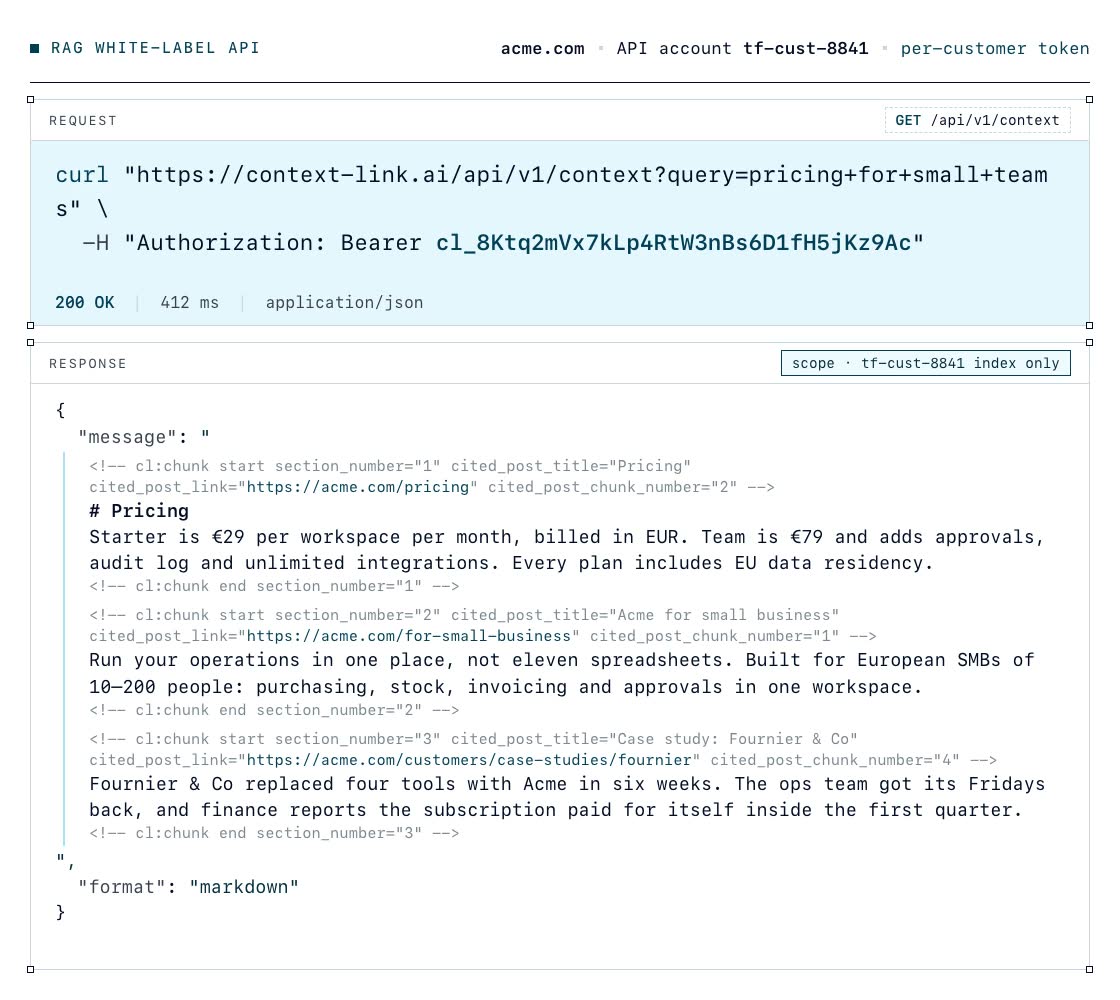
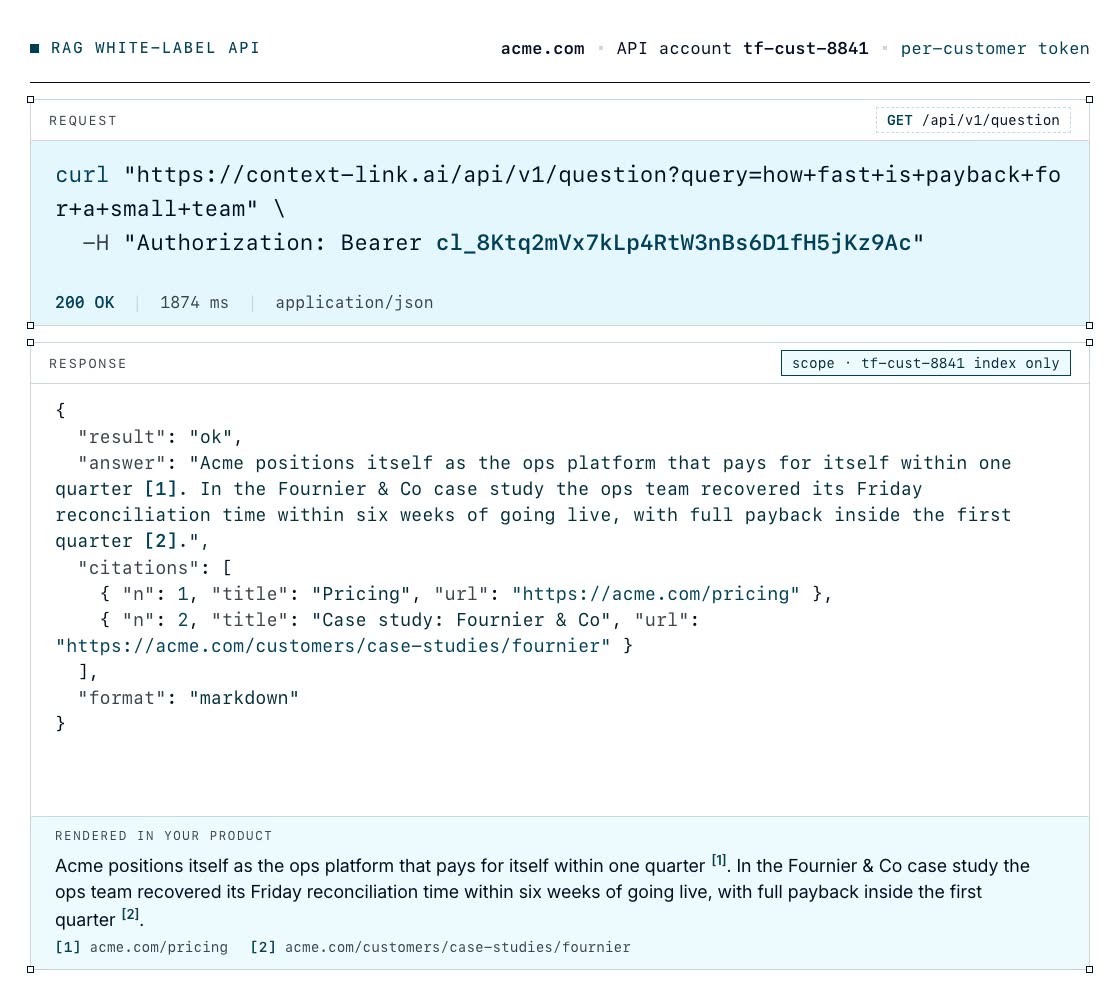
06 / Who buys this
Built for products that get better with context
Plain AI has no idea who your customer is, so it writes for nobody in particular and your users bin the output. Give the same feature that customer's own context and it comes back specific, in their language, about their business. That is the difference between a feature people try once and one they keep using.
Your users ask your product to write for their business, and the draft is only ever as good as what you know about them. Connect the brand book and style guides sitting in their Google Drive, their published site, and the YouTube channel they have been talking on for two years. Call GET /context before the generation step and the draft comes back in their vocabulary, quoting their own pricing page and their own posts, instead of the generic version every other tool hands them.
A number moved and the dashboard cannot say why, because the reason was never in the events. Connect the customer's Notion, where the roadmap, launch notes and quarterly goals live, and the planning docs in their Drive. Now your product can put a cited sentence next to the chart: this is the campaign that shipped that week, this is the goal it was aimed at. Retrieval works by meaning, so it finds the note even though nobody thought to tag it with the metric name.
Connect the customer's support mailbox and their help centre and every reply your product drafts is grounded in the answers that team has already given and the policies they have actually published. Call GET /question and you get one paragraph plus numbered citations back to their own articles, so the agent can check it before sending. Their refund window, their tone, their escalation rules, and none of it pasted into a prompt by hand.
Your users run work for other people, so the context you need sits one level deeper: per client, not per account. Provision an index per client, connect that client's Basecamp project, the briefs and case studies in Drive, and the client's own site. A status update, a scope of work or a pitch then quotes the actual brief, and nobody has to reread the archive before writing it.
08 / Pricing
Pricing
7-day free trial · start for free · cancel any time
Developer API
7-day free trial
includes
start for free · cancel any time

Supported by real humans
Ready when you are
Synced with their website, topped up by what you push. No vector database or scoring algorithm to host. First-class docs and an admin MCP for a quick integration.
7-day free trial · start for free · cancel any time
FAQ
Frequently Asked Questions
What is a white-label RAG API?
An API that lets your product know each of its customers and personalise to them, using retrieval-augmented generation over that customer's own content, synced from their website and whatever you push, under your brand, without you building the retrieval. Context Link's RAG White-Label plan holds one private vector index per end-customer inside your account, built from their website and/or the data you feed it. Your backend provisions an index at signup, pushes or crawls that customer's content, and calls two endpoints with that customer's token: GET /api/v1/context for the matching passages as markdown, and GET /api/v1/question for a concise grounded answer with citations. Everything is server-to-server. Your customers never see Context Link.
What does the index sync from?
Two things by default, in any combination, and an optional third. Their public website, if you give a site URL at provisioning: Context Link crawls it (capped at 500 pages), chunks and embeds it so it can be searched by meaning, re-syncs it on a schedule, and fires a signed webhook when the first crawl is done. And anything your backend can send as markdown through the Custom Connections API, by a stable id: dashboards, reports, help articles, notes. You never store or index it yourself; that is half the point. On top of those, if it suits your product, your customers can connect their own sources from inside your UI: Notion, Google Drive, OneDrive, Basecamp, Monday, a YouTube channel, a mailbox, web mentions of their name and any website. We hold the credentials, refresh what can be refreshed, and re-sync each one on a schedule. Accounts with no website are fine; they are queryable as soon as content is pushed.
Can my customers connect their own sources too?
Yes, if that suits your product. It is additive to what you push, not a replacement for it, and it happens from your UI, never from a page of ours. You add a source with one call, PUT /api/v1/api_accounts/:uid/connections/:connection_uid, naming the type and any setup fields it needs. Two shapes come back. Direct sources take their fields in the body, so the response says connected and syncing starts: any website, a mailbox, a YouTube channel, web mentions of their name, and Monday with a pasted API token. OAuth sources return redirect_required with a redirect_url: Notion, Google Drive, OneDrive and Basecamp; you send the customer there, they consent, and we bounce them to a return_url you chose. The consent screen carries your own OAuth app, registered with the provider under your name, so what the customer agrees to is your product. The call is idempotent on your connection_uid, so a retry is safe and re-minting a stale redirect is just another PUT.
What happens when a customer's connection breaks?
Tokens expire, passwords change, people revoke access. We refresh what can be refreshed automatically and re-sync on a schedule; already-indexed content stays queryable throughout, so a broken connection degrades freshness rather than taking the feature down. When a source genuinely needs the customer back, it moves to auth_failed, which you can see on the connection and on the fleet screen. POST .../connections/:connection_uid/reauthorise mints a fresh redirect you can surface in your own UI. Deleting a connection purges its content from that customer's index.
Is there a video?
Yes. Add RAG to Your SaaS - personalise your AI responses walks through what the plan is for: one isolated index per end-customer, provisioned at signup, and how GET /context and GET /question slot into a feature you already ship. There is a longer written version in the RAG White-Label docs, and shorter clips of the API accounts screen and fleet query log further up this page.
What can I personalise with it?
Three things, in practice. AI responses: anything your product generates for a customer can be grounded in their own material first, so an outline, a draft, a recommendation or an answer reflects what they actually sell and say. Onboarding: read the account's top_level_context paragraph and the first screens a new customer sees can already speak to their business rather than a placeholder. UI: defaults, examples, suggested prompts and empty states can be filled from the customer's own content instead of generic copy. All of it comes from one index per customer that you never have to host or tune.
How is one customer's content kept separate from another's?
Every end-customer is an API account with its own token, and every passage in the index carries that account's id. Retrieval with a customer token filters to that account plus anything you deliberately publish at the organisation level, such as your own help docs. Content pushed with a customer's token is only ever visible to that customer, and there is no scope parameter to get wrong. Your provisioning token is the one credential that can search across every account, which is why it belongs in your core backend only.
What am I not building?
The parts of RAG that take the time. A crawler that gets past bot defences and keeps the index current. Chunking at 800 to 3,200 characters with boundaries that keep meaning intact. Standard OpenAI embeddings in a hosted vector database, re-run only when content actually changes, and not a proprietary encoding you would be locked into. A retrieval pipeline that goes beyond a raw vector lookup: a blended rerank weighting similarity by passage length and source weight, fuzzy boosting on titles and tags, a filter that drops boilerplate, and expansion to the full document when a query lands squarely on one page. Named Modes let you weight sources differently per use case. And the hosting, backups, and per-tenant isolation of all of it. If you do offer connected sources, add to that list a connector per source times every customer who wants it: the OAuth dance, token refresh, pagination, rate limits, format quirks, and the maintenance when a provider changes its API.
Which endpoint should my feature call?
Call GET /api/v1/context when your own model will do the reasoning: it returns the matching passages as markdown, which is rich input for a generation step or an agent. Call GET /api/v1/question when you want to show an answer directly: one short paragraph plus numbered citations, which also protects an agent's context window instead of dumping the customer's whole corpus into it. There is a third, cheaper signpost that needs no query at all: every account carries a top_level_context paragraph describing who that customer is, written automatically once their index has content.
How much does it cost, and is there a per-token charge?
$50 a month per bundle of 10 end-customer accounts, with a seven-day free trial. When you provision an eleventh customer, a bundle is added automatically. There are no token or usage fees on top: /context is retrieval only, and each bundle carries 5,000 concise-answer requests a month. Bundles never shrink on their own; you downgrade explicitly if your fleet does.
Is this a chatbot widget I can drop into my product?
No. Context Link does not ship an embeddable chat surface, and it does not expose MCP to your end customers. It is the retrieval layer behind whatever you build: a help panel, an outlining feature, a search bar, an agent. You own the UI, the prompt, and the model. If a ready-made docs chatbot is the whole requirement, a tool like Kapa.ai is purpose-built for that.
How does this compare with OpenAI's vector store or building on Pinecone?
OpenAI's file search and a vector database both give you the storage-and-similarity part. You still build ingestion, crawling, chunking, re-sync, reranking, per-tenant isolation, and the operational side of running it for many customers. The RAG White-Label API packages that whole layer with a fixed price per customer account, and returns markdown or a cited answer that works with any model you already use.
What are the limits I should plan around?
500 crawled pages per customer website, and crawling is deliberately slow to avoid being blocked, so wire up the index-ready webhook rather than blocking a request on it. Connected sources are capped per customer, five of any one type and ten in total, which is room for several mailboxes or channels without one account queuing unbounded sync work. Query rate limits are per customer token (5 per 10 seconds on /context, 2 per 10 seconds on /question), so one busy customer never starves another. Write rate limits are shared across your organisation at 5 per 10 seconds, so bulk pushes serialise. Custom connections hold up to 1,000 posts and 100 MB each. The full tables are in the errors and limits reference.
Where do I start?
Read the RAG White-Label docs, or hand the single raw version to Claude Code, Cursor, or whichever coding agent you use and ask it to plan the integration. Then start the free trial, mint a provisioning token from Settings, and provision a test customer with your own site URL.