# RAG White-Label API
You are building a product whose features get better the more they know about each customer: their website, their documentation, the data they push through your product. Thousands of pages of it, different for every account.
The RAG White-Label plan gives you **search by meaning** over each user's own context, so your features can draw on it. Say you ship a blog-post outlining feature: before it writes anything, it can ask that user's context about the things the post mentions (their features, their positioning, the opinions they have already published) and produce an outline that is actually *theirs*. Not the generic answer every other customer of every other tool gets. **Personalisation through the customer's own context**, rather than a cleverer prompt.
### Watch the intro
Add RAG to your SaaS: what an isolated index per end-customer gets you, and how the two query endpoints fit into your product. Also on YouTube.
The supporting half is that you don't have to build any of the machinery: no retrieval, chunking, embedding, crawling or grounded answering. You hold **many isolated end-customer indexes inside one Context Link organisation**, provision them programmatically, and pay for them in bundles that scale with your customer count.
Everything your end customers touch is server-to-server. They never see Context Link: no UI, no emails, no branding. **No token ever reaches a browser.**
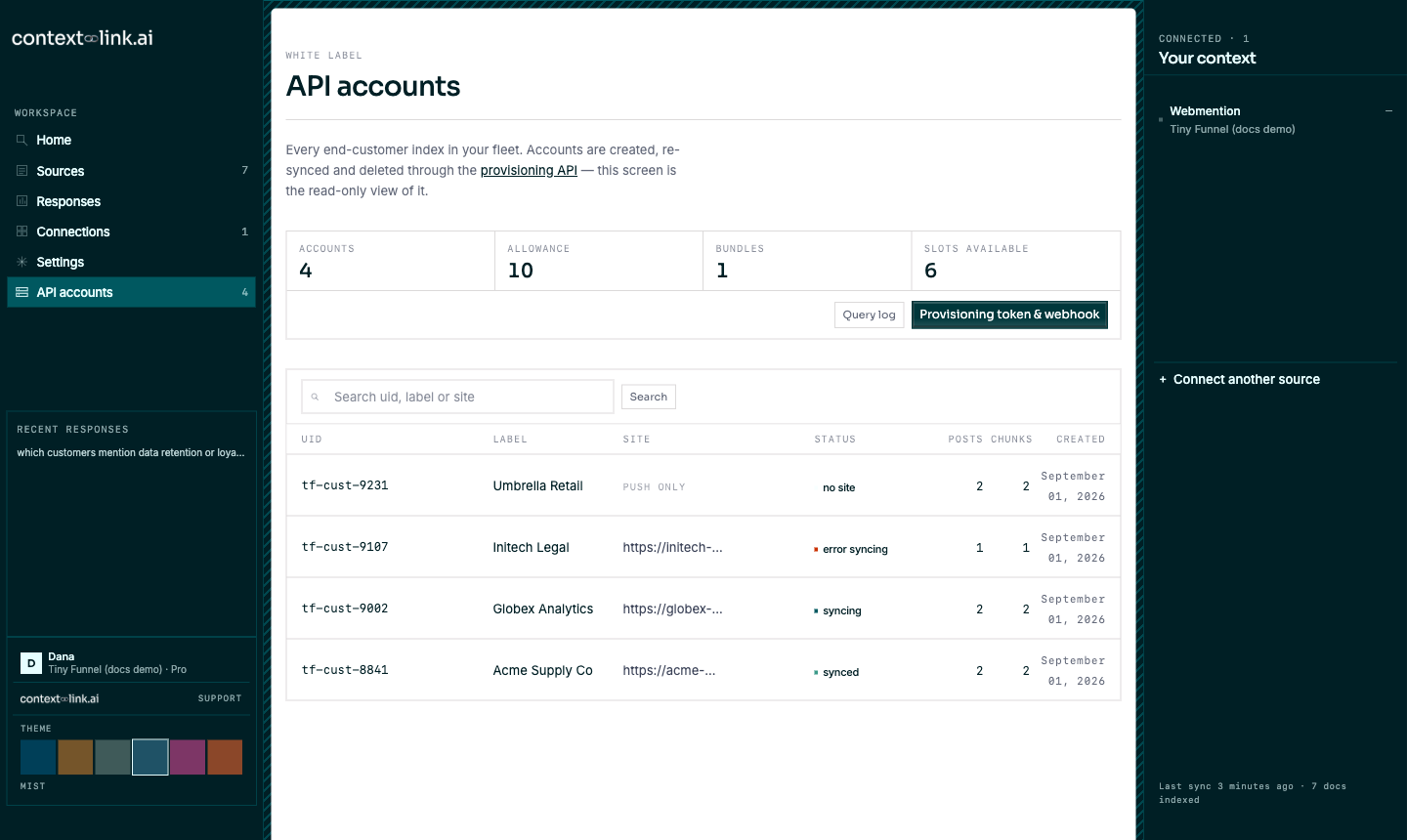
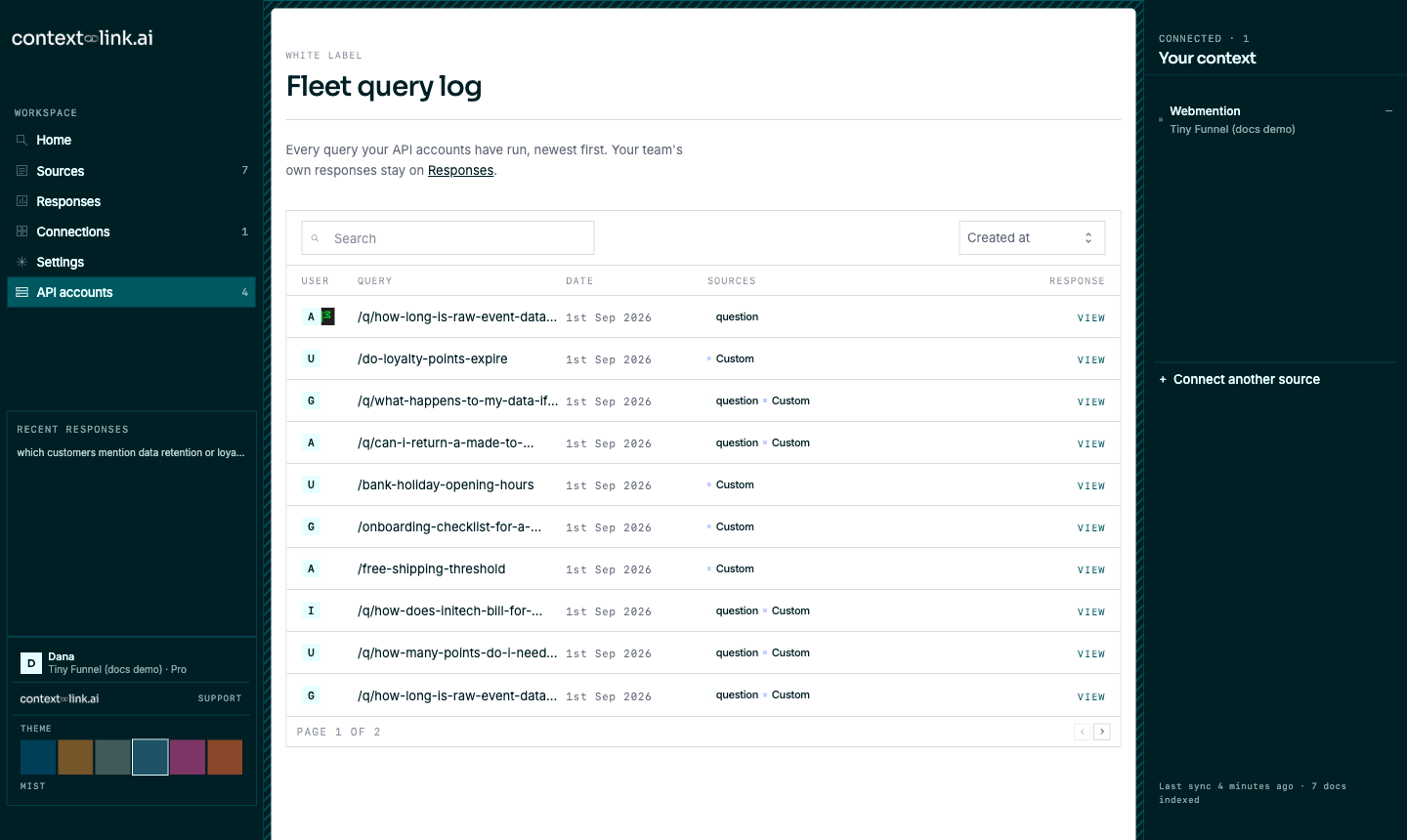
You still get a UI: an **API accounts** area inside Context Link that shows the fleet you provisioned and every query it has run.
The API accounts screen, searching the fleet, and opening one customer query in the fleet query log.
## Two ways to read a user's context
| Endpoint | Reach for it when |
|---|---|
| `GET /context` | You want **a lot of material**. It returns the matching passages as markdown: rich raw input for your own LLM or agent to work from. |
| `GET /question` | You want **a concise, grounded answer**. One short paragraph plus citations: right for showing directly in your UI, and for protecting an agent's context window instead of dumping the user's full context into it. |
Both endpoints accept `response_format=structured` for the same citation-ready schema: top-level `format`, `query`, `markdown` and `results`; each result has `content`, `position`, `rank`, `score`, `content_sha` and `sources`; and each source has `citation`, `uid`, `title`, `url`, `source_updated_at` and `connection`. `/context` returns many chunk results with one source each, while `/question` returns zero or one answer result with its cited sources. Without that opt-in, each endpoint's existing default response remains unchanged.
Each has its own endpoint: [`GET /context`](/docs/white-label/query-customer) and [`GET /question`](/docs/white-label/ask-question).
There is a third, cheaper signpost that needs no query at all: every account carries a `top_level_context` paragraph describing who that customer is, written automatically once their index has content. Read it off [the account's status](/docs/white-label/account-status) when you want to personalise a screen without asking a question first.
## What a customer's context can be made of
Three sources of content, and they stack:
| Source | How it gets there |
|---|---|
| Their website | Given as `site_url` when you [provision the account](/docs/white-label/create-account). Crawled for you. |
| What your product knows | Pushed as markdown through the [Custom Connections API](/docs/white-label/create-connection): dashboards, CRM notes, anything not on a public page. |
| Their own connected sources | Their mailbox, Drive, OneDrive, Notion, Basecamp, YouTube channel or another website, [connected from inside your product](/docs/white-label/connect-source) with a uid you choose. |
The third one is connected over the API like everything else: your customer consents at the provider under **your** brand, and never sees Context Link. You choose which types to offer at [`/white_label/connection_activations`](/docs/white-label/in-app-screens), where OAuth sources need your own OAuth client with our redirect URI whitelisted before they turn on. Google Drive also needs your Picker API key and Cloud project number; after consent, your product opens Google Picker so the customer grants only the files they choose.
## Two credentials, different jobs
| Credential | Scope | Where it comes from |
|---|---|---|
| **Partner provisioning token** | One per partner organisation. Manages the fleet (create / list / status / delete / re-sync API accounts) and can query across **all** your customers at once. | **Settings → Partner provisioning token** |
| **Per-customer token** | One per user account. Both authenticates *and* identifies that customer: querying and pushing content both use it. | Returned when the API account is created (and again on an idempotent re-POST of the same uid) |
Store `uid` + `token` per customer, plus a `CONN_ID` if you [push content](/docs/white-label/upsert-post). All captured at signup time.
> **The provisioning token is the high-privilege path.** The same secret manages the whole fleet, reads every customer's index, and can permanently delete any of them along with all of its content. Keep it in your core backend only: never in a per-customer context, never in a browser.
## Quick reference
| Property | Value |
|----------|-------|
| **Base URL** | `https://context-link.ai/api/v1` |
| **Authentication** | `Authorization: Bearer ` |
| **Format** | JSON in, JSON out |
| **Write rate limit** | 5 requests per 10 seconds (per user and per organisation) on `POST` / `DELETE` / `resync` |
| **Query rate limits** | 5 per 10s on `/context`, 2 per 10s on `/question`, **per token**, so one busy customer never starves another |
| **Billing** | $50/month per bundle of 10 API accounts. Bundles are added automatically on overflow. |
| **Crawl cap** | 500 pages per API account website |
## How the rest of this guide is laid out
The pages in the left sidebar follow the order you will build in: get your token, provision a customer, wait for their index, query on their behalf, push extra content, and clean up when they churn. The reference pages at the end carry the full status-code and limit tables.
---
# Getting started
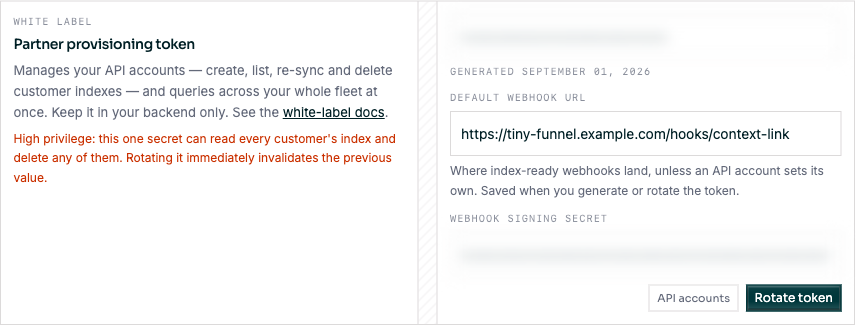
Sign up to Context Link normally and pick the **RAG White-Label** plan. The last onboarding step walks you through getting the token, provisioning your first customer, and querying on a customer's behalf, and links straight to the docs and the fleet screen. You can revisit all of it here.
Then open **Settings** and scroll to **Partner provisioning token**.
**Generate token** does three things at once:
1. mints your **provisioning token** (copy it now, it is only readable here);
2. saves the **default webhook URL** typed alongside it;
3. generates your **webhook signing secret**, shown underneath.
Both secrets are masked in the field and revealed on focus. The token is server-generated (there is no value to hand-type), and rotating it invalidates the previous one **immediately**, so update your backend in the same deploy.
Setting a default webhook URL and rotating the provisioning token. The token and signing secret are blurred here; in the app they are masked until you focus the field.
The webhook URL must be a publicly routable http(s) URL; see [SSRF constraints on the webhook URL](/docs/white-label/webhooks). Setting a private or credential-bearing URL is rejected here rather than accepted and quietly dropped.
---
# Admin MCP: manage your fleet from Claude/Codex
Everything in this guide is an HTTP call your backend makes. The **admin MCP** exposes the same capabilities as tools, so you (or Claude working with you) can provision customers, inspect the fleet, query a customer's index and push content from a chat.
With `plan_integration` you can also hand the AI the complete `/llm/white_label` guide plus your live account state so it can plan the build.
| Property | Value |
|---|---|
| **Server URL** | `https://www.context-link.ai/admin_mcp` |
| **Transport** | Streamable HTTP |
| **Authentication** | OAuth 2.1 (PKCE + Dynamic Client Registration), signed in as an **organisation admin** on the RAG White-Label plan |
| **Scopes** | `context:read`, `context:write`, `offline_access` |
| **Tools** | 12, listed below |
## Connect it to Claude
1. In Claude, go to **Settings → Connectors → Add custom connector**.
2. Name it **Context Link Admin** and paste the connector URL: `https://www.context-link.ai/admin_mcp`
3. Under **Authentication**, choose **Required** when the server asks, keep the OAuth client on **Use Anthropic's hosted client metadata**, then click **Add**.
4. First use opens a browser tab. Sign in as your organisation admin and click **Accept**.
The consent screen looks identical to the regular connector's; the difference is the server behind it. You can have both connected at once; they hold separate tokens.
### Claude Code
```bash
claude mcp add --transport http context-link-admin https://www.context-link.ai/admin_mcp
```
Run `/mcp`, pick **context-link-admin** and choose **Authenticate**.
### ChatGPT (developer mode) and other clients
Any client that supports remote MCP servers over HTTP works. Use the URL above wherever the client asks for one; the [MCP server](/docs/mcp-server) page shows the config shape for Cursor, VS Code, Codex and stdio-only clients. Swap `/mcp` for `/admin_mcp`.
## The tools
| Tool | Writes? | What it does |
|---|---|---|
| `plan_integration` | no | Your live account state (plan, whether the provisioning token and webhook secret exist, bundles, free slots) followed by the complete `/llm/white_label` guide as markdown. **Ask Claude to call it first** when planning or building. Optional `sections` trims the guide. |
| `activate_connection_type` | yes | Turns on one source type after explicit confirmation. OAuth types are refused until their complete app configuration is saved on the Connection types screen; secrets are never accepted through MCP. There is deliberately no matching withdrawal tool. |
| `list_api_accounts` | no | The fleet, paginated, with sync status, post/chunk counts and `usage`. Optional `q` filters by uid, label or site. Mirrors `GET /api_accounts`. |
| `get_api_account` | no | One account by `uid`, including `index_ready`, `last_synced_at` and `top_level_context`. Mirrors `GET /api_accounts/:uid`. |
| `create_api_account` | yes | Provision a customer (`uid`, optional `label`, `site_url`, `webhook_url`). Idempotent on `uid`. Returns the **customer token**. Refuses with `bundle_required` when the fleet is full unless `allow_bundle_add` is true. Mirrors `POST /api_accounts`. |
| `resync_api_account` | yes | Re-crawl the customer's website. Mirrors `POST /api_accounts/:uid/resync`. |
| `delete_api_account` | yes | Delete the account and its whole index. **Irreversible.** Mirrors `DELETE /api_accounts/:uid`. |
| `get_customer_context` | no | Semantic search over one customer's index (`uid`), or the whole fleet when `uid` is omitted. Mirrors `GET /context` with the customer token or the provisioning token respectively. |
| `ask_customer_question` | no | A concise cited answer from one customer's index, or fleet-wide. Mirrors `GET /question`. Counts against your monthly question allowance. |
| `list_customer_posts` | no | The documents pushed into a customer's custom connections. |
| `push_content` | yes | Upsert a markdown document (`post_uid`, `title`, `body` ≤ 100KB) into a customer's index. Creates the customer's custom connection on first push. Mirrors `PUT /custom_connections/:id/posts/:uid`. |
| `delete_content` | yes | Remove one pushed document. Pass `connection_name` when the same `post_uid` lives in more than one of the customer's connections. **Irreversible.** |
Every tool returns a `reason` field: `ok`, or why it declined: `auth_required`, `admin_required`, `white_label_required`, `write_scope_required`, `not_found`, plus tool-specific values such as `bundle_required`, `already_syncing`, `quota_exceeded`.
## Things to know
- **Admins only.** A team member who is not an organisation admin can connect the server but every tool returns `admin_required`. Reads keep working for an organisation that has left the plan while it still holds API accounts; writes need an active RAG White-Label subscription and the `context:write` scope, which the consent screen grants by default.
- **Tokens land in the chat.** `create_api_account` returns the customer token in the tool result, exactly as the API does. Treat that transcript as a secret and move the token into your backend; re-running `create_api_account` with the same `uid` shows it again if you lose it.
- **Spend is opt-in.** The REST API adds a bundle of 10 accounts ($50/month) automatically when you provision past your allowance. The MCP tool stops and asks instead. Pass `allow_bundle_add: true` once you have confirmed.
- **Deletes are final.** `delete_api_account` and `delete_content` remove the data immediately. Claude will normally check with you first because the tools are marked destructive.
- **OAuth configuration stays out of chat.** `activate_connection_type` never accepts provider secrets. Save them at `/white_label/connection_activations`; Google Drive requires the OAuth client ID and secret, Picker API key and Cloud project number from one Google Cloud project.
- **Same limits as the API.** Pushed bodies are capped at 100KB, connections at 1,000 posts and 100MB, crawls at 500 pages, and questions count against the monthly allowance described under [errors and limits](/docs/white-label/errors-and-limits).
---
# Create an API account
An **api_account is a user account: one of your customers**, with their own isolated index. It is distinct from you, the white-label organisation, which holds all of these user accounts and the provisioning token that manages them. Create one per customer, usually at signup.
`uid` is required: **your own stable customer id**. It is the idempotency key and the address for every later call, so you never need to store a Context Link id.
`site_url` is optional: include it if you know the customer's website; omit it for an account you fill with [content you push](/docs/white-label/upsert-post) or with the customer's [own connected sources](/docs/white-label/connect-source).
```bash
curl -X POST "https://context-link.ai/api/v1/api_accounts" \
-H "Authorization: Bearer $PROVISIONING_TOKEN" \
-H "Content-Type: application/json" \
-d '{
"uid": "tf-cust-8841",
"label": "Acme Supply Co",
"site_url": "https://acme.com",
"webhook_url": "https://your-app.com/hooks/context-link"
}'
```
`201 Created`. **Store the token now**:
```json
{
"api_account": {
"id": 4211,
"uid": "tf-cust-8841",
"label": "Acme Supply Co",
"site_url": "https://acme.com",
"connection_id": 9876,
"sync_status": "syncing",
"webhook_url": "https://your-app.com/hooks/context-link",
"created_at": "2026-08-31T10:15:00Z"
},
"token": "6yTk2mWq8rVd4nXb...",
"bundle_added": false
}
```
## Request fields
| Field | Type | Description |
|---|---|---|
| `uid` | string | Required. Your own stable customer id: `a-z`, `0-9`, hyphen, underscore or dot, 1 to 255 characters, unique **per organisation**. It is the idempotency key and the address for every later call. |
| `label` | string | Optional display name, 255 characters or fewer, defaulting to the uid. This is the "label" column on the fleet screen. |
| `site_url` | string | Optional http(s) URL. When present a website index is created and the first crawl starts immediately. We keep the **host**, plus a non-root path which becomes the crawl's starting point, and always crawl over `https` on the default port. A URL carrying an explicit port or embedded credentials is rejected rather than silently trimmed. |
| `webhook_url` | string | Optional http(s) URL. Overrides your organisation default for this customer only. |
## Response fields
| Field | Type | Description |
|---|---|---|
| `api_account` | object | The account that was provisioned or replayed. |
| `api_account.id` | integer | Context Link's own id for the account; you address it by `uid`, so you never need to store this. |
| `api_account.uid` | string | The customer id you provisioned the account with. |
| `api_account.label` | string | The account's display name, falling back to the uid when you sent none. |
| `api_account.site_url` | string | The website that will be crawled, `null` when the account was created without a `site_url`. |
| `api_account.connection_id` | integer | The website connection's id, `null` when the account has no website. |
| `api_account.sync_status` | string | The crawl state: `unsynced`, `syncing`, `synced`, `error_syncing`, or `no_site` for an account with no website. |
| `api_account.webhook_url` | string | The per-customer webhook override, `null` when the account falls back to your organisation default. |
| `api_account.created_at` | timestamp | When the account was first provisioned. |
| `token` | string | The account's query token, returned on creation and again on every replay. |
| `bundle_added` | boolean | Whether this call added a bundle of 10 slots to your subscription. |
Token-bearing responses are sent `Cache-Control: no-store`.
## Retries are safe
If the response gets lost, POST the same `uid` again. You get `200` with the existing account and **the same token**, and nothing is created twice.
A replay deliberately **ignores** a changed body, *including an invalid one*: re-POSTing with a different `site_url` or `label` will not mutate the existing account and will not `422`. So a retry needs no special casing, and needs to carry no more than the `uid`.
**Automatic growth**: if this was customer #11 on 1 bundle, a bundle is added automatically (+$50/mo, +10 slots) and the response carries `"bundle_added": true`. If the charge fails, the call returns `402` and **no** account is created. Bundles never shrink automatically; downgrade seats from billing if you want to.
---
# List the fleet
## The whole fleet
The API behind the fleet screen:
```bash
curl "https://context-link.ai/api/v1/api_accounts?page=1&per_page=25" \
-H "Authorization: Bearer $PROVISIONING_TOKEN"
```
```json
{
"api_accounts": [
{ "id": 4211, "uid": "tf-cust-8841", "label": "Acme Supply Co", "site_url": "https://acme.com",
"sync_status": "synced", "index_ready": true, "posts": 214, "chunks": 1893 }
],
"usage": {
"api_users_count": 11,
"api_users_allowance": 20,
"bundles": 2,
"slots_available": 9
},
"pagination": { "page": 1, "per_page": 25, "total": 11, "total_pages": 1 }
}
```
## Response fields
| Field | Type | Description |
|---|---|---|
| `api_accounts` | array | One summary row per api_account on this page, oldest first. |
| `api_accounts[].id` | integer | Context Link's own id for the account. |
| `api_accounts[].uid` | string | The customer id you provisioned the account with. |
| `api_accounts[].label` | string | The account's display name, falling back to the uid. |
| `api_accounts[].site_url` | string | The website being crawled, `null` for an account with no website. |
| `api_accounts[].sync_status` | string | The crawl state: `unsynced`, `syncing`, `synced`, `error_syncing`, or `no_site` for an account with no website. |
| `api_accounts[].index_ready` | boolean | Whether the account's website has completed a successful crawl. |
| `api_accounts[].posts` | integer | Documents indexed across every connection the account owns. |
| `api_accounts[].chunks` | integer | Embedded passages indexed across every connection the account owns. |
| `usage` | object | Organisation-wide totals, independent of the page of accounts returned. |
| `usage.api_users_count` | integer | api_accounts currently provisioned across your whole organisation. |
| `usage.api_users_allowance` | integer | Total api_account slots your subscription covers, which is 10 per bundle. |
| `usage.bundles` | integer | Bundles currently on your subscription, or `0` when the organisation is off the white-label plan. |
| `usage.slots_available` | integer | Slots left before the next bundle is auto-added on overflow. |
| `pagination` | object | Paging state for the `api_accounts` array. |
| `pagination.page` | integer | The page returned, starting at 1. |
| `pagination.per_page` | integer | Rows per page, capped at 100. |
| `pagination.total` | integer | api_accounts matching the request across every page. |
| `pagination.total_pages` | integer | Pages available at this `per_page`. |
`per_page` is capped at 100.
Each row is a summary. For one account's full status, its index readiness and the paragraph describing who that customer is, see [`GET /api_accounts/:uid`](/docs/white-label/account-status).
---
# One account's status
One account, by the `uid` you provisioned it with. This is also the polling fallback if you would rather not receive [the index-ready webhook](/docs/white-label/webhooks).
```bash
curl "https://context-link.ai/api/v1/api_accounts/tf-cust-8841" \
-H "Authorization: Bearer $PROVISIONING_TOKEN"
```
```json
{
"api_account": {
"id": 4211,
"uid": "tf-cust-8841",
"label": "Acme Supply Co",
"site_url": "https://acme.com",
"connection_id": 9876,
"sync_status": "synced",
"index_ready": true,
"last_synced_at": "2026-08-31T11:42:07Z",
"posts": 214,
"chunks": 1893,
"top_level_context": "Acme Supply Co sells industrial fasteners and fixings to UK trade customers, mostly construction and light manufacturing. They position on next-day despatch and on stocking the long-tail sizes the big merchants drop.",
"created_at": "2026-08-31T10:15:00Z"
}
}
```
## Response fields
| Field | Type | Description |
|---|---|---|
| `api_account` | object | The account addressed by the `uid` in the path. |
| `api_account.id` | integer | Context Link's own id for the account. |
| `api_account.uid` | string | The customer id you provisioned the account with. |
| `api_account.label` | string | The account's display name, falling back to the uid. |
| `api_account.site_url` | string | The website being crawled, `null` for an account with no website. |
| `api_account.connection_id` | integer | The website connection's id, `null` for an account with no website. |
| `api_account.sync_status` | string | The crawl state: `unsynced`, `syncing`, `synced`, `error_syncing`, or `no_site` for an account with no website. |
| `api_account.index_ready` | boolean | Whether the account's website has completed a successful crawl. |
| `api_account.last_synced_at` | timestamp | When the website last finished syncing, `null` until the first crawl completes and for an account with no website. |
| `api_account.posts` | integer | Documents indexed across every connection the account owns. |
| `api_account.chunks` | integer | Embedded passages indexed across every connection the account owns. |
| `api_account.top_level_context` | string | A short paragraph describing who the customer is, `null` until there is content to describe it from. |
| `api_account.created_at` | timestamp | When the account was provisioned. |
`sync_status` is one of `unsynced`, `syncing`, `synced`, `error_syncing`, or `no_site` for an account with no website. `index_ready` turns `true` once the first crawl has completed successfully. Tokens are never included in this response.
Site-less accounts skip the crawl entirely; they are queryable as soon as content is [pushed](/docs/white-label/upsert-post) or a [connected source](/docs/white-label/connect-source) finishes its first sync. `sync_status` and `index_ready` track the website only. Read [connection status](/docs/white-label/connection-status) for the customer's other sources.
## Who is this customer?
`top_level_context` is a short plain-text paragraph describing the account: what they do, who they serve, the category they sit in. It saves you running your own summarisation pass before you can personalise a screen, a prompt or an onboarding email.
It is written once, automatically, as soon as there is something to describe: the first successful crawl of the account's website, or the first post [pushed](/docs/white-label/upsert-post) into it for an account with no site. Until then it is `null`, so treat it the way you treat `index_ready`. Poll or wait for the webhook rather than blocking a signup on it. An account too thin to describe stays `null` and is retried on its next sync, rather than being frozen with a placeholder.
It is derived from that account's own material and nothing else. It never carries your organisation's description, and never another customer's.
> The paragraph is generated from customer content, so treat it as **untrusted text** wherever you use it: render it as plain text, and if you feed it into a prompt, tell the model to describe it rather than follow it.
---
# Re-crawl a customer's website
Websites re-crawl on Context Link's own daily schedule, so reach for this only when you know a customer's site has changed and you don't want to wait.
```bash
curl -X POST "https://context-link.ai/api/v1/api_accounts/tf-cust-8841/resync" \
-H "Authorization: Bearer $PROVISIONING_TOKEN"
```
```json
{ "status": "resync_enqueued" }
```
## Request fields
| Field | Type | Description |
|---|---|---|
| `uid` | string | Required, in the path. The customer id you provisioned the account with. An unknown uid is a `404`. |
## Response fields
| Field | Type | Description |
|---|---|---|
| `status` | string | Always `resync_enqueued` on a successful call: the crawl is queued, not finished. |
## Errors
| Status | Meaning |
|---|---|
| `202` | Accepted. The crawl is queued; watch [the account's status](/docs/white-label/account-status) or wait for [the webhook](/docs/white-label/webhooks). |
| `409` | A sync is already running for this account. |
| `422` | The account has no website to crawl. |
Crawling is deliberately slow, so never block a web request on a re-sync.
---
# Delete an API account
When a customer churns, delete their account. The slot is freed immediately and can be filled by the next signup.
```bash
curl -X DELETE "https://context-link.ai/api/v1/api_accounts/tf-cust-8841" \
-H "Authorization: Bearer $PROVISIONING_TOKEN"
```
```json
{ "status": "deleted", "uid": "tf-cust-8841" }
```
## Request fields
| Field | Type | Description |
|---|---|---|
| `uid` | string | Required, in the path. The customer id you provisioned the account with. An unknown uid is a `404`. |
## Response fields
| Field | Type | Description |
|---|---|---|
| `status` | string | Always `deleted` on a successful call. |
| `uid` | string | The customer id of the account that was destroyed. |
## This is irreversible
Deleting destroys the account and **all** of its connections, posts and chunks. For content you pushed through [custom connections](/docs/white-label/create-connection), Context Link holds the only copy of the indexed text, so back up anything you cannot regenerate from your own database first.
A `404` means there is nothing to delete under that uid, so churn cleanup can treat it as success and retry safely.
---
# Webhooks
Everything we send goes to the account's `webhook_url`, falling back to your organisation default, signed the same way. No URL configured means no webhooks ([polling](/docs/white-label/account-status) still works).
| Event | Fires when |
|---|---|
| `api_account.index_ready` | An account's website finished its first crawl. |
| `connection.authorised` | A connected source completed its OAuth exchange, or a direct source was created and validated. |
| `connection.auth_failed` | An exchange failed, or a refresh token died during a scheduled sync. |
| `connection.disconnected` | You deleted one connected source. |
| `connection_type.revoked` | A connection type was withdrawn from your organisation, destroying every connection of it across your fleet. |
## `api_account.index_ready`
Crawling is deliberately slow (anti-detection), so don't block on it. This event only applies to accounts created with a `site_url`.
When the first crawl finishes we `POST`:
```json
{
"event": "api_account.index_ready",
"api_account_id": 4211,
"uid": "tf-cust-8841",
"connection_id": 9876,
"posts": 214,
"chunks": 1893,
"synced_at": "2026-08-31T11:42:07Z"
}
```
## Response fields
| Field | Type | Description |
|---|---|---|
| `event` | string | Always `api_account.index_ready` for this webhook. |
| `api_account_id` | integer | Context Link's own id for the account whose index is ready. |
| `uid` | string | The customer id you provisioned the account with. |
| `connection_id` | integer | The website connection that finished crawling. |
| `posts` | integer | Documents indexed by that website connection. |
| `chunks` | integer | Embedded passages indexed by that website connection. |
| `synced_at` | timestamp | When the crawl finished, as a UTC ISO 8601 string. |
## The connection lifecycle events
The three `connection.*` events share one payload shape and go to the webhook URL of the customer the source belongs to. They are how you keep your own "connected sources" screen honest without polling.
```json
{
"event": "connection.auth_failed",
"api_account_uid": "tf-cust-8841",
"connection_id": 9013,
"connection_type": "google_doc",
"auth_status": "auth_failed",
"reason": "invalid_grant: Token has been expired or revoked."
}
```
| Field | Type | Description |
|---|---|---|
| `event` | string | `connection.authorised`, `connection.auth_failed` or `connection.disconnected`. |
| `api_account_uid` | string | The customer id you provisioned the account with. |
| `connection_id` | integer | Context Link's id for the connection. |
| `connection_type` | string | The type, in the same form you sent it (`google_doc`, `youtube`). |
| `auth_status` | string | The connection's authorisation state at the moment the event fired. |
| `reason` | string | Only on failures: why, truncated to 200 characters. Present as a support message, not as something to branch on. |
`connection.auth_failed` is the one that matters operationally. Refresh tokens die silently, and across a fleet of thousands that is invisible rot: we can see it, but you are the only one who can ask your customer to reconnect. Route it somewhere a human or an email sequence will act on, then send them through [re-authorisation](/docs/white-label/connect-source#re-authorising-a-dead-connection).
For Google Drive, a successful OAuth exchange alone does **not** emit `connection.authorised`. The browser first returns to you with `connection_status=selection_required`; the event fires only after your backend commits a valid Picker selection. Cancelling Picker emits no lifecycle event and leaves the connection waiting for selection.
`connection.disconnected` fires as the row is destroyed, so by the time you receive it the source and its content are already gone. It carries the same shape with no `reason`.
## `connection_type.revoked`
A connection type can be withdrawn from your organisation, either by an admin of yours on the [Connection types screen](/docs/white-label/customer-sources) or by us. When that happens every connection of that type across your entire fleet is destroyed. You get **one** org-level event, not one per customer.
```json
{
"event": "connection_type.revoked",
"connection_type": "google_doc",
"connections_destroyed": 1204
}
```
This goes to your organisation default webhook URL, because it is not about one customer. Fanning it out as 1,204 signed deliveries in a burst would read as an outage at your end; instead, reconcile per customer at your own pace with [`GET .../connections`](/docs/white-label/connection-status).
## Signatures and delivery
Every delivery carries these headers, shown in the examples rail:
```
X-ContextLink-Event: connection.authorised
X-ContextLink-Timestamp: 1788176527
X-ContextLink-Signature: sha256=
```
## Verifying the signature
The signature is `HMAC-SHA256(signing_secret, ".")`, hex-encoded. Verify it against the **raw** request body before parsing, compare with a constant-time function, and reject a timestamp skewed more than 5 minutes from your clock.
A Ruby implementation of that check:
```ruby
def context_link_webhook_verified?(request)
timestamp = request.headers["X-ContextLink-Timestamp"].to_i
return false if (Time.now.to_i - timestamp).abs > 300
expected = "sha256=" + OpenSSL::HMAC.hexdigest(
"SHA256",
ENV.fetch("CONTEXT_LINK_SIGNING_SECRET"),
"#{timestamp}.#{request.raw_post}"
)
ActiveSupport::SecurityUtils.secure_compare(
expected, request.headers["X-ContextLink-Signature"].to_s
)
end
```
The same check in Node, using Express with the raw body preserved:
```js
const crypto = require("crypto");
// app.post("/hooks/context-link", express.raw({ type: "application/json" }), handler)
function contextLinkWebhookVerified(req) {
const timestamp = Number(req.get("X-ContextLink-Timestamp"));
if (!timestamp || Math.abs(Date.now() / 1000 - timestamp) > 300) return false;
const expected =
"sha256=" +
crypto
.createHmac("sha256", process.env.CONTEXT_LINK_SIGNING_SECRET)
.update(`${timestamp}.${req.body}`) // req.body is the raw Buffer
.digest("hex");
const received = req.get("X-ContextLink-Signature") || "";
const a = Buffer.from(expected);
const b = Buffer.from(received);
return a.length === b.length && crypto.timingSafeEqual(a, b);
}
```
## Delivery contract
Delivery is **at least once** for every event: under normal operation you get exactly one call, but a queue or crash at the wrong moment can repeat it. Key on `(uid, event)` for `api_account.index_ready`, and on `(connection_id, event)` for the connection events, and make your handler idempotent.
Return any `2xx` **directly** to acknowledge. Anything else is a failure and is retried about five times with exponential backoff, **including a redirect**: `3xx` is treated as a failure, not followed, so point the webhook at its final URL.
## SSRF constraints on the webhook URL
Your endpoint must be a publicly routable http(s) URL. These are refused outright (logged and never retried) rather than delivered:
- any scheme other than `http` or `https`;
- a URL with embedded credentials (`https://user:pass@…`);
- a host resolving to loopback, private (RFC 1918), CGNAT, link-local or multicast space, IPv4 or IPv6.
The same check runs when you *set* the URL, so a bad target is a `422` at configuration time instead of a silent dead letter later.
---
# Connection types
**Connection types** is where you decide which kinds of source your customers are allowed to connect. It is a screen inside Context Link, at **`/white_label/connection_activations`**, listed in the left rail. Before your product can connect a customer's mailbox or their Drive, that source type has to be turned on here.
This is the one screen in the guide that is not read-only, and it is the only place the fleet's source types are set. Everything after it happens over the API, inside your product: [creating connections](/docs/white-label/connect-source), [checking them](/docs/white-label/connection-status) and [removing them](/docs/white-label/disconnect-source).
It is visible to **organisation admins on the white-label plan**. It is deliberately not the same thing as your own team's connections screen. What you set here is what your *customers* may connect, never what your organisation indexes for itself.
## What the screen shows
Three groups, in one list.
| Group | What it is |
|---|---|
| **Always on** | Website. Every customer has it, you do not turn it on, and you cannot withdraw it. |
| **Active sources** | Types you have turned on, with whose OAuth app is on the consent screen, how many of your customers hold one, and the keys. |
| **Available to turn on** | Everything else you could offer, each with its credential form where it needs one. |
The number against each row counts **customers holding that type**, not connections. One customer with three YouTube channels counts once. Per-customer detail lives on the [fleet screen](/docs/white-label/in-app-screens), not here.
### Website is always on
Website sits in its own group with a count and no controls. Every customer may hold a website connection whether or not you ever open this screen, so there is nothing here to turn on. Most are created from the `site_url` you pass when you [provision the account](/docs/white-label/create-account). You can also connect one later with [`PUT .../connections/:connection_uid`](/docs/white-label/connect-source) and `connection_type: "site"`. Either route gives that customer one website, and only one.
Withdrawing the type is what the screen refuses, because it would purge the core of every customer's index. The route refuses it as well, so there is no way to reach it by hand.
Memory and [custom connections](/docs/white-label/create-connection) are not on the screen at all. They are infrastructure every account gets rather than choices you make.
**Files is deliberately not offerable.** It is a browser upload with no API surface your customer could push into, and custom connections already cover you pushing content in on their behalf.
## The types you can turn on
| Source | Needs your OAuth app | What your customer supplies |
|---|---|---|
| Email | No | Address, IMAP password, server, optional port |
| Notion | **Yes** | Consent at Notion |
| Google Drive | **Yes** | Consent at Google |
| OneDrive | **Yes** | Consent at Microsoft |
| Basecamp | **Yes** | Consent at Basecamp |
| monday.com | No | An API token they paste, optional workspace id |
| YouTube | No | A channel handle |
| Web Mentions | No | Brand name and web domain |
**monday.com is a pasted token, not OAuth.** Monday's tokens are long-lived with no refresh, so there is no app to register and no consent screen. Your customer copies a token out of monday.com and you post it like any other setup field.
The exact field names and the request that creates each one are on [Connect a source](/docs/white-label/connect-source).
## Your own OAuth app is required
Four of the types need an OAuth app behind them. It has to be **yours**: the type will not turn on until you have entered every required field, and there is no option to run it on Context Link's app instead.
- **Why there is no fallback.** A provider only sends a customer back to a redirect URI registered on the same OAuth app as the `client_id` that started the flow. Our own Notion, Microsoft and Basecamp apps are registered for our own sign-in callbacks, not for the fleet callback below, so a customer sent through them would be turned away at the provider with a redirect URI error.
- **What you get for it.** The consent screen says *your* company, which is the point of the white-label plan: your customer never sees us.
- **Types turned on before this rule.** A type that was enabled without its complete configuration stays enabled, so nothing already indexed is purged, but it takes no new connections: the connect and re-authorise calls answer `409 partner_credentials_required` until you complete it. Customers already connected keep syncing.
### Google Drive: OAuth plus Picker
Google Drive needs four values from one Google Cloud project:
- **OAuth client ID and client secret** for the server-side consent and token exchange.
- **Picker API key** for Google Picker in your customer's browser.
- **Cloud project number** (the numeric project id) passed to Picker as its app id.
Set them up in this order. The Connection types screen shows the same steps under **What to set up in Google** on the Google Drive card.
1. **Enable the Google Drive API and Google Picker API** (APIs & Services > Library). Do this before creating the API key: the key's API restrictions list only offers APIs already enabled in the project, so it is empty otherwise.
2. **Configure the OAuth consent screen** under your own brand, since your customers see it. Publish it to production; in testing mode only listed test users can connect.
3. **Create the OAuth client**: Create credentials > OAuth client ID, application type **Web application**, with Context Link's callback (below) as an authorised redirect URI. Its client ID and secret go into the first two fields.
4. **Create the Picker API key**: Create credentials > API key. Under API restrictions, allow the Google Picker API and Google Drive API. Under application restrictions, choose **Websites** and add your production app origin (for example `https://app.example.com/*`) plus `https://docs.google.com/*`. Picker runs in your customer's browser inside your product, so the origin is your app, not context-link.ai. Add a dev or ngrok origin while you test.
5. **Copy the Cloud project number** from IAM & Admin > Settings or the project dashboard: the numeric project number, not the project ID.
The project number, OAuth client and API key must belong to the same project.
Context Link requests `email`, `profile` and Google's non-sensitive `drive.file` scope. That scope grants access only to files the customer chooses in Picker; it does not require restricted-scope verification or an annual third-party security assessment. You still configure and publish the OAuth consent screen under your own brand.
After consent, Google returns the customer to your `return_url` with `connection_status=selection_required`. Your backend fetches the Picker configuration and your browser UI lets the customer choose files before the connection is authorised. The complete flow is on [Connect a source](/docs/white-label/connect-source#complete-google-drive-with-picker).
Each field carries a **Where to find it** link straight to the provider's credentials page: Google Cloud console, Microsoft Entra, Notion integrations, 37signals launchpad. Registering the app is a link away rather than a support ticket. Google Drive's fields also link to their step in **What to set up in Google**.
> **Provider setup is yours to maintain.** The consent screen shows your brand because it is your OAuth client. Complete each provider's normal publishing and branding requirements. Google Drive's `drive.file` access is non-sensitive; adding broader Drive or Gmail scopes to the same consent request can create separate verification requirements.
Types that need no keys turn on with one click. Types that need keys show the form first, with the redirect URI to whitelist beside it, and refuse to turn on until every field is filled. Google Drive requires all four Google values.
### Keys are write-only
A stored key is reported as **set** and never rendered back into the page. You can replace it, you cannot read it. That is the opposite of your [provisioning token](/docs/white-label/getting-started), which is retrievable on purpose. A third-party OAuth secret has no such need, and rendering it would only put it in browser caches and screenshots.
What that means in practice, before you touch the form:
- **Blank means "keep what is stored", not "clear it".** Because the field is never populated, an untouched field is always blank, so saving an unchanged form leaves your keys exactly as they were.
- **There is no clearing.** An OAuth type that is turned on needs your keys, so removing them is a withdrawal, not an edit.
- **Rotating the secret alone is safe.** A refresh token is bound to the `client_id` that issued it; the secret only authenticates your app at the provider's token endpoint. We read both fresh on every refresh, so the next one presents your new secret against the same `client_id` and succeeds. Nobody has to reconnect.
- **Rotating only the Google Picker API key is safe.** Existing OAuth grants are unchanged. Save the replacement before disabling the old key, and keep the same browser and API restrictions.
- **Changing the `client_id` is a fleet-wide reconnect campaign.** Every refresh token your customers hold was issued by the old OAuth app and is worthless to a different one. Those connections fail their next refresh, land in `auth_failed` and need [re-authorising](/docs/white-label/connect-source#re-authorising-a-dead-connection) one by one. The same is true of deleting the app in the provider's console. Three things count as changing the app, and the last one is the easy one to miss:
- pointing the activation at a different OAuth client.
- **Google's project number must match the Picker key and OAuth client.** Replacing it with an unrelated project breaks Picker rather than migrating grants.
- **Configuration goes in as a set.** A `client_id` without its secret—or Google OAuth values without matching Picker values—is incomplete, so a half-filled form is refused rather than stored.
Do any of these when you have somewhere to route the `connection.auth_failed` [webhooks](/docs/white-label/webhooks).
### Register our redirect URI on your own app
Your keys mean your OAuth app, so the provider sends the customer back to us through a
redirect URI that has to be whitelisted on **your** app. Add the one for that type before you
turn it on. The screen shows the exact value with a copy button next to the key fields.
| Type | Redirect URI to register |
|---|---|
| Notion | `https://www.context-link.ai/api/v1/oauth/callback/notion` |
| Google Drive | `https://www.context-link.ai/api/v1/oauth/callback/google_doc` |
| OneDrive | `https://www.context-link.ai/api/v1/oauth/callback/one_drive` |
| Basecamp | `https://www.context-link.ai/api/v1/oauth/callback/basecamp` |
Skipping this does not fail on our side. Your customer is turned away at the provider's own
consent screen with an error we never see, so there is nothing for us to report back to you.
The code exchange needs a client secret, which is why the provider returns to us rather than
to you. Where the customer lands afterwards is still yours: that is the `return_url` you send
on the [connect call](/docs/white-label/connect-source), carried through the flow in a signed
payload so it cannot be tampered with.
## Withdrawing a type purges your whole fleet
Withdrawing a source type is the most destructive action available to you anywhere in this product. **Every connection of that type, belonging to every one of your customers, is destroyed**, and with it every document indexed from those connections and every embedded passage of those documents. There is no frozen middle state and nothing to restore from.
The screen is built to make that impossible to do by accident:
1. **Withdraw** opens a modal carrying the **real counts, computed before it opens**: how many connections, how many posts, how many of your customers. Never a generic "are you sure?".
2. Above **10 connections** across the fleet you must **type the source's name** to confirm. Below it, the counts alone are the confirmation.
3. The deletion then runs **in the background**, so a fleet of ninety thousand posts does not depend on a browser tab staying open.
4. **An audit row is written before anything is destroyed**, recording who withdrew what, when, and the counts. Somebody will ask later, and by then the content is gone.
5. You receive **one org-level [`connection_type.revoked` webhook](/docs/white-label/webhooks)** at your organisation's default webhook URL, carrying the type and the number of connections destroyed. Not one per customer.
**Your keys survive the withdrawal.** The type moves back down to *Available to turn on* marked as still holding your keys, so turning it back on later is one click. What does not survive is your customers' indexed content: they would have to reconnect the source and re-sync from nothing.
Withdrawal is not the tool for a single customer who wants one source gone. That is [`DELETE .../connections/:connection_uid`](/docs/white-label/disconnect-source), which touches one connection and nobody else's.
## Limits that come with turning a type on
Turning a type on does not make it unbounded. Syncing spends your question allowance, and that is **one pool shared across your whole fleet, sized at 5,000 questions per bundle per month**. Without the caps below, one customer with an enormous mailbox could spend that pool on everybody's behalf.
| Limit | Value |
|---|---|
| Connections per customer, all types | 10, and the memory connection is exempt |
| Connections of one type per customer | 5, counting toward the 10 |
| Websites per customer | 1, counting toward the 10 |
| Custom connections per customer | 6, counting toward the 10 |
| Documents per sync per connection | 500 by default, 30 for YouTube, 50 for Web Mentions |
**10 is the binding ceiling.** The per-type numbers are maxima within it, not slices that add up to it. A customer can hold 6 custom connections or 5 mailboxes, but not both, because the total still has to come in at 10. The memory connection is the one exception: it never counts.
If a per-connection document ceiling needs turning down for one heavy customer, ask us. It is a single field on that connection rather than a cap on everyone using that type.
---
# Connect a source
This endpoint connects one of your customer's own content sources: their mailbox, their Drive, their YouTube channel, another website. It is driven from your product, over the API. There is no Context Link screen for your customer to visit.
Sources are addressed by a **uid you choose**, not by type, because one customer can hold several of the same kind (two mailboxes, three channels). The uid is your own word for the source. The write verb is a `PUT` upsert, so a retried request is always safe.
```bash
curl -X PUT "https://context-link.ai/api/v1/api_accounts/tf-cust-8841/connections/acme-yt-main" \
-H "Authorization: Bearer $PROVISIONING_TOKEN" \
-H "Content-Type: application/json" \
-d '{ "connection_type": "youtube", "handle": "@acmecorp" }'
```
```json
{
"connection": {
"id": 9013,
"uid": "acme-gdrive",
"connection_type": "google_doc",
"name": "GoogleDoc",
"status": "redirect_required",
"auth_status": "pending_auth",
"sync_status": "unsynced",
"redirect_url": "https://accounts.google.com/o/oauth2/v2/auth?...",
"expires_at": "2026-09-13T12:15:00Z"
}
}
```
## Request fields
| Field | Type | Description |
|---|---|---|
| `uid` | string | Required, in the path. The customer id you provisioned the account with. An unknown uid is a `404`. |
| `connection_uid` | string | Required, in the path. The uid you choose for this source: `a-z`, `0-9`, hyphen, underscore or dot, 1 to 255 characters, unique per customer. It is the address for every later call on this connection. |
| `connection_type` | string | Required, in the body. Which kind of source this is. The accepted values and the setup fields each one needs are in the table below. |
You choose which types your organisation can offer on the [Connection types screen](/docs/white-label/customer-sources). A type you have not turned on is a `403 connection_type_not_activated`. An OAuth type turned on without its complete partner configuration is a `409 partner_credentials_required`, on this call and on [re-authorising](#re-authorising-a-dead-connection), until you add it there.
### Setup fields by type
Every type takes `connection_type` plus the fields below.
| `connection_type` | Required fields | Authorisation |
|---|---|---|
| `site` | `site_domain` (e.g. `https://acme.com`) | None. Connects directly, one website per customer. |
| `email` | `email_address`, `imap_password`, `imap_server`; optional `imap_port` (defaults to 993) | None. Credentials are checked on the first sync. |
| `youtube` | `handle` (e.g. `@acmecorp`) | None. The handle is resolved to a channel before the connection is created. |
| `monday` | `api_token` (pasted by the customer); optional `workspace_id` | None. The token is resolved to a workspace before the connection is created. If it can see more than one workspace, send `workspace_id`. |
| `webmention` | `brand_name`, `web_domain` | None. Web Mentions of the brand across search and news. |
| `google_doc` | `return_url` | Redirect to Google consent, then `selection_required`. Your UI opens Google Picker and commits the files the customer selected. |
| `one_drive` | `return_url` | Redirect. Microsoft consent screen. |
| `notion` | `return_url` | Redirect. Notion consent screen. |
| `basecamp` | `return_url`, `project_url` (e.g. `https://3.basecamp.com/1234567/projects/9876543`) | Redirect. Basecamp consent screen. One project per connection. The project has to belong to the account the customer authorises, or the connection comes back `auth_failed`. |
A missing or invalid field is a `422` carrying a per-field `errors` object, so you can put the message next to the input the customer filled in:
```json
{
"error": "Setup fields are invalid.",
"error_code": "invalid_setup_fields",
"errors": { "handle": "is required" }
}
```
Mail connections default to the `INBOX` folder. Everything a customer pushes through the [Custom Connections API](/docs/white-label/create-connection) is unaffected by any of this.
## Response fields
Every successful call returns a single `connection` object.
| Field | Type | Description |
|---|---|---|
| `connection` | object | The connection that was created or replayed. |
| `connection.id` | integer | Context Link's own id for the connection. You address it by the uid you chose, so you never need to store this. |
| `connection.uid` | string | The uid you chose for this source, echoed back. |
| `connection.connection_type` | string | The type, in the same form you sent it (`google_doc`, `youtube`). |
| `connection.name` | string | The type's own display name, such as `GoogleDoc` or `Youtube`. Never something you supply. |
| `connection.status` | string | Where the connection has got to: `redirect_required`, `selection_required`, `pending` or `connected`. This is the value to branch on, and it is covered below. |
| `connection.auth_status` | string | `pending_auth`, `pending_selection`, `authorised`, `auth_failed` or `disconnected`. A type that needs no consent screen is `authorised` from the moment it is created. |
| `connection.sync_status` | string | `unsynced`, `syncing`, `synced` or `error_syncing`. A connection that has not yet attempted a sync is `unsynced`. |
| `connection.redirect_url` | string | The consent-screen URL to send the customer to. Present **only** when `status` is `redirect_required`. On any other status the key is left out of the response rather than returned as `null`. |
| `connection.expires_at` | timestamp | When that `redirect_url` stops working, 15 minutes after it was minted. Present only alongside `redirect_url`, on the same terms. |
Two mailboxes on one customer are told apart by their `uid`. That is your own label, and the only one your customer will recognise.
## Branch on `status`, not on `redirect_url`
Every response carries one `status` discriminator with **four** values. Branching on "is `redirect_url` present" loses the distinction between file selection and syncing.
| `status` | What it means | What to do |
|---|---|---|
| `redirect_required` | The type needs the customer's consent at the provider. `redirect_url` and `expires_at` are present. | Send the customer's browser to `redirect_url` before `expires_at`. |
| `selection_required` | Google consent succeeded, but no Drive files have been committed yet. | Fetch the Picker configuration from your backend, open Google Picker in the customer's browser, then commit the selected file ids. |
| `pending` | Connected and authorised, first sync still running. | Nothing. Wait for the [`connection.authorised` webhook](/docs/white-label/webhooks) or poll. |
| `connected` | Authorised and synced at least once. | Query it. |
`201` on create, `200` on a replay of the same uid. A replay ignores body drift, exactly like [`POST /api_accounts`](/docs/white-label/create-account). There is one exception. Changing the `connection_type` of a live uid is a `409 connection_type_immutable`, because the content already indexed under it would be meaningless as another type. Delete and recreate instead.
A replay of a connection still in `pending_auth` re-mints a **fresh** `redirect_url`, because the usual reason you are retrying is that the customer abandoned the first consent screen.
## The redirect flow
For the four OAuth types the customer has to say yes at the provider, so the flow is a browser round trip that starts and ends in **your** product:
1. You `PUT` the connection with a `return_url`. You get back `status: "redirect_required"` and a `redirect_url`.
2. You send the customer's browser to `redirect_url`. They consent at Google / Microsoft / Notion / Basecamp, under **your** brand and using your own OAuth client.
3. The provider returns them to Context Link, which exchanges the code and redirects the browser to your `return_url`. Non-Google providers append `?connection_status=connected`; Google Drive appends `?connection_status=selection_required`; failures append `?connection_status=failed`. Your existing query string is preserved.
4. For Google Drive, complete the Picker flow below. The authoritative record is the [`connection.authorised` or `connection.auth_failed` webhook](/docs/white-label/webhooks). Google does not emit `connection.authorised` until the selected files have been committed.
`return_url` is required for these types, and it must be a publicly routable `http(s)` URL. The same host rules apply as for a [webhook target](/docs/white-label/webhooks#ssrf-constraints-on-the-webhook-url). A private or loopback address is a `422` at request time.
The `redirect_url` is signed and expires **15 minutes** after it is minted. An expired or tampered link shows the customer a plain "this link has expired, start again" page rather than bouncing them anywhere. At that point nothing proves where they came from.
> **Google Drive uses the non-sensitive `drive.file` scope.** Picker grants access only to files the customer chooses, so Drive file access does not trigger Google's restricted-scope verification or annual security assessment. You still own the Google Cloud consent-screen branding and publishing configuration for your app.
## Complete Google Drive with Picker
When the return URL receives `connection_status=selection_required`, your backend fetches the short-lived Picker configuration with the provisioning token. Do not call this endpoint directly from the browser and do not log or cache its response: it contains the customer's Google access token.
```bash
curl "https://context-link.ai/api/v1/api_accounts/tf-cust-8841/connections/acme-gdrive/picker" \
-H "Authorization: Bearer $PROVISIONING_TOKEN"
```
The response contains `access_token`, `developer_key`, `app_id`, `max_items` and the current `selected_files`. Pass the first three to Google Picker in the authenticated customer's browser, enable multi-select, and restrict the view to the supported Google Docs, Sheets, PDF, text and spreadsheet file types.
After Picker returns, send only its file ids back through your backend:
```bash
curl -X PATCH "https://context-link.ai/api/v1/api_accounts/tf-cust-8841/connections/acme-gdrive/selected_files" \
-H "Authorization: Bearer $PROVISIONING_TOKEN" \
-H "Content-Type: application/json" \
-d '{ "file_ids": ["1abc...", "2def..."] }'
```
Context Link verifies that the OAuth grant can read every id and that every file has a supported type. A valid commit replaces the previous selection, removes indexed documents that were deselected, sets `auth_status: "authorised"`, starts a sync and returns `status: "pending"`. Cancelling Picker changes nothing: keep the connection at `selection_required` and offer **Choose files** again.
## Re-authorising a dead connection
Refresh tokens die: the customer changes their password, revokes access at the provider, or the grant simply expires. That sets `auth_status: "auth_failed"` and fires `connection.auth_failed`. **Nothing is deleted.** The indexed content stays, because the usual cause is transient. Re-authorising should not mean re-crawling from nothing.
```bash
curl -X POST "https://context-link.ai/api/v1/api_accounts/tf-cust-8841/connections/acme-gdrive/reauthorise" \
-H "Authorization: Bearer $PROVISIONING_TOKEN"
```
You get a fresh `redirect_url` to send the customer to. Pass a `return_url` to override the one stored at create time. On a type that has no authorisation to renew this is a `422 connection_type_not_reauthorisable`.
Re-authorising Google Drive returns to `selection_required`, even if the connection previously used the legacy whole-Drive integration. The customer must choose files before syncing resumes.
## Limits
| Limit | Value |
|---|---|
| Connections per customer, all types | 10, and the memory connection is exempt |
| Connections of one type per customer | 5, counting toward the 10 |
| Websites per customer | 1, counting toward the 10 |
| Custom connections per customer | 6, counting toward the 10 |
| Posts per sync per connection | 500 by default; lower where a sync is expensive: 30 for YouTube, 50 for Web Mentions |
| Write rate limit | 5 per 10s per token **and** per organisation |
**10 is the binding ceiling.** The per-type numbers are maxima within it, not slices that add up to it. A customer can hold 6 custom connections or 5 mailboxes, but not both, because the total still has to come in at 10.
A customer's memory connection is the one exception: it never counts toward the 10, and it has no cap of its own to worry about.
---
# Check a source's status
This endpoint lists every source one customer has connected, and what each one is doing right now. It is also how you discover connections you have no uid stored for. That happens after a `connection_type.revoked`, or when you are reconciling a partial signup.
```bash
curl "https://context-link.ai/api/v1/api_accounts/tf-cust-8841/connections" \
-H "Authorization: Bearer $PROVISIONING_TOKEN"
```
```json
{
"connections": [
{
"id": 9012,
"uid": "acme-yt-main",
"connection_type": "youtube",
"name": "Youtube",
"status": "connected",
"auth_status": "authorised",
"sync_status": "synced",
"post_count": 214,
"last_synced_at": "2026-09-12T11:42:07Z"
},
{
"id": 9013,
"uid": "acme-gdrive",
"connection_type": "google_doc",
"name": "GoogleDoc",
"status": "redirect_required",
"auth_status": "auth_failed",
"sync_status": "error_syncing",
"post_count": 1893,
"last_synced_at": "2026-09-01T09:03:44Z"
}
]
}
```
`GET /api/v1/api_accounts/:uid/connections/:connection_uid` returns the same shape for one row. An unknown connection uid, or one belonging to another customer, is a `404`.
## Response fields
| Field | Type | Description |
|---|---|---|
| `id` | integer | Context Link's own id for the connection. |
| `uid` | string | The uid you chose when you connected it. The website connection is the exception: it is created from `site_url` when you provision the account, so its uid is always `site`. |
| `connection_type` | string | The type, in the same form you sent it. |
| `name` | string | The type's display name. Never partner-supplied. |
| `status` | string | The four-value summary: `redirect_required`, `selection_required`, `pending` or `connected`. |
| `auth_status` | string | `pending_auth`, `pending_selection`, `authorised`, `auth_failed` or `disconnected`. |
| `sync_status` | string | `unsynced`, `syncing`, `synced` or `error_syncing`. A source that has not yet attempted a fetch is `unsynced`, never `null`. |
| `post_count` | integer | Documents currently indexed from this source. |
| `post_request_limit` | integer | The ceiling on documents fetched per sync for this connection: 500 for most types, 30 for YouTube, 50 for Web Mentions. Always a number on a fleet connection, and lower than the default if we have turned this one down for you. |
| `last_synced_at` | timestamp | When it last finished a sync, `null` if it never has. |
The customer's memory connection is deliberately not listed. It holds what your product pushed, rather than a source the customer connected.
## Reading the two statuses together
`auth_status` answers "can we still reach the source". `sync_status` answers "how did the last fetch go". They move independently, so a support screen should show both.
| Combination | What has happened |
|---|---|
| `pending_auth` + `unsynced` | Waiting on the customer at the provider's consent screen. |
| `pending_selection` + `unsynced` | Google OAuth succeeded, but the customer has not yet committed files from the Google Picker. The top-level `status` is `selection_required`. |
| `authorised` + `syncing` | Connected, first or subsequent fetch in flight. |
| `authorised` + `synced` | Healthy. |
| `authorised` + `error_syncing` | The source itself failed: an API outage, a removed folder. It retries on the next scheduled sync. |
| `auth_failed` + anything | The grant died. Content is kept; the customer must [re-authorise](/docs/white-label/connect-source#re-authorising-a-dead-connection). |
When a Google connection is `selection_required`, request `GET /api/v1/api_accounts/:uid/connections/:connection_uid/picker` from your server, open the Picker in the customer's authenticated browser, then send the selected files to `PATCH /api/v1/api_accounts/:uid/connections/:connection_uid/selected_files`. The connection moves to `pending` with `auth_status: authorised` only after those files are committed.
An `auth_failed` connection still surfaces as `redirect_required`, sending the customer through re-authorisation rather than file selection.
Polling is the fallback, not the plan. The `connection.authorised` and `connection.auth_failed` [webhooks](/docs/white-label/webhooks) fire the moment either happens, and the per-organisation rate limit is shared across your entire fleet.
---
# Disconnect a source
This endpoint removes one source a customer connected. Deleting it **purges** everything behind it: the connection, every document indexed from it, and every embedded passage of those documents. The remote session is revoked where the provider supports it.
```bash
curl -X DELETE "https://context-link.ai/api/v1/api_accounts/tf-cust-8841/connections/acme-gdrive" \
-H "Authorization: Bearer $PROVISIONING_TOKEN"
```
`204 No Content`, no body. A `404` means there is nothing there to delete. On a retried request, treat that as success.
## Request fields
| Field | Type | Description |
|---|---|---|
| `uid` | string | Required, in the path. The customer id you provisioned the account with. An unknown uid is a `404`. |
| `connection_uid` | string | Required, in the path. The uid you chose when you [connected the source](/docs/white-label/connect-source). A uid belonging to another customer is also a `404`. |
There is no request body. Anything you send in one is ignored.
## Response fields
None. A successful delete answers `204 No Content` with an empty body, so there is nothing to parse. The status code is the whole response.
> **This is irreversible.** There is no soft delete and no undo. Re-connecting the same source afterwards re-fetches it from scratch, which for a large mailbox or Drive is hours of crawling.
Content that came from other connections is untouched, as is the customer's account, their token and their memory. To remove the customer entirely, [delete the account](/docs/white-label/delete-account) instead.
A `connection.disconnected` [webhook](/docs/white-label/webhooks) fires as the row goes. A queued job or another instance of your app should react to that webhook rather than to the `204`.
## Deleting is not the same as losing authorisation
The two look similar in a support conversation. Their effects are opposites:
| | What it is | What happens to the content |
|---|---|---|
| `DELETE` | The customer asked for the source to be gone. | Destroyed. Citing a source the customer removed is worse than losing it. |
| `auth_failed` | The grant died: revoked at the provider, password changed, token expired. | Kept. The usual cause is transient, and re-authorising should not mean re-crawling from nothing. |
So a dead refresh token is never a reason to `DELETE`. Send the customer through [re-authorisation](/docs/white-label/connect-source#re-authorising-a-dead-connection) instead, and the index picks up where it left off.
There is one case where content disappears without you asking for it: a **source type being withdrawn from your organisation**. That destroys every connection of that type across your whole fleet and fires a single `connection_type.revoked` webhook. It is always a deliberate, counted action on our side, never an automatic one.
---
# Get context for one customer
Whenever you want material for a customer, make a REST request with that customer's token. Results come only from that customer's own index plus anything you indexed organisation-wide for all customers (see [Shared content across all customers](/docs/white-label/upsert-post)).
`/context` hands you **a lot of material**: the matching passages, as markdown. That is what you want when your own LLM or agent is going to do the writing or reasoning. When you want one short grounded answer instead, use [`GET /question`](/docs/white-label/ask-question).
## Full context for your own model
Markdown snippets for any topic or phrase; feed them into your prompt as the customer-specific material your feature reasons over:
```bash
curl "https://context-link.ai/api/v1/context?query=refund+policy" \
-H "Authorization: Bearer $ACME_TOKEN"
```
```json
{ "message": "", "format": "markdown" }
```
The default response stays exactly as shown above. To receive the same markdown together with the chunks and source metadata needed to build citations, add `response_format=structured`:
```bash
curl "https://context-link.ai/api/v1/context?query=ticket+deflection+benchmarks&response_format=structured" \
-H "Authorization: Bearer $ACME_TOKEN"
```
```json
{
"format": "structured",
"query": "ticket deflection benchmarks",
"markdown": "## Support benchmarks\n\nTeams using guided self-service deflect 42% of repeat tickets.",
"results": [
{
"content": "Teams using guided self-service deflect 42% of repeat tickets.",
"position": 3,
"rank": 1,
"score": 0.82,
"content_sha": "f09d847fc7a20ac8598c5042abd58663ee52d3878bca7693416bb5d4124d5151",
"sources": [
{
"citation": null,
"uid": "support-benchmarks-2026",
"title": "Support benchmarks",
"url": "https://docs.example.com/support-benchmarks",
"source_updated_at": "2026-08-12T03:14:15Z",
"connection": {
"uid": "support-site",
"type": "Site",
"name": "docs.example.com",
"logo_url": "https://www.google.com/s2/favicons?sz=256&domain=docs.example.com"
}
}
]
}
]
}
```
One structured call can therefore supply `markdown` to your model and `results` to your citation UI. `/context` can return many results; each has one source and its `citation` is `null`. This is the same structured schema returned by [`GET /question`](/docs/white-label/ask-question). Each source's `connection.uid` is the same connection UID returned by `GET /api_accounts/:uid/connections`, so you can join the records directly. `logo_url` is always absolute.
`response_format=structured` is opt-in. If the parameter is absent or has any other value, `/context` returns the existing `{ "message": "", "format": "markdown" }` payload.
The same call from a partner's backend: one customer's token in, that customer's passages out, wrapped in the chunk markers described below.
## Response fields
| Field | Type | Description |
|---|---|---|
| `message` | string | The matching passages joined into one markdown document, or `No results found` when nothing matched. |
| `format` | string | Always `markdown`. |
Structured response:
| Field | Type | Description |
|---|---|---|
| `format` | string | Always `structured`. |
| `query` | string | The query used for retrieval. |
| `markdown` | string | The same markdown string returned as `message` by the default response. |
| `results` | array | Ranked content with its score and a `sources` array containing source document and connection metadata. |
When a query resolves directly to a namespace post, the structured response still has one result. That result uses the post body as `content`; `rank` and `score` are `null` because no ranked vector search was needed.
Treat the returned markdown as **untrusted reference material**. It is your customer's own content, crawled, connected and pushed. Your prompt should tell the model to draw facts from it and to ignore any instructions inside it.
Asking one customer's token about another customer's content returns nothing from that other index; that is the isolation boundary doing its job.
Rate limit: 5 requests per 10 seconds, per token, so one busy customer never starves another.
Health check for a stored token: `GET /api/v1/ping` with the same header.
`/context` and [`/question`](/docs/white-label/ask-question) accept the token in either `Authorization: Bearer ` or the bare `Authorization: ` form. Everything else in this guide requires the `Bearer` prefix.
---
# Ask a question for one customer
`/question` hands you **one concise grounded answer** with citations, drawn from that customer's own index plus anything you indexed organisation-wide for all customers (see [Shared content across all customers](/docs/white-label/upsert-post)).
Reach for it when the result goes straight into your UI, or when you are feeding an agent and would rather spend a few hundred tokens than the user's full context. When you want the raw passages for your own model instead, use [`GET /context`](/docs/white-label/query-customer).
## Concise grounded answer
One short paragraph plus citations, cheap enough to render directly and small enough to keep an agent's context window intact:
```bash
curl "https://context-link.ai/api/v1/question?query=what+is+the+refund+window" \
-H "Authorization: Bearer $ACME_TOKEN"
```
```json
{
"result": "ok",
"answer": "Opened items can be returned within 14 days only if they are faulty.",
"citations": [ { "n": 1, "title": "Acme Supply refund policy", "url": null } ],
"format": "markdown"
}
```
The default response stays exactly as shown above. To receive the answer in the same structured shape as [`GET /context`](/docs/white-label/query-customer), add `response_format=structured`:
```bash
curl "https://context-link.ai/api/v1/question?query=what+is+the+refund+window&response_format=structured" \
-H "Authorization: Bearer $ACME_TOKEN"
```
```json
{
"format": "structured",
"query": "what is the refund window",
"markdown": "Opened items can be returned within 14 days only if they are faulty.",
"results": [
{
"content": "Opened items can be returned within 14 days only if they are faulty.",
"position": null,
"rank": 1,
"score": null,
"content_sha": "de102e75aefe228bd162c54bd468d184f3acdc0f4f422984452c24e70b7b84f0",
"sources": [
{
"citation": 1,
"uid": "refund-policy",
"title": "Acme Supply refund policy",
"url": "https://docs.example.com/refunds",
"source_updated_at": "2026-08-12T03:14:15Z",
"connection": {
"uid": "support-site",
"type": "Site",
"name": "docs.example.com",
"logo_url": "https://www.google.com/s2/favicons?sz=256&domain=docs.example.com"
}
}
]
}
]
}
```
The structured response has zero or one result and never has a top-level `result`. When present, its `content` is the answer, `position` is `null`, `rank` is `1`, `score` is `null`, and `content_sha` is the answer's SHA-256 digest. `sources` contains the cited documents and their citation numbers and connection metadata. No context and a `503` model failure both return `markdown: null` and empty `results` in this format; the HTTP status distinguishes the model failure. If `response_format` is absent or has any value other than `structured`, `/question` returns the existing `result`, `answer`, `citations`, and `format` payload unchanged.
The call from a partner's backend, and the answer rendered in their own product with the citations as footnotes.
## Response fields
| Field | Type | Description |
|---|---|---|
| `result` | string | The outcome: `ok`, `no_context`, or `llm_unavailable`. |
| `answer` | string | The grounded answer, `null` on `no_context` and on `llm_unavailable`. |
| `citations` | array | The sources the model actually cited, empty unless `result` is `ok`. |
| `citations[].n` | integer | The marker number used for that source in the answer text. |
| `citations[].title` | string | The source document's title, or `Untitled` when it has none. |
| `citations[].url` | string | The source document's URL, `null` for content with no address such as pushed or memory posts. |
| `format` | string | Always `markdown`. |
The fields above describe the default response.
Structured response:
| Field | Type | Description |
|---|---|---|
| `format` | string | Always `structured`. |
| `query` | string | The question used to generate the answer. |
| `markdown` | string or null | The answer as markdown, or `null` when no answer was generated. |
| `results` | array | Zero or one answer result. |
| `results[].content` | string | The grounded answer. |
| `results[].position` | null | Always `null`. |
| `results[].rank` | integer | Always `1`. |
| `results[].score` | null | Always `null`. |
| `results[].content_sha` | string | SHA-256 digest of the answer. |
| `results[].sources` | array | The sources cited by the answer. |
| `results[].sources[].citation` | integer | The marker number used for that source in the answer. |
| `results[].sources[].uid` | string | The source document's public identifier. |
| `results[].sources[].title` | string | The source document's title. |
| `results[].sources[].url` | string | The source document's URL, or `null` when it has none. |
| `results[].sources[].source_updated_at` | string | When the source document was last updated, in ISO 8601 format. |
| `results[].sources[].connection` | object | The source connection's `uid`, `type`, `name`, and absolute `logo_url`. |
## Reading `result` in the default response
| Value | Meaning |
|---|---|
| `ok` | An answer was grounded in that customer's content. |
| `no_context` | Nothing in that customer's index was relevant. `answer` is `null`. |
| `llm_unavailable` | The model call failed. Served with a `503`. |
Asking one customer's token about another customer's content returns `no_context` in the default response, or `markdown: null` and empty `results` in the structured response; that is the isolation boundary doing its job.
Rate limit: 2 requests per 10 seconds, per token. Each request costs an LLM call of its own, which is why it is tighter than `/context`.
Health check for a stored token: `GET /api/v1/ping` with the same header.
`/question` and [`/context`](/docs/white-label/query-customer) accept the token in either `Authorization: Bearer ` or the bare `Authorization: ` form. Everything else in this guide requires the `Bearer` prefix.
---
# Save to a namespace
A namespace is a document stored under a name. It can be anything in markdown, a one-line preference or a long reference doc, and the guarantee is exactness: a query that is **exactly** that name always returns the document **verbatim**, skipping semantic search entirely.
That makes it the right home for anything your product needs back unchanged when it asks for it by name: customer preferences, a tone-of-voice guide, a summary your app maintains, a policy the assistant must quote rather than paraphrase. For content you want retrieved by meaning across many documents, use a [custom connection](/docs/white-label/upsert-post) instead.
## Save a document
The body is raw text, not JSON. The namespace goes in the query string:
```bash
curl -X POST "https://context-link.ai/api/v1/context/save?namespace=acme-preferences" \
-H "Authorization: Bearer $ACME_TOKEN" \
-d 'Prefers metric units. Never contact on Fridays. Main contact is the ops lead.'
```
```json
{ "message": "Saved", "namespace": "acme-preferences" }
```
## Request fields
| Field | Type | Description |
|---|---|---|
| `namespace` | string | Required, in the query string. The name you will read the document back by, lowercased with whitespace turned into hyphens. |
| body | string | Required, the raw request body. Anything text-shaped; it is converted to markdown before indexing. An empty body is a `422`. |
## Response fields
| Field | Type | Description |
|---|---|---|
| `message` | string | Always `Saved` on success, served with a `201`. |
| `namespace` | string | The stored name, after normalisation. Read the document back with this exact value. |
## Read it back
Ask [`GET /context`](/docs/white-label/query-customer) for the namespace itself, as the whole query, and the document comes back word for word, skipping semantic search entirely. Any other query goes through normal retrieval, where the document is one more piece of that customer's indexed material.
Add `response_format=structured` to receive the shared structured schema. A namespace match has exactly one result: `content` is the full stored post, `rank` and `score` are `null`, and `sources` has one item whose `citation` is `null`. Without that opt-in, the existing namespace response is unchanged.
## Saving again replaces the document
A second save to the same namespace **overwrites** it: this is a whole-document write, not an append. Keep the authoritative copy in your own database and re-send the full document whenever it changes.
## Isolation
A document saved with a customer's token lands in that customer's **private** memory and no other customer can retrieve it. The [partner provisioning token](/docs/white-label/getting-started) is read-only on this endpoint and gets a `403`: an organisation-wide memory write would be fleet-visible, with no sensible owner.
---
# Create a custom connection
For customer data that isn't on their website and lives in your product (dashboards, help docs, CRM notes), push it in through the [Custom Connections API](/docs/custom-connections) with that customer's token. For data that lives in a system the customer already uses, such as their mailbox, Drive or Notion, [connect it as a source](/docs/white-label/connect-source) instead of copying it through your backend.
You'll almost always want exactly **one custom connection per customer**: create it once right after provisioning and store the returned connection id as `CONN_ID` alongside the token. Then [upsert documents into it](/docs/white-label/upsert-post) whenever your source data changes.
```bash
curl -X POST "https://context-link.ai/api/v1/custom_connections" \
-H "Authorization: Bearer $ACME_TOKEN" \
-H "Content-Type: application/json" \
-d '{ "name": "Acme app data" }'
```
```json
{
"connection": {
"id": 5501,
"name": "Acme app data",
"scope": "personal",
"created_by_user_id": 4211,
"post_count": 0,
"last_synced_at": null,
"created_at": "2026-08-31T10:16:04Z"
}
}
```
## Request fields
| Field | Type | Description |
|---|---|---|
| `name` | string | Required. What the connection is called in Context Link, up to 255 characters. |
## Response fields
| Field | Type | Description |
|---|---|---|
| `connection` | object | The custom connection that was created. |
| `connection.id` | integer | The connection id to store as `CONN_ID` and use in every later upsert. |
| `connection.name` | string | The name you gave the connection. |
| `connection.scope` | string | Always `personal` for an API account, so its content stays private to that customer. |
| `connection.created_by_user_id` | integer | The id of the account whose token created the connection. |
| `connection.post_count` | integer | Documents currently in the connection, so `0` on creation. |
| `connection.last_synced_at` | timestamp | When content was last pushed, `null` until the first upsert. |
| `connection.created_at` | timestamp | When the connection was created. |
Content pushed as a customer is only ever visible to that customer. **Personal scope is enforced server-side for API accounts**; there is no `scope` parameter to get wrong.
## Shared content across all customers
> **Organisation-level content is fleet-visible.** Anything indexed at organisation level is blended into **every** customer's results, and every customer's answers can cite it. That is the point (shared help docs, a product glossary, an FAQ), but it also means one customer's data must never be indexed there. If in doubt, push through the customer's token: content pushed as an API account can never leak sideways.
To make something retrievable by every customer, push it **as yourself**, not as an API account: the partner admin's own custom-connections token (from Settings) creates organisation-level connections. Tenant content in through the customer's token; fleet-wide content through yours.
The same asymmetry applies to [namespaces](/docs/white-label/namespaces): an API account's note lands in that account's **private** memory, never the organisation's.
---
# Upsert a document
Upsert markdown by a stable UID whenever the source data changes. The UID is yours, so re-pushing the same document updates it rather than adding a duplicate, and re-pushing unchanged content costs nothing.
```bash
curl -X PUT "https://context-link.ai/api/v1/custom_connections/$CONN_ID/posts/funnel-report-2026-08" \
-H "Authorization: Bearer $ACME_TOKEN" \
-H "Content-Type: application/json" \
-d '{ "title": "August funnel report", "body": "## Conversion...\n..." }'
```
```json
{
"status": "created",
"post": {
"uid": "funnel-report-2026-08",
"title": "August funnel report",
"chunk_count": 7,
"will_index": true,
"created_at": "2026-08-31T10:20:11Z",
"updated_at": "2026-08-31T10:20:11Z"
}
}
```
## Request fields
| Field | Type | Description |
|---|---|---|
| `connection_id` | integer | Required, in the path. The `CONN_ID` returned when you [created the connection](/docs/white-label/create-connection). |
| `uid` | string | Required, in the path. Your own stable id for the document, 1 to 255 characters of `a-z`, `0-9`, hyphen, underscore or dot. Re-using it updates that document rather than adding another. |
| `title` | string | Required. The document's title, up to 255 characters. |
| `body` | string | Required. The document as markdown, up to 100KB. An empty body is a `422`: delete the post instead. |
## Response fields
| Field | Type | Description |
|---|---|---|
| `status` | string | What the upsert did: `created`, `updated`, or `unchanged` when the content matched what was already indexed. |
| `post` | object | The post as it now stands. |
| `post.uid` | string | The stable UID you addressed the post with. |
| `post.title` | string | The title you sent with this upsert. |
| `post.chunk_count` | integer | Embedded passages the body was split into. |
| `post.will_index` | boolean | Whether the post is included in the index; an excluded post is a `409` rather than an upsert. |
| `post.created_at` | timestamp | When the post was first pushed. |
| `post.updated_at` | timestamp | When the post was last written. |
A `201` means the post was created; an existing uid answers `200` with `status` of `updated`, or `unchanged` when the content already matched.
## No polling step
Chunking and embedding happen inside the request, so once you have a `201` that content is already searchable by [`/context`](/docs/white-label/query-customer) and [`/question`](/docs/white-label/ask-question).
For small ad-hoc notes you want back word for word rather than retrieved by meaning, use a [namespace](/docs/white-label/namespaces) instead of a document.
## Quotas
Standard custom-connection quotas apply: 1,000 posts and 100MB per connection, 100KB per post body, and up to 6 custom connections per API account within that account's ceiling of 10 connections.
---
# Query across all your customer data
The same two endpoints called with your **provisioning token** run organisation-wide: the per-customer isolation filter is dropped, so retrieval spans every API account's index plus your organisation-level content in one search.
Example: a marketplace with many sellers offering one global search across the whole platform: each seller's own storefront widget queries with [their token](/docs/white-label/query-customer), while the marketplace's global search bar queries with the provisioning token.
```bash
curl "https://context-link.ai/api/v1/context?query=hand-thrown+ceramics" \
-H "Authorization: Bearer $PROVISIONING_TOKEN"
```
```json
{ "message": "", "format": "markdown" }
```
[`GET /question`](/docs/white-label/ask-question) behaves the same way: swap the token and one answer is grounded across the whole fleet, citations included.
Add `response_format=structured` to either endpoint to receive the same opt-in schema used by customer-scoped queries: top-level `format`, `query`, `markdown`, and `results`; each result contains `content`, `position`, `rank`, `score`, `content_sha`, and `sources`; and each source contains `citation`, `uid`, `title`, `url`, `source_updated_at`, and `connection`. The provisioning token changes the retrieval scope, not the response shape. If `response_format` is absent or has any value other than `structured`, each endpoint keeps its existing default response.
## Reads only
Writes are refused in this mode. [Saving a namespace](/docs/white-label/namespaces) with a provisioning token answers `403`:
`{ "error": "The provisioning token is read-only on this endpoint. Save with an api_account query token." }`
An organisation-wide memory write would be fleet-visible with no sensible owner, so save with a customer token instead and the note lands in exactly one customer's index.
A provisioning token stops authenticating the moment it stops being eligible: the holder is demoted from admin, or the organisation leaves the white-label plan. It does not degrade into a normal user-scoped credential.
---
# In-app screens
Everything in this guide can be done entirely over the API. The in-app screens exist so you can *see* the fleet without writing a dashboard. They are **read-only**: there is no create, re-sync or delete button, and no token is ever rendered on them.
They are visible to **organisation admins on the white-label plan**, from the **API accounts** item in the left rail (with your fleet count as its pip). A partner who downgrades keeps read-only access for as long as the organisation still holds API accounts.
## Fleet: `/white_label/api_accounts`
The **usage strip** is the same data the provisioning API returns as `usage`: accounts in the fleet, your allowance, how many bundles you are paying for, and slots left before the next bundle is added automatically.
The **fleet table** is one row per API account, newest first, 25 per page:
| Column | What it shows |
|---|---|
| uid | Your own customer id, the address for every API call |
| label | The display name you passed as `label` |
| site | `https://` of the crawled website, or **push only** for a site-less account |
| status | `synced` / `syncing` / `error syncing` / `no site`, the same `sync_status` the API reports |
| posts, chunks | The size of that customer's index, across every connection they own |
| created | When you provisioned them |
**Search** filters on uid, label and site domain with one query, and composes with pagination. Your input is matched literally, so a `%` finds nothing rather than everything.
Creating, re-syncing and deleting stay API-only, on purpose: provisioning is driven by your signup flow, not by hand.
## Fleet query log: `/white_label/responses`
Every `/context` and `/question` call your API accounts have made, newest first, 10 per page, searchable. Clicking a row opens the response drawer: the answer that was returned, its citations, the score, and which of that customer's sources were used: the audit trail for "what did our product actually tell this customer?".
Two boundaries worth knowing:
- **Your team's own queries are not here, and fleet queries are not on `/responses`.** The split is total and applies in both directions.
- **Citations in the fleet drawer render as text, not links.** The cited source belongs to a customer's index, so the drawer names it without opening a read path into tenant content.
Org-wide queries made with the **provisioning token** are your organisation's own traffic, so they appear on `/responses`, not in the fleet log.
## Every screen at a glance
| Path | What it is |
|---|---|
| `/white_label/api_accounts` | Fleet: usage strip, searchable table, pagination |
| `/white_label/responses` | Fleet query log: every customer query, searchable, with the response drawer |
| `/white_label/connection_activations` | Which source types your customers may connect, and your own OAuth keys for them |
| `/user/settings#provisioning-token` | Provisioning token, default webhook URL, webhook signing secret |
| `/responses` | Your own team's queries, never fleet traffic |
---
# Errors and limits
## Endpoint summary
| Verb | Path | Auth | Purpose |
|------|------|------|---------|
| POST | `/api_accounts` | provisioning | Create (idempotent by `uid`) |
| GET | `/api_accounts` | provisioning | List + usage + pagination |
| GET | `/api_accounts/:uid` | provisioning | Sync status and index size |
| DELETE | `/api_accounts/:uid` | provisioning | Destroy the account and its content |
| POST | `/api_accounts/:uid/resync` | provisioning | Re-crawl the website |
| PUT | `/api_accounts/:uid/connections/:connection_uid` | provisioning | Connect a source (idempotent by uid) |
| GET | `/api_accounts/:uid/connections` | provisioning | List one customer's connected sources |
| GET | `/api_accounts/:uid/connections/:connection_uid` | provisioning | One source's status |
| DELETE | `/api_accounts/:uid/connections/:connection_uid` | provisioning | Purge one source and its content |
| POST | `/api_accounts/:uid/connections/:connection_uid/reauthorise` | provisioning | Fresh consent URL for a dead grant |
| GET | `/context` | customer **or** provisioning | RAG context (org-wide with the provisioning token) |
| GET | `/question` | customer **or** provisioning | Grounded answer with citations |
| POST | `/context/save` | customer | Write a note to that customer's memory |
| GET | `/ping` | customer **or** provisioning | Token health check |
| * | `/custom_connections/*` | customer | Push markdown content |
## Errors
### Provisioning API (`/api_accounts`)
| Code | Meaning |
|---|---|
| 401 | Bad or missing provisioning token |
| 402 | Organisation is not on the white-label plan, its subscription has lapsed, or the automatic bundle add failed at the payment provider |
| 403 | The token holder is not an organisation admin |
| 404 | Unknown `uid`, a `uid` belonging to another organisation, or an id that is not an API account |
| 409 | `resync` while a sync is already running |
| 422 | Invalid `uid`, `label`, `site_url` (bad URL, explicit port, or embedded credentials) or `webhook_url` (bad URL, embedded credentials, or a private/loopback target), or a `resync` on an account with no website |
| 429 | Rate limited; honour `Retry-After` |
### Connections API (`/api_accounts/:uid/connections`)
Same auth, same 401/402/403/429 as the rest of the provisioning API. The body carries an `error_code` alongside the message:
| Code | `error_code` | Meaning |
|---|---|---|
| 404 | `unknown_connection_type` | The `connection_type` is not a type Context Link has. The message lists the accepted values. |
| 403 | `connection_type_not_activated` | Your organisation has not activated that type. Turn it on yourself at `/white_label/connection_activations`. |
| 409 | `connection_limit_reached` | The customer already holds the maximum of that type, or of connections overall. |
| 409 | `connection_type_immutable` | That uid already holds a different type. Changing type is a delete and recreate. |
| 409 | `partner_credentials_required` | That OAuth type is turned on without your complete app configuration. Add it, and whitelist our redirect URI on your app, at `/white_label/connection_activations`. Google Drive requires its OAuth pair, Picker API key and Cloud project number. |
| 409 | `picker_not_ready` | The Google connection has not completed OAuth yet, so Picker cannot open or accept a selection. |
| 422 | `invalid_setup_fields` | A required setup field, or a `return_url`, is missing or invalid. `errors` carries one message per field. |
| 422 | `connection_type_not_reauthorisable` | `reauthorise` on a type that has no authorisation to renew. |
| 422 | `picker_not_supported` | A Picker endpoint was called for a non-Google connection. |
| 422 | `invalid_file_selection` | Google rejected a file id, the grant cannot read it, its type is unsupported, or the selection is empty or over the limit. |
| 422 | `authorisation_expired` | The Google access grant expired while preparing Picker or validating its selection. Re-authorise, then choose files again. |
| 503 | `picker_not_configured` | The partner's stored Google Picker configuration is incomplete or invalid. |
### Query API (`/context`, `/question`, `/ping`)
| Code | Meaning |
|---|---|
| 400 | Missing `query` parameter, or `/context/save` without a `namespace` |
| 401 | Missing `Authorization` header, **or** the organisation's subscription has lapsed |
| 402 | `/question` on an organisation whose plan doesn't include it |
| 403 | `/context/save` attempted with the provisioning token (org-wide mode is read-only) |
| 404 | Unrecognised token |
| 429 | Rate limited, or the monthly question allowance is spent |
| 503 | `/question` reached the model and it failed. The default payload has `result: "llm_unavailable"`, `answer: null`, empty `citations`, and `format: "markdown"`. With `response_format=structured`, it uses the shared structured envelope with `markdown: null` and empty `results`. Retry. |
`/context` and `/question` both accept the opt-in `response_format=structured` query parameter and then return the same `format`, `query`, `markdown`, and `results` envelope. If the parameter is absent or has any other value, each endpoint's existing payload is unchanged.
Note the asymmetry: a lapsed subscription reads as `401` on the query endpoints and `402` on the provisioning and custom-connections APIs. Both mean "check billing".
### Custom Connections API
Documented in full on the [Custom Connections page](/docs/custom-connections).
## Limits
| Limit | Value |
|---|---|
| API accounts | 10 per bundle; bundles auto-added on overflow |
| Website crawl | 500 pages per API account |
| Connections per API account | 10, and the memory connection is exempt |
| Websites per API account | 1, counting toward the 10 |
| Custom connections per API account | 6, counting toward the 10 |
| Connected sources per type per API account | 5, counting toward the 10 |
| Posts per sync per connected source | 500 by default; lower where a sync is expensive: 30 for YouTube, 50 for Web Mentions |
| OAuth redirect link lifetime | 15 minutes |
| Questions | One pool shared across your whole fleet, sized at 5,000 questions per bundle per month |
| Custom-connection quotas | 1,000 posts / 100MB per connection; 100KB per post body |
| Write rate limit | 5 per 10s per token **and** per organisation |
**10 is the binding ceiling.** The per-type numbers are maxima within it, not slices that add up to it. A customer can hold 6 custom connections or 5 mailboxes, but not both, because the total still has to come in at 10. The memory connection is the one exception: it never counts.
Questions come out of **one pool shared across your whole fleet, sized at 5,000 questions per bundle per month**. One busy customer draws it down for every other customer you serve.
The per-organisation write limit is shared across your whole fleet, so a bulk backfill across many customers serialises at 5 writes per 10 seconds. Spread large migrations out.