# Claude Skills: SEO Context for Content Creation
The **SEO Context skills** help you build a persistent knowledge base for SEO content creation with Claude and OpenAI Codex. Instead of re-explaining your brand voice, target keywords, and content guidelines in every AI conversation, store them once in Context Link and retrieve them whenever you need them.
These skills are designed to work with SEO-focused workflows like the [SEO Machine](https://github.com/TheCraigHewitt/seomachine) plugin, but work standalone too.
## What's included
Four skills covering six context types:
| Skill | Purpose | Context Types |
|-------|---------|---------------|
| **get-seo-context** | Retrieve or create SEO context | Guidelines, Target Keywords, Competitor Analysis |
| **get-seo-writing-context** | Retrieve or create writing context | Brand Voice, Style Guide, Writing Examples |
| **save-seo-context** | Save/update SEO context | Guidelines, Target Keywords, Competitor Analysis |
| **save-seo-writing-context** | Save/update writing context | Brand Voice, Style Guide, Writing Examples |
## Context namespaces
Each context type is stored under a dedicated namespace:
**SEO Context:**
- `seo_memory_guidelines`, SEO rules (keyword density, structure, meta elements, linking strategy)
- `seo_memory_target_keywords`, Target keywords and topic clusters
- `seo_memory_competitor_analysis`, Competitive intelligence
**Writing Context:**
- `seo_memory_brand_voice`, Brand voice, tone, and messaging framework
- `seo_memory_style_guide`, Grammar, formatting, and editorial standards
- `seo_memory_writing_examples`, Exemplary content samples for style reference
## When to use these skills
- You're creating content regularly and want consistent voice, style, and SEO optimization
- You're using multiple AI tools and want them all to access the same brand guidelines
- You're onboarding a new team member or AI workflow and need to transfer your content knowledge
- You're working with the SEO Machine plugin and want cloud-based context storage instead of local files
## How the "get" skills work
The get skills (get-seo-context and get-seo-writing-context) follow a smart workflow:
1. **Try to fetch existing context**, Claude makes GET requests to each namespace
2. **Use what exists**, Any context that returns content is used immediately
3. **Run wizard for missing contexts**, If a namespace returns 404, Claude walks you through questions to build that context
4. **Save the new context**, Once you've answered the questions, Claude POSTs the compiled context back to Context Link
This means the first time you use these skills, you'll go through a brief setup wizard. After that, the context is retrieved instantly.
## The skill files
Below are the full skill definitions. Replace `YOUR_CONTEXT_LINK` with your personal Context Link URL (e.g. `yourname.context-link.ai`). If you use a PIN, append `?p=YOUR_PIN` to the URL.
If you don't include your Context Link URL, Claude will ask you for it when you use the skill.
### get-seo-context
[skill-content skill="get-seo-context"]
### get-seo-writing-context
This skill is also available as a [plugin](/claude-cowork-plugins-for-marketing) in our Claude marketplace.
[skill-content skill="get-seo-writing-context"]
### save-seo-context
[skill-content skill="save-seo-context"]
### save-seo-writing-context
[skill-content skill="save-seo-writing-context"]
## Installation
### Claude (Chat, Cowork, and Code)
To install these skills:
1. In **Claude Chat** or **Claude Cowork**, click **Customize** in the top right
2. Click **Skills**, then **+**, then **Upload a skill**
3. Upload each skill file you want to use
4. **Allow network access** (see below)
For **Claude Code**, place the skill files in your project's `.claude/skills/` directory.
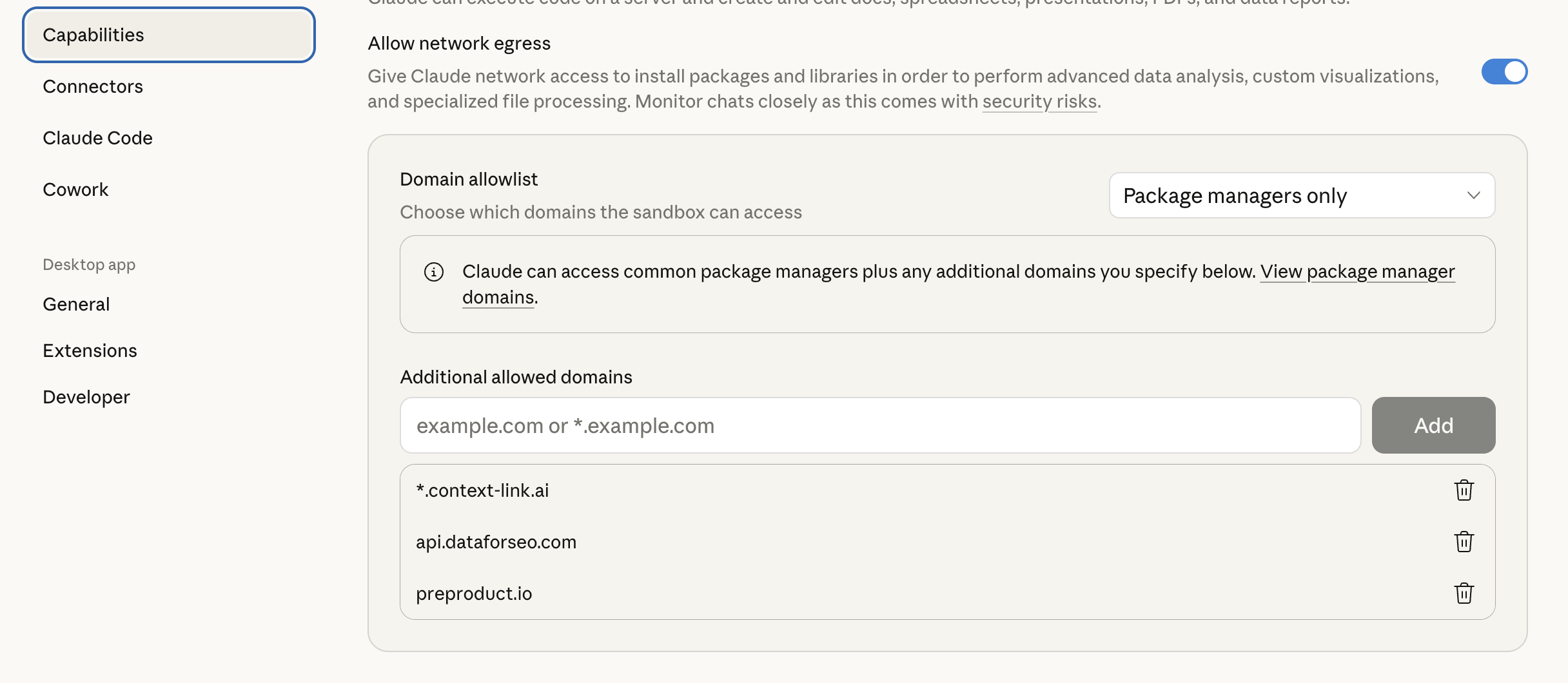
#### Allow network access
For Claude to reach Context Link, you need to allow the domain in Claude's settings:
1. In Claude, go to **Settings → Capabilities → Domain Allowlist**
2. Add `*.context-link.ai` to the allowlist (or select "All domains")
 ## Example usage
**First-time setup (wizard flow):**
> **You:** Get SEO context
>
> **Claude:** *Tries to fetch `seo_memory_guidelines`, `seo_memory_target_keywords`, and `seo_memory_competitor_analysis`. If any are missing, starts the wizard.*
>
> "I found your target keywords and competitor analysis, but no SEO guidelines exist yet. Let me help you create them. What's your target content length for standard blog posts?"
**Retrieving existing context:**
> **You:** Get SEO writing context, then write a blog post about influencer monetization
>
> **Claude:** *Fetches brand voice, style guide, and writing examples. Uses them to write content that matches your established voice and style.*
**Updating context after changes:**
> **You:** We've decided to shift our tone to be more conversational. Save this to brand voice.
>
> **Claude:** *Compiles the new brand voice guidelines and POSTs them to `seo_memory_brand_voice`.* "Saved to Context Link as `seo_memory_brand_voice`."
**Using with SEO Machine:**
If you're using the SEO Machine plugin, run these skills at the start of a session to load your context, then use SEO Machine commands like `/write` or `/research` as normal. Claude will have your full brand and SEO context available.
## Compared to SEO Machine's local context files
The SEO Machine plugin stores context in local files (`context/brand-voice.md`, etc.). These Context Link skills store the same information in the cloud. Choose based on your workflow:
| | Local files (SEO Machine) | Context Link skills |
|---|---|---|
| **Setup** | Clone repo, edit files | Answer wizard questions |
| **Access** | Only in that repo/project | Any AI tool, any device |
| **Updates** | Edit files directly | Use save skills or update via API |
| **Version control** | Git | Context Link versioning |
| **Best for** | Single project, local workflow | Multi-project, cloud-first workflow |
You can also use both, start with local files, then migrate to Context Link when you want cross-project access.
---
## Example usage
**First-time setup (wizard flow):**
> **You:** Get SEO context
>
> **Claude:** *Tries to fetch `seo_memory_guidelines`, `seo_memory_target_keywords`, and `seo_memory_competitor_analysis`. If any are missing, starts the wizard.*
>
> "I found your target keywords and competitor analysis, but no SEO guidelines exist yet. Let me help you create them. What's your target content length for standard blog posts?"
**Retrieving existing context:**
> **You:** Get SEO writing context, then write a blog post about influencer monetization
>
> **Claude:** *Fetches brand voice, style guide, and writing examples. Uses them to write content that matches your established voice and style.*
**Updating context after changes:**
> **You:** We've decided to shift our tone to be more conversational. Save this to brand voice.
>
> **Claude:** *Compiles the new brand voice guidelines and POSTs them to `seo_memory_brand_voice`.* "Saved to Context Link as `seo_memory_brand_voice`."
**Using with SEO Machine:**
If you're using the SEO Machine plugin, run these skills at the start of a session to load your context, then use SEO Machine commands like `/write` or `/research` as normal. Claude will have your full brand and SEO context available.
## Compared to SEO Machine's local context files
The SEO Machine plugin stores context in local files (`context/brand-voice.md`, etc.). These Context Link skills store the same information in the cloud. Choose based on your workflow:
| | Local files (SEO Machine) | Context Link skills |
|---|---|---|
| **Setup** | Clone repo, edit files | Answer wizard questions |
| **Access** | Only in that repo/project | Any AI tool, any device |
| **Updates** | Edit files directly | Use save skills or update via API |
| **Version control** | Git | Context Link versioning |
| **Best for** | Single project, local workflow | Multi-project, cloud-first workflow |
You can also use both, start with local files, then migrate to Context Link when you want cross-project access.
---
Don't have a Context Link account yet? [Sign up and connect your first source](https://context-link.ai), start building your SEO content knowledge base today.